














Gold Monster 2000 Review: The Complete Guide

Introduction
The Gold Monster 2000 is Minelab’s advanced gold detector designed for prospectors who want high sensitivity to very small gold while maintaining stable performance in difficult and mineralized ground.
It uses Multi-Au™ simultaneous multi-frequency technology, operating across multiple frequencies from 12 to 75 kHz. According to Minelab, this allows the detector to remain highly sensitive to a wide range of gold nugget sizes, including extremely small pieces weighing below 0.01 g.
The detector also combines several important tools, including Echo Wave™ Audio, the Gold Chance Indicator, Target ID from 00 to 99, automatic and manual sensitivity, and multiple Ground Type settings for different soil conditions.
In this complete Gold Monster 2000 review and guide, we will explain how the detector works, its technologies, settings, ground balance system, Target ID, discrimination features, battery, coils, specifications, troubleshooting, and the best way to use it in the field.
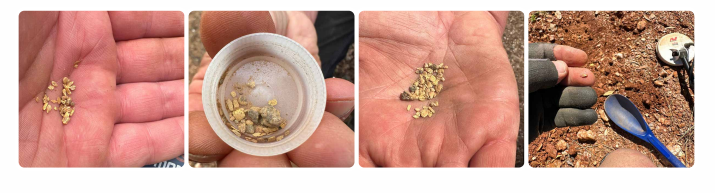
Table of Contents
What Is the Gold Monster 2000?
The Gold Monster 2000 is a simultaneous multi-frequency gold detector developed by Minelab for detecting small and ultra-fine gold in a wide range of soil conditions.
Unlike the older Gold Monster 1000, which uses a single 45 kHz operating frequency, the Gold Monster 2000 uses multiple frequencies between 12 and 75 kHz. This broader frequency range is designed to improve sensitivity across different nugget sizes while maintaining better stability in mineralized ground.
Minelab positions the detector as a bridge between traditional single-frequency VLF gold detectors and higher-performance gold detectors. Its main strength is the ability to detect very small, shallow gold while using advanced ground handling and discrimination features to help users work more efficiently in difficult soil.
The detector can be used by beginners, artisanal miners, and experienced prospectors. Minelab also describes it as a useful companion to detectors such as the GPX 6000 and GPZ 7000, especially for target pinpointing, patch finding, and recovering smaller gold that may be missed during excavation.
Multi-Au™ Technology Explained
One of the most important technologies inside the Gold Monster 2000 is Multi-Au™, Minelab’s simultaneous multi-frequency system developed specifically for gold detection.
According to Minelab, Multi-Au™ builds on its Multi-IQ™ technology and combines multi-frequency VLF operation with signal-processing techniques inspired by Pulse Induction (PI) technology. This combination is designed to improve ground balance performance while preserving high sensitivity to very small gold targets.
The detector operates across multiple frequencies between 12 and 75 kHz, rather than using only one fixed frequency. This allows the Gold Monster 2000 to respond to a wider range of nugget sizes, from larger pieces down to extremely fine gold.
Another advantage of Multi-Au™ is its ability to handle mineralized soil more effectively than a conventional single-frequency VLF detector. Minelab states that this gives the Gold Monster 2000 improved ground balance and better target discrimination in difficult soil conditions.

Echo Wave™ Audio
The Gold Monster 2000 uses Echo Wave™ Audio to provide target information without removing the normal detection response.
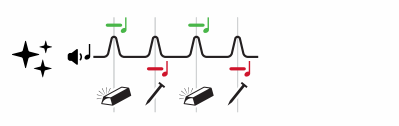
The system combines the detector’s regular Detection Audio with additional discrimination tones. A high tone indicates a target that is more likely to be non-ferrous and potentially gold, while a low tone indicates a target that is more likely to be ferrous, such as iron or a hot rock.
At the same time, the normal Detection Audio remains active, so the user can still hear changes in pitch and volume based on the strength of the target signal. This is important because faint or deep targets can still be heard even when the discrimination information is uncertain.
Minelab designed Echo Wave™ Audio to help prospectors distinguish possible gold from unwanted targets while maintaining sensitivity to very small gold.
Gold Chance Indicator
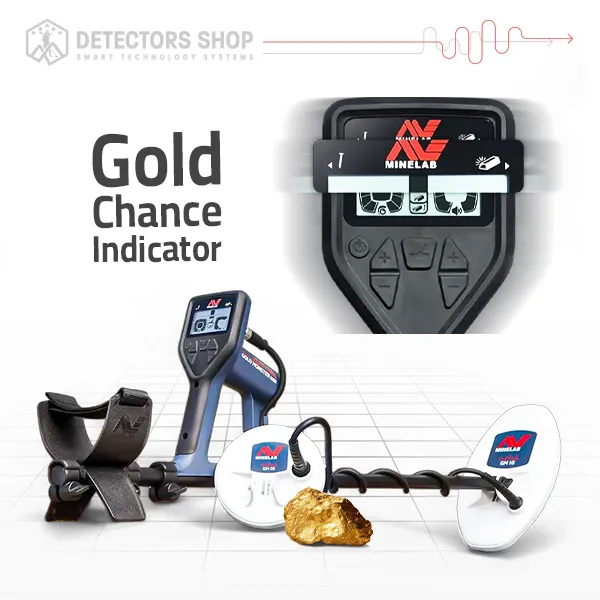
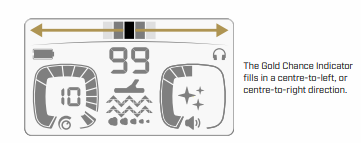
The Gold Chance Indicator is one of the most useful discrimination tools on the Gold Monster 2000. It does not confirm that a target is gold; instead, it estimates whether the detected target is more likely to be non-ferrous or ferrous.
When the indicator fills toward the right, the target is more likely to be non-ferrous and could potentially be gold. When it fills toward the left, the target is more likely to be ferrous, such as iron or a hot rock. The more bars shown on either side, the stronger the detector’s confidence in that estimate.
The accuracy of the Gold Chance Indicator depends on both the target signal and the surrounding ground conditions. In mineralized soil, weak or deep targets may produce fewer bars or unstable indications because ground noise can mix with the target signal.
Minelab also notes that sweeping over the target several times can improve the estimate. As the coil gathers more information, the Gold Chance reading can become more reliable.
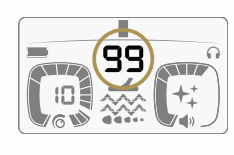
Target ID 00–99
The Gold Monster 2000 assigns a Target ID number from 00 to 99 whenever it detects a target. This number is based mainly on the target’s conductive properties and can help the user understand the likely size and type of the object before digging.
Minelab gives several typical Target ID ranges. 00–15 can include small gold nuggets, foil, lead shot, and small iron fragments. 10–40 can include medium gold nuggets, small coins, hot rocks, and iron trash. 40–99 can include larger gold nuggets, larger coins, and bigger iron targets.
However, the Target ID does not tell you whether a target is ferrous or non-ferrous. That information comes from the Gold Chance Indicator. Target ID should therefore be used together with Gold Chance, Echo Wave™ Audio, the normal detection response, and your knowledge of the site.
It is also important to remember that gold can appear at almost any Target ID depending on its size and shape. Small nuggets are more common at lower IDs, while larger nuggets can appear at higher numbers.
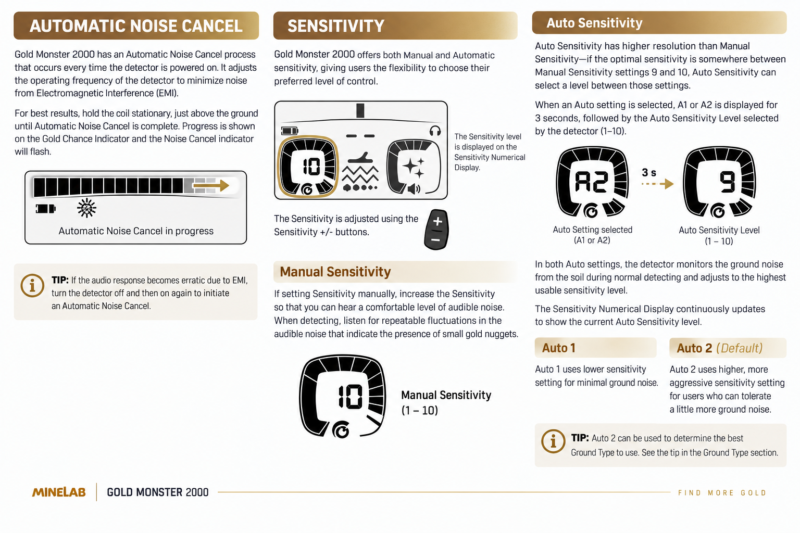
Sensitivity Settings: Manual, Auto 1 & Auto 2
The Gold Monster 2000 provides both Manual Sensitivity and Automatic Sensitivity, giving users the choice between direct control and automatic adjustment based on ground conditions.
In Manual Sensitivity, the level can be adjusted from 1 to 10. Minelab recommends increasing sensitivity until there is a comfortable level of audible background noise, then listening for repeatable changes that may indicate a very small gold target.
The detector also offers two automatic modes: Auto 1 and Auto 2. In both modes, the detector continuously monitors ground noise and automatically selects the highest usable sensitivity level.
Auto 1 uses a lower sensitivity level to provide quieter and more stable operation. Auto 2, which is the default setting, uses a more aggressive sensitivity level and is designed for users who can tolerate slightly more ground noise in exchange for higher sensitivity.
A useful advantage of Auto Sensitivity is that it has finer resolution than the manual settings. For example, if the ideal sensitivity falls somewhere between Manual 9 and 10, the automatic system can select an intermediate level.
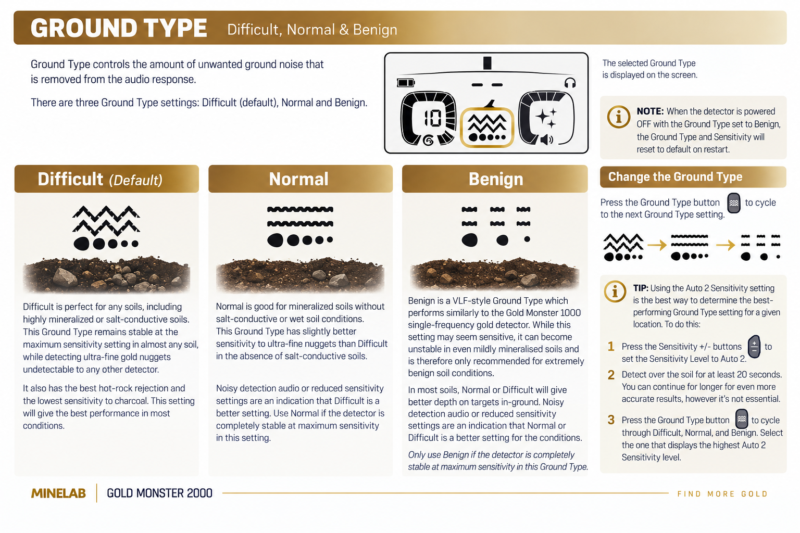
Ground Type: Difficult, Normal & Benign
The Gold Monster 2000 includes three Ground Type settings designed to control how much unwanted ground noise is removed from the audio response: Difficult, Normal, and Benign.
Difficult
Difficult is the default setting and is designed for a wide range of soils, including highly mineralized and salt-conductive ground. Minelab states that it remains stable at very high sensitivity and also provides the best rejection of hot rocks and lower sensitivity to charcoal.
Normal
Normal is intended for mineralized ground without significant salt conductivity or wet-soil effects. In suitable conditions, it can provide slightly better sensitivity to ultra-fine gold than Difficult. If the detector becomes noisy or requires lower sensitivity, Minelab recommends switching back to Difficult.
Benign
Benign behaves more like a traditional VLF ground mode and is only recommended for extremely mild soil conditions. It may appear highly sensitive, but it can become unstable even in lightly mineralized ground. In most real-world soils, Normal or Difficult will usually provide better in-ground performance.
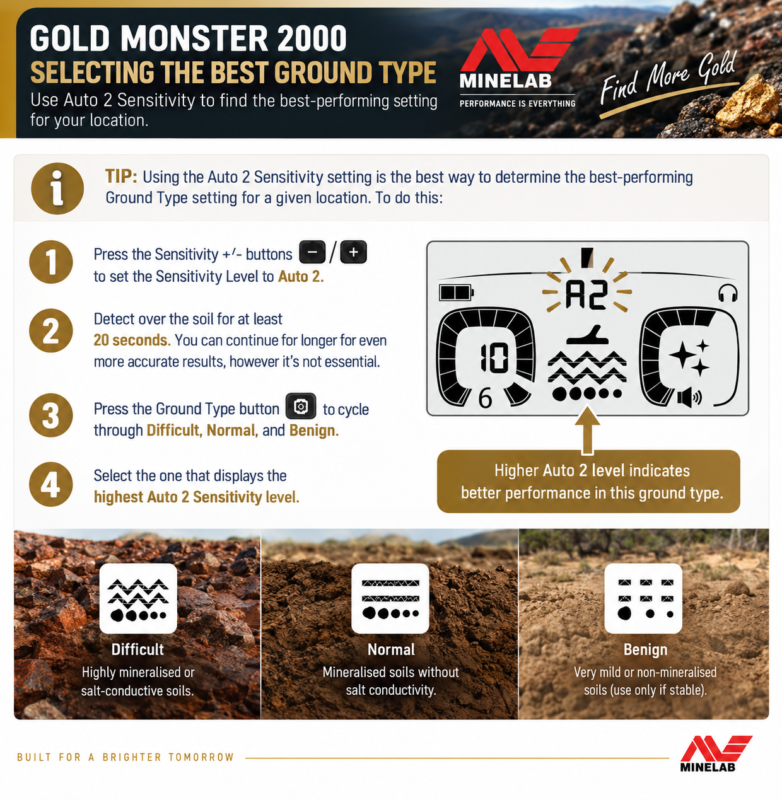
A useful method is to use Auto 2 Sensitivity and cycle through all three Ground Types. After detecting over the soil for at least 20 seconds, choose the setting that allows the highest stable Auto 2 sensitivity level.
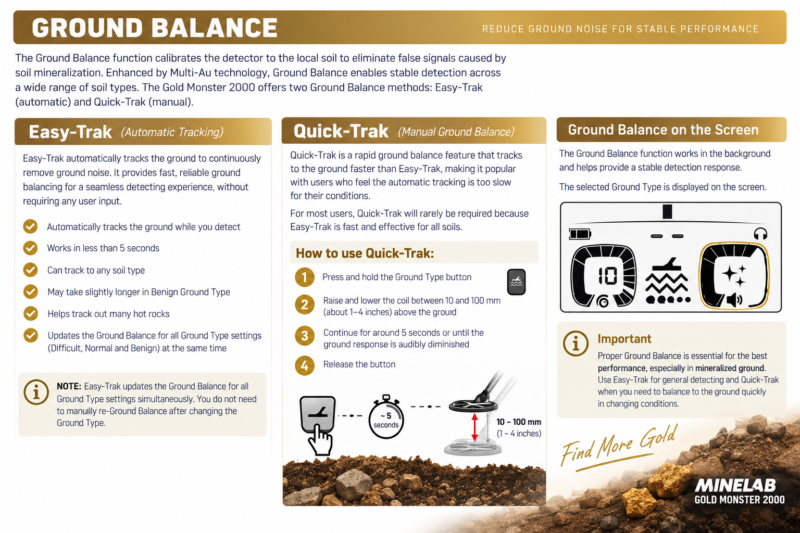
Ground Balance: Easy-Trak & Quick-Trak
The Gold Monster 2000 uses Ground Balance to reduce false signals caused by soil mineralization and changing ground conditions. Minelab provides two methods: Easy-Trak for automatic tracking and Quick-Trak for faster manual ground balancing.
Easy-Trak
Easy-Trak automatically tracks the ground while you detect and continuously adjusts the Ground Balance to reduce unwanted ground noise. Minelab describes it as the recommended method because it works automatically and normally requires no user input.
It can usually adapt to the soil in less than 5 seconds, and it also helps track out many hot rocks. Another useful point is that Easy-Trak updates the Ground Balance for all Ground Type settings at the same time, so you do not need to rebalance manually every time you switch between Difficult, Normal, and Benign.
Quick-Trak
Quick-Trak is a faster Ground Balance method for situations where you want the detector to adapt more quickly to the soil.
To use it, press and hold the Ground Type button while raising and lowering the coil about 10 to 100 mm above the ground. Continue for around 5 seconds, or until the ground response becomes quieter, then release the button.
Automatic Noise Cancel
The Gold Monster 2000 automatically performs a Noise Cancel every time the detector is powered on. This process adjusts the detector’s operating frequencies to reduce unwanted noise caused by electromagnetic interference (EMI).
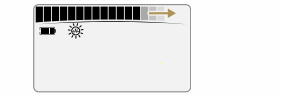
For the best result, Minelab recommends holding the coil stationary and just above the ground while the Automatic Noise Cancel process is running. During this time, the progress is shown on the Gold Chance Indicator and the Noise Cancel icon flashes on the display.
If the detector starts producing erratic or excessive audio because of EMI, the recommended solution is simple: switch the detector off and back on again so it can perform a fresh Automatic Noise Cancel.
Common EMI sources can include power lines, electric fences, electric motors, transformers, radio transmitters, mobile phones, and even distant lightning activity.
Gold Monster 2000 Audio & Threshold Tone
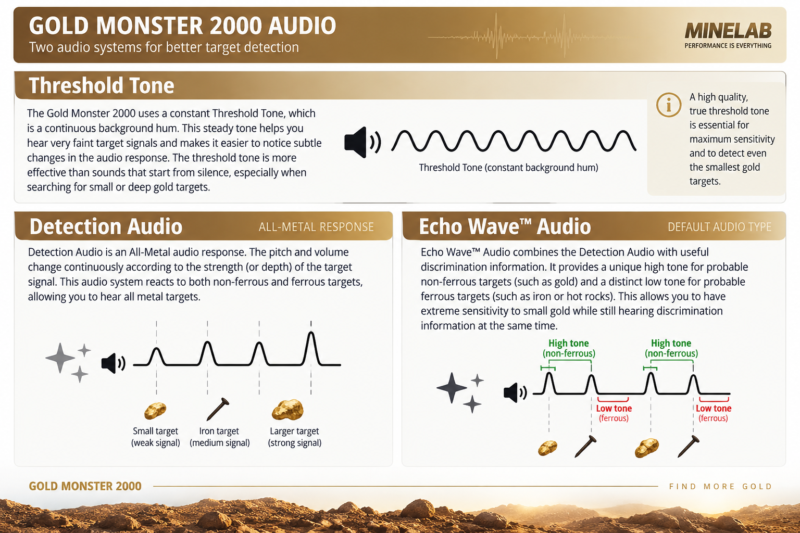
The Gold Monster 2000 uses two main audio systems: Detection Audio and Echo Wave™ Audio. Both operate with a continuous Threshold Tone, which helps the user hear very faint target responses more clearly.
The Threshold Tone is a constant background hum. According to Minelab, subtle changes in this continuous tone can make very small or weak targets easier to notice than sounds that begin from complete silence.
Detection Audio
Detection Audio is an All-Metal response, meaning it reacts to both ferrous and non-ferrous targets. The pitch and volume change continuously according to the strength of the target signal, which can help the user judge whether a target is weak, strong, shallow, or deeper.
Echo Wave™ Audio
Echo Wave™ Audio adds discrimination tones on top of the normal Detection Audio. A high tone suggests a probable non-ferrous target, while a low tone suggests a probable ferrous target such as iron or a hot rock.
How to Use the Discrimination Features Correctly
The Gold Monster 2000 is designed to give the user more information about a detected target rather than simply hiding or rejecting targets. This is important in gold prospecting because small nuggets can produce weak or mixed responses, especially in mineralized ground.
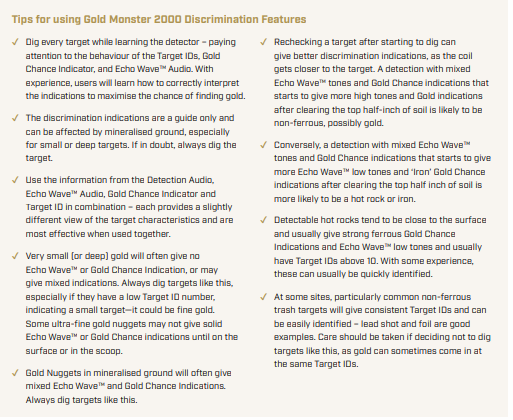
Minelab recommends using the Target ID, Gold Chance Indicator, Echo Wave™ Audio, and the normal Detection Audio together. Each one gives a slightly different view of the target, and they are most useful when interpreted as a group rather than individually.
When you are still learning the detector, the best approach is to dig every target and compare what the detector showed before recovery with what was actually in the ground. This helps you understand how different targets behave on your own sites.
Very small or deep gold may give no clear Echo Wave™ tone, no strong Gold Chance indication, or even mixed responses. Minelab specifically recommends digging uncertain targets, especially when the Target ID is low, because the target could still be fine gold.
Rechecking a target after removing some soil can also improve the discrimination information. As the coil gets closer to the target, the Echo Wave tones and Gold Chance indication may become more reliable.
Detecting Basics & Proper Sweep Technique
Battery, Charging & Runtime
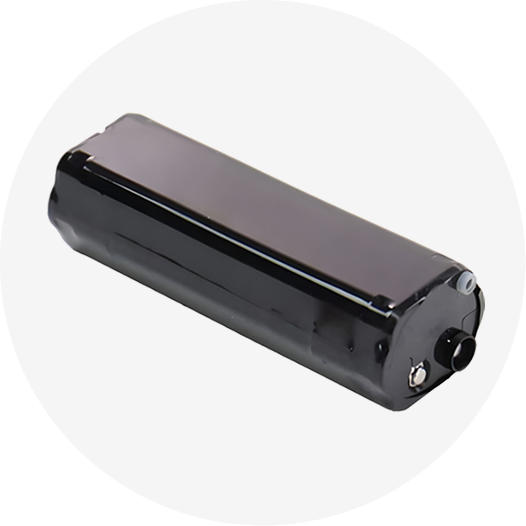
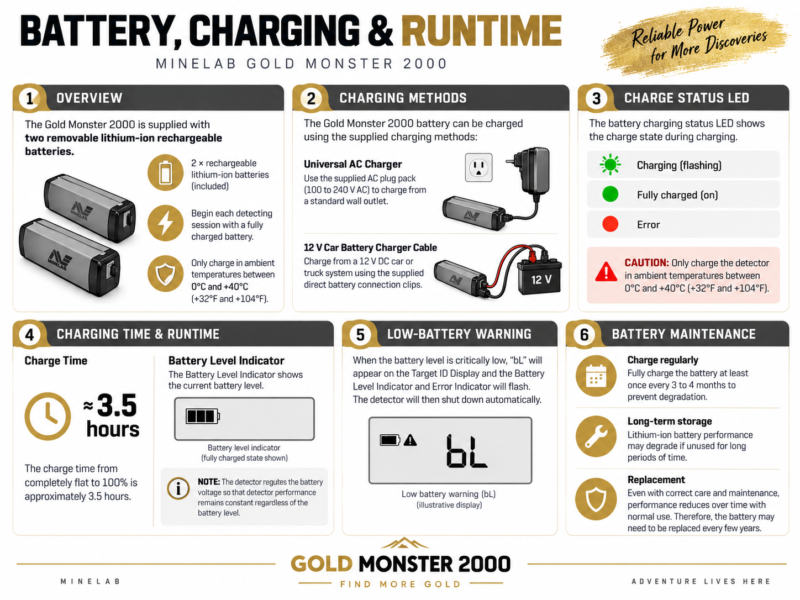
The Gold Monster 2000 is supplied with two removable rechargeable lithium-ion batteries, giving users a practical way to continue detecting by carrying a fully charged spare battery in the field.
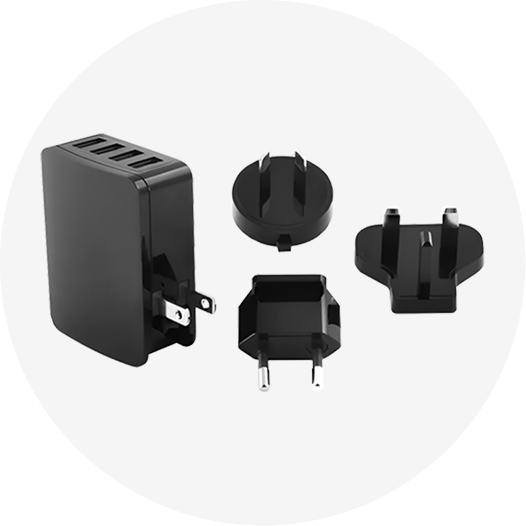
A full charge from completely empty takes approximately 3.5 hours. The battery can be charged using the supplied universal AC charger or from a typical 12 V vehicle battery using the included car battery charger cable.
The detector provides approximately 8 hours of battery runtime, depending on operating conditions and usage. The system also regulates battery voltage so detector performance remains consistent as the battery level drops.
When the battery becomes critically low, “bL” appears on the Target ID display and the detector automatically shuts down shortly afterward to protect the system.
For long-term battery care, Minelab recommends fully charging the battery at least once every 3 to 4 months if it is not being used regularly.For the Gold Monster 2000 to perform consistently, the search coil should be kept level and close to the ground while sweeping from side to side. Avoid lifting the coil at the end of each swing, because this reduces ground coverage and can weaken target responses.
Each sweep should slightly overlap the previous sweep so that no narrow strips of ground are missed. The Getting Started Guide specifically illustrates level sweeping and overlapping passes as part of the basic detecting technique.
Keep metal objects away from the search coil while detecting. Picks, phones, boots with metal components, or other nearby metal can interfere with the detector and produce false responses.
After recovering a target, refill the hole before continuing. This is also included in Minelab’s basic field-use guidance.
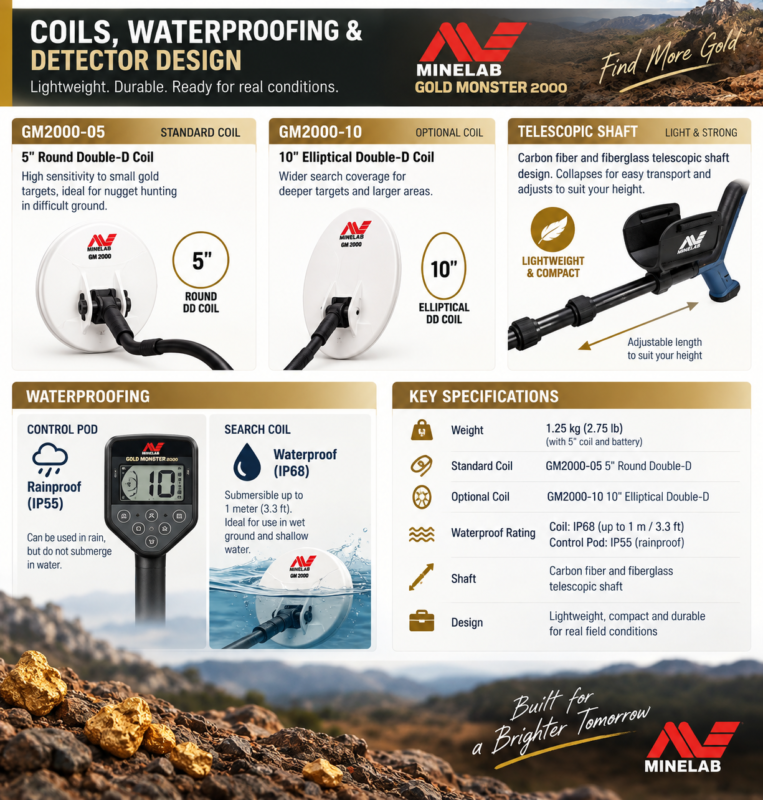
Coils, Waterproofing & Detector Design
The Gold Monster 2000 comes standard with the GM2000-05 5-inch Round Double-D coil, which is designed for high sensitivity to small gold targets. Minelab also lists an optional GM2000-10 10-inch Elliptical Double-D coil for users who want a different search profile.
The detector uses a compact telescopic shaft made from carbon fiber and fiberglass, allowing it to collapse down for easier transport while remaining lightweight in the field. With the 5-inch coil and battery installed, the detector weighs approximately 1.25 kg (2.75 lb).
Waterproofing
The control pod is rainproof and rated IP55, but it is not designed to be submerged. The search coil is waterproof and rated IP68 up to 1 meter (3.3 ft).
This means the detector can be used in wet ground and the coil can be placed in shallow water, but the control unit must remain above the water surface. Minelab specifically warns against submerging the Control
Gold Monster 2000 Specifications
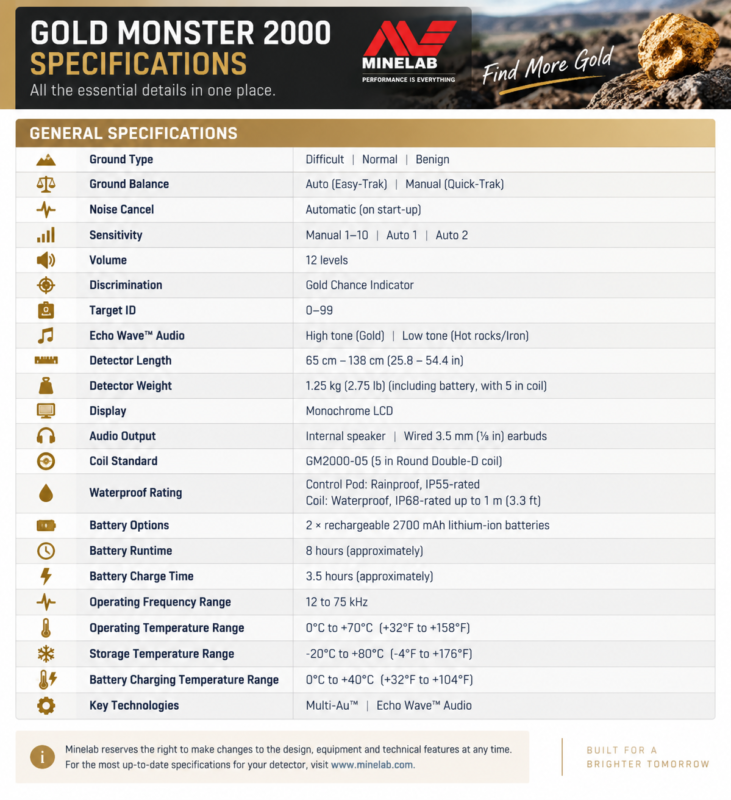
The Gold Monster 2000 combines a lightweight design with multi-frequency gold detection, automatic ground tracking, discrimination tools, and a compact 5-inch Double-D search coil. The table below summarizes the main specifications published by Minelab.
| Specification | Details |
|---|---|
| Ground Type | Difficult / Normal / Benign |
| Ground Balance | Auto (Easy-Trak) / Manual (Quick-Trak) |
| Noise Cancel | Automatic on start-up |
| Sensitivity | Manual 1–10 / Auto 1 / Auto 2 |
| Volume | 12 levels |
| Discrimination | Gold Chance Indicator |
| Target ID | 0–99 |
| Echo Wave™ Audio | High tone: probable non-ferrous / Low tone: probable ferrous |
| Operating Frequency Range | 12–75 kHz |
| Standard Coil | GM2000-05 5″ Round Double-D |
| Detector Weight | 1.25 kg with battery and 5″ coil |
| Detector Length | 65–138 cm |
| Battery | 2 × rechargeable 2700 mAh lithium-ion |
| Approx. Runtime | 8 hours |
| Approx. Charge Time | 3.5 hours |
| Control Pod | Rainproof, IP55 |
| Search Coil | Waterproof, IP68 up to 1 m |
| Audio Output | Internal speaker / 3.5 mm wired earbuds |
| Display | Monochrome LCD |
| Key Technologies | Multi-Au™ / Echo Wave™ Audio |
What’s Included in the Box
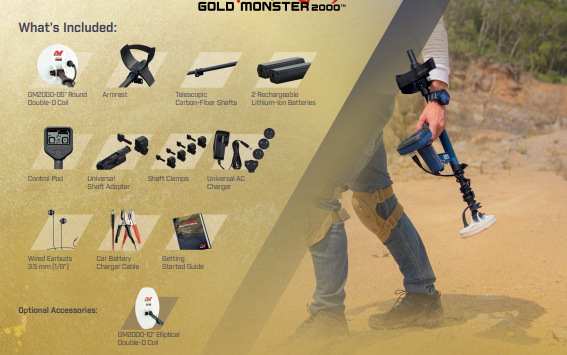
The Gold Monster 2000 package includes the main detector components and the accessories needed to begin detecting without requiring extra equipment.
According to Minelab, the standard package includes the GM2000-05 5-inch Round Double-D coil, telescopic carbon-fiber shafts, armrest, control pod, shaft clamps, a universal shaft adapter, two rechargeable lithium-ion batteries, a universal AC charger, a car battery charger cable, wired 3.5 mm earbuds, and the Getting Started Guide.
The optional accessory listed by Minelab is the GM2000-10 10-inch Elliptical Double-D coil, which gives users another coil option for different detecting conditions and search coverage.
Gold Monster 2000 Troubleshooting & Common Errors
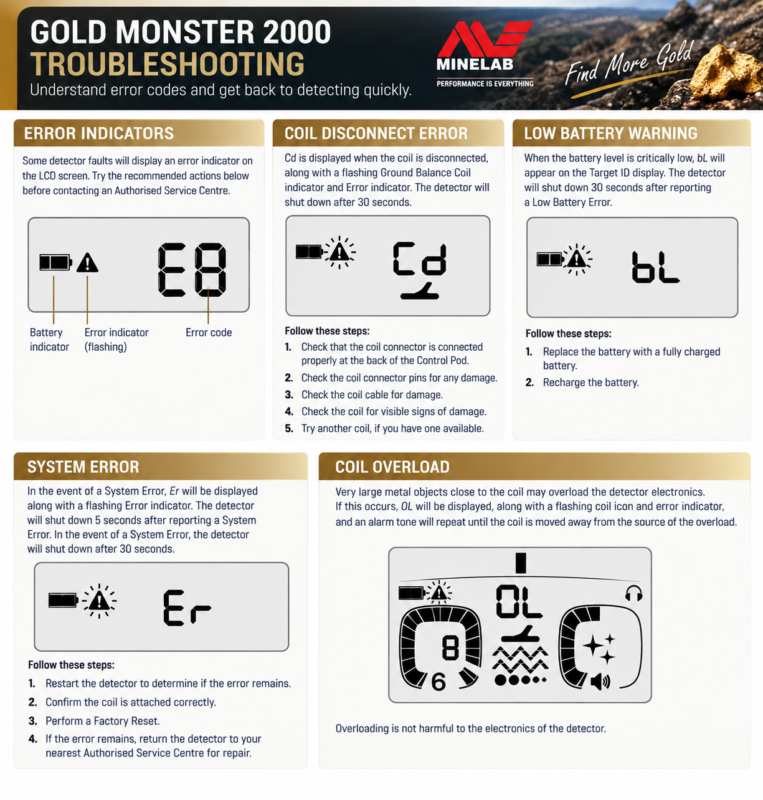
The Gold Monster 2000 can display several error codes that help identify common problems before contacting an authorised service centre.
Coil Disconnect Error — Cd
If the coil is disconnected, the display shows Cd, along with a flashing coil indicator and Error icon. Minelab recommends checking the coil connection, connector pins, coil cable, and the coil itself for damage.
Low Battery Warning — bL
When the battery reaches a critically low level, bL appears on the Target ID display. The detector then shuts down shortly afterward. The solution is to replace the battery with a charged one or recharge the existing battery.
System Error — Er
A system fault is indicated by Er. Minelab recommends restarting the detector, checking that the coil is connected correctly, and performing a Factory Reset. If the error remains, the detector should be checked by an authorised service centre.
Coil Overload — OL
Very large metal objects close to the coil can overload the detector electronics and cause OL to appear. Simply move the coil away from the large metal object. Minelab notes that this overload condition does not damage the detector electronics.
General Troubleshooting: Noise, Headphones, Heat & Shaft Problems
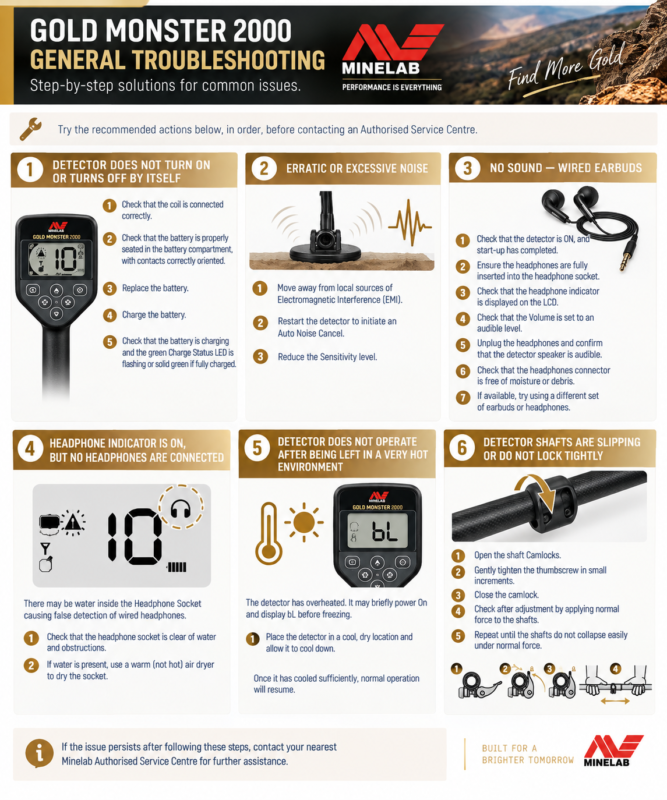
The Gold Monster 2000 manual includes several practical troubleshooting steps for common field problems. Minelab recommends trying these checks in order before contacting an authorised service centre.
Erratic or Excessive Noise
If the detector becomes unstable or produces too much noise, first move away from nearby sources of electromagnetic interference (EMI). Then restart the detector so it performs a new Automatic Noise Cancel. If the noise continues, reduce the Sensitivity level.
No Sound Through Wired Earbuds
If there is no sound from the wired earbuds, check that the detector is fully powered on, the headphones are inserted correctly, the headphone icon appears on the LCD, and the volume is set high enough to hear. Minelab also recommends checking the connector for moisture or debris and trying another pair of headphones if available.
Headphone Icon Appears Without Headphones Connected
If the headphone symbol appears even though no headphones are connected, water may be inside the headphone socket. The manual recommends checking the socket and, if moisture is present, drying it using warm, not hot, air.
Detector Overheated
If the detector has been left in an extremely hot environment, such as inside a parked vehicle, it may temporarily stop operating correctly. Move it to a cool, dry location and allow it to cool before turning it on again.
Shaft Slipping
If the telescopic shafts begin slipping or the camlocks do not hold firmly, open the camlocks and gently tighten the thumbscrew in small increments. Close the camlock and test it again until the shafts remain secure under normal use.
Care, Cleaning & Storage
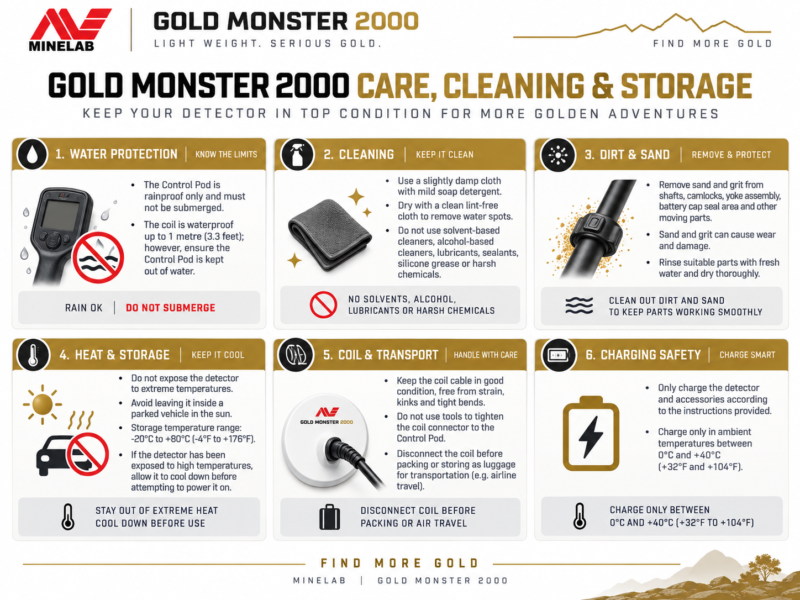
Proper care is important for keeping the Gold Monster 2000 in good working condition, especially after use in dusty, sandy, wet, or very hot environments.
The Control Pod must not be submerged in water because it is rainproof only. The search coil, however, is waterproof to 1 meter (3.3 ft). After detecting in wet or dirty conditions, make sure the control unit remains protected from immersion.
For cleaning, Minelab recommends using a slightly damp cloth with mild soap detergent. Avoid solvent-based or alcohol-based cleaners, lubricants, sealants, silicone grease, or similar chemicals because they can damage materials and seals.
Sand and grit should also be removed from moving parts such as the shafts, camlocks, yoke assembly, battery housing, and battery seal area. The shafts, camlocks, and yoke assembly can be rinsed with fresh water and then dried thoroughly.
Storage
Avoid leaving the detector in extreme heat, especially inside a parked vehicle. Minelab lists a storage temperature range of −20°C to +80°C, but prolonged exposure to extreme heat should still be avoided.
Before packing the detector for transport or luggage, Minelab recommends disconnecting the coil. Also keep the coil cable free from tight bends, kinks, and unnecessary strain.
Software Updates & Factory Reset
The Gold Monster 2000 includes updateable software, allowing Minelab to provide future software improvements through a USB charging/data transfer cable. Minelab directs users to its product manuals and software section for the latest update files and installation instructions.
Software Updates
Before installing any update, use Minelab’s current instructions and the correct update package for the Gold Monster 2000. This helps ensure the detector remains compatible with the latest available software.
Factory Reset
A Factory Reset restores the detector to its default settings and can be useful if settings have been changed extensively or if troubleshooting requires a clean reset.
To perform a Factory Reset:
- Make sure the detector is powered off.
- Press and hold the Power button.
- Continue holding it for about 7 seconds until FP appears on the Target ID display.
- Release the button.
- The detector will then begin an Automatic Noise Cancel.
The default settings include Difficult Ground Type, Auto 2 Sensitivity, and Echo Wave™ Audio On, which Minelab describes as a practical starting setup for most conditions.
Best Gold Monster 2000 Settings for Different Ground Conditions
There is no single “best” setting for every location. Minelab’s manual recommends choosing the Ground Type and Sensitivity based on the actual soil conditions, with Auto 2 being especially useful for finding the best-performing setup.
1. Highly Mineralized or Salt-Conductive Ground
Use:
- Ground Type: Difficult
- Sensitivity: Auto 2
- Ground Balance: Easy-Trak
- Echo Wave™ Audio: On
Difficult is the default mode and is designed for highly mineralized or salt-conductive soils. Minelab states that it offers the best stability in difficult ground, along with strong hot-rock rejection.
2. Mineralized Ground Without Salt Conductivity
Use:
- Ground Type: Normal
- Sensitivity: Auto 2
- Ground Balance: Easy-Trak
Normal can provide slightly better sensitivity to ultra-fine gold than Difficult when the ground is mineralized but not wet or salt-conductive. If the detector becomes noisy, switch back to Difficult.
3. Very Mild or Benign Ground
Use:
- Ground Type: Benign
- Sensitivity: Auto 2 or high Manual sensitivity
- Ground Balance: Easy-Trak
Minelab recommends Benign only in extremely mild soil. Even lightly mineralized ground can make this mode unstable, so Normal or Difficult will often work better in real field conditions.
4. Best Method to Choose the Right Ground Type
Minelab recommends using Auto 2 Sensitivity to compare the three Ground Type settings:
- Select Auto 2.
- Detect over the soil for at least 20 seconds.
- Cycle through Difficult, Normal, and Benign.
- Choose the Ground Type that shows the highest Auto 2 Sensitivity level.
Minelab Gold Monster 2000 for Small Gold and Ultra-Fine Nuggets
One of the biggest strengths of the Gold Monster 2000 is its sensitivity to very small gold.
Minelab states that the detector operates across multiple frequencies from 12 to 75 kHz, which helps it respond to a wide range of nugget sizes, including extremely small pieces weighing below 0.01 g.
The detector is especially effective for shallow, ultra-fine gold, and Minelab specifically positions it as a detector that can recover gold that may have been missed by older single-frequency VLF detectors.
This makes the Gold Monster 2000 especially useful in areas such as old mining sites, tailings piles, and worked ground where larger targets may already have been recovered but very small gold still remains. Minelab notes that hunted-out areas can become productive again because the detector can respond to ultra-fine gold missed by other detectors.
The detector can also complement larger high-performance gold detectors such as the GPX 6000 and GPZ 7000, particularly when pinpointing targets, checking a productive patch, or recovering small nuggets around a larger target.
Where to Buy the Gold Monster 2000
The Gold Monster 2000 is available through Detectors Shop, where customers can receive product information, purchasing assistance, and support in choosing the right detector and accessories for their prospecting needs.
At Detectors Shop, our team can help you understand the detector’s settings, available coils, accessories, and the most suitable setup for your detecting conditions.
For customers looking for the Gold Monster 2000 in Dubai, the UAE, the Middle East, or for international delivery, contact Detectors Shop for current availability, pricing, shipping options, and product support.
Contact Detectors Shop today to learn more about the Minelab Gold Monster 2000.
Final Verdict: Gold Monster 2000
The Gold Monster 2000 represents a major step forward from traditional single-frequency VLF gold detectors.
Its Multi-Au™ technology, operating across multiple frequencies from 12 to 75 kHz, is designed to provide exceptional sensitivity to small and ultra-fine gold while maintaining stable performance across different ground conditions.
Features such as Echo Wave™ Audio, the Gold Chance Indicator, 0–99 Target ID, automatic sensitivity, Easy-Trak Ground Balance, and three Ground Type settings give prospectors several ways to interpret targets without sacrificing sensitivity to very small gold.
The detector is also lightweight at approximately 1.25 kg, offers around 8 hours of battery runtime, and includes a compact 5-inch Double-D coil that makes it particularly suitable for detailed searching and fine-gold recovery.
For beginners, experienced prospectors, and users who already operate detectors such as the GPX 6000 or GPZ 7000, the Gold Monster 2000 can serve as a highly capable tool for locating small gold, checking productive patches, and working previously searched areas.
Is the Gold Monster 2000 a multi-frequency detector?
Yes. The Gold Monster 2000 uses Multi-Au™ simultaneous multi-frequency technology and operates across frequencies between 12 and 75 kHz.
How small of a gold nugget can the Gold Monster 2000 detect?
Minelab states that the detector is sensitive to extremely small gold, including nuggets weighing below 0.01 g under suitable conditions.
What is the best sensitivity setting for the Gold Monster 2000?
Minelab uses Auto 2 as the factory default. Auto 2 uses a more aggressive sensitivity level, while Auto 1 provides quieter operation. Manual sensitivity is adjustable from 1 to 10.
What Ground Type should I use?
The detector has Difficult, Normal, and Benign Ground Types. Difficult is the default and is suitable for highly mineralized and salt-conductive ground, while Normal is useful in mineralized ground without strong salt conductivity. Benign should generally be reserved for very mild soil.
What does the Gold Chance Indicator do?
The Gold Chance Indicator estimates whether a target is more likely to be non-ferrous or ferrous. A reading toward the gold side suggests a non-ferrous target, while a reading toward the iron side suggests iron or a hot rock. It does not guarantee that a target is gold.
What do the Target ID numbers mean?
Target IDs range from 00 to 99 and are based on conductivity. Smaller gold often appears at lower IDs, while larger targets may produce higher numbers. However, gold can potentially appear at almost any Target ID depending on its size and shape.
Is the Gold Monster 2000 waterproof?
The search coil is waterproof to 1 meter (3.3 ft) and rated IP68. The Control Pod is IP55 rainproof, but it must not be submerged.
How long does the Gold Monster 2000 battery last?
Minelab lists approximately 8 hours of runtime with an approximate charging time of 3.5 hours. The detector is supplied with two rechargeable lithium-ion batteries.
What coil comes with the Gold Monster 2000?
The standard coil is the GM2000-05 5-inch Round Double-D coil. Minelab also lists the GM2000-10 10-inch Elliptical Double-D coil as an optional accessory.
Can the Gold Monster 2000 be used with the GPX 6000 or GPZ 7000?
Yes. Minelab describes the Gold Monster 2000 as a useful complement to detectors such as the GPX 6000 and GPZ 7000, particularly for pinpointing, patch finding, and locating smaller nuggets around excavated targets.
Does the Gold Monster 2000 support software updates?
Yes. Its software can be updated using a USB charging/data transfer cable, with update files and installation instructions provided by Minelab.
Is the Gold Monster 2000 suitable for beginners?
Minelab specifically describes it as easy to learn and suitable for beginner prospectors, while its advanced discrimination and ground-handling features also make it useful for experienced users.
Looking for the Gold Monster 2000 ? Contact Detectors Shop for availability, price, worldwide shipping, and expert product support.
Sources & References
This guide is based on official Minelab resources, including the Gold Monster 2000 User Manual, Getting Started Guide, and official product information.
