







Detectors Shop logo

Original gold & metal detectors for discovering deeply buried treasures

Explore the Minelab GPZ 7000 product page at Detectors Shop for product information, current price, availability and purchasing assistance.
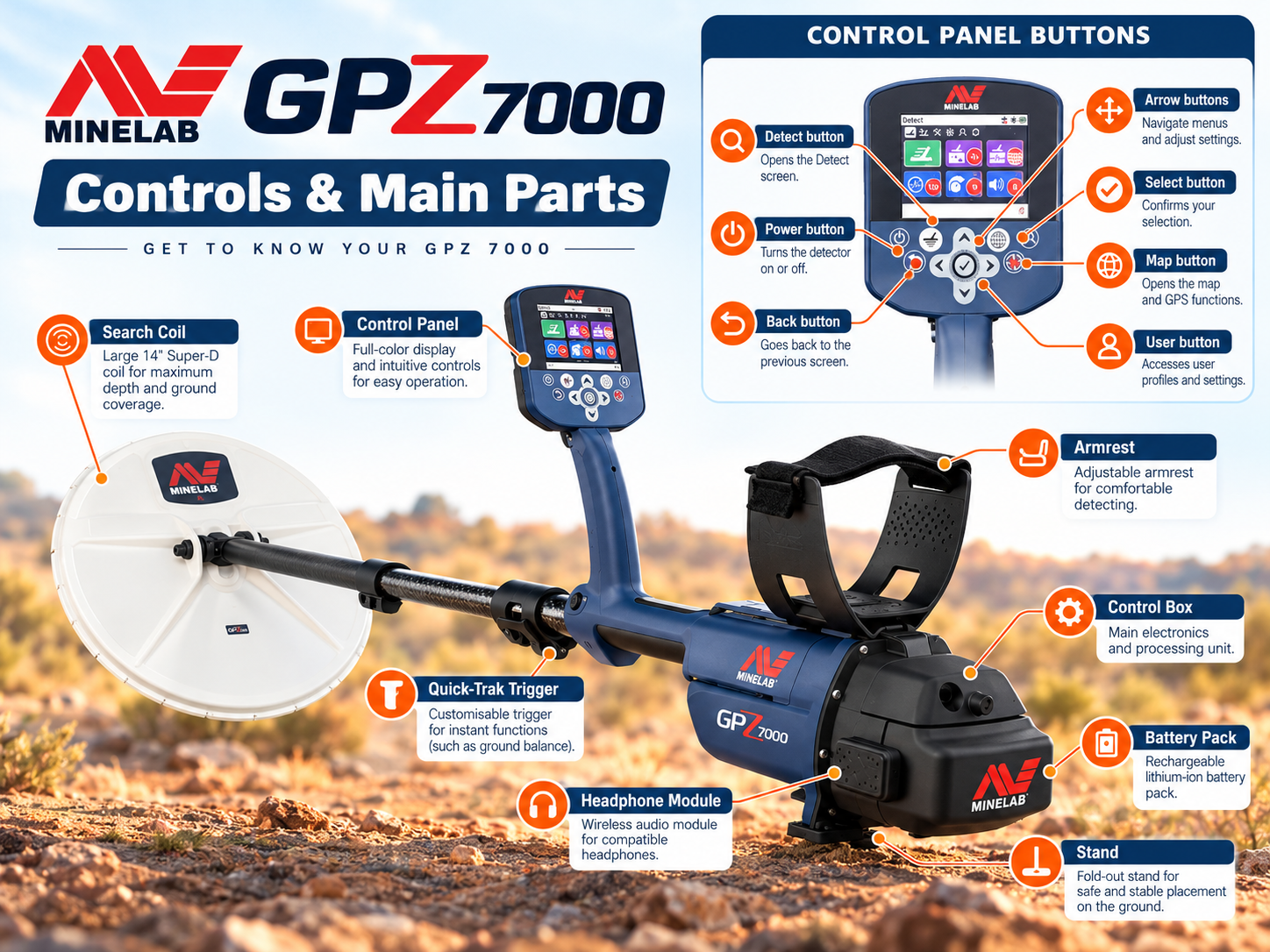
Illustrated GPZ 7000 detector components and front control panel buttons
GPZ 7000 parts and control panel — independent educational illustration.

Minelab GPZ 7000 User Guide: Setup, Gold Modes, Ground Balance & Field Tips

The detector is a professional gold-prospecting detector designed to recover natural gold in demanding ground conditions. This independent, detailed GPZ 7000 user guide explains the controls, ZVT technology, Super-D coil, first-time setup, gold modes, ground types, Quick-Trak balancing, audio, field technique and troubleshooting. We also explain what the machine cannot promise, including fixed detection depths or certain identification of buried gold.

Whether you are preparing for your first day in the field or adjusting an established workflow, this guide combines Minelab’s official field instructions with practical, clearly labelled interpretation. Settings are starting points, not universal guarantees; local ground and gold characteristics determine results.

What Is the Minelab GPZ 7000?

The GPZ series was developed for dedicated nugget hunting rather than general-purpose coin hunting or underground imaging. It combines a dedicated gold-search platform, user-adjustable ground handling, a color interface and location-management features. It is especially relevant to prospectors dealing with mineralized soils where conventional detectors can struggle to separate weak metal responses from ground effects.

It detects metallic targets, not underground water, caves or guaranteed ore deposits. A response alone cannot prove that a buried object is gold; excavation and identification are required. For a broader comparison of Minelab’s approaches, see our guide to Minelab gold detectors.

ZVT Technology and the Super-D Coil Explained

What does ZVT mean?

ZVT stands for Zero Voltage Transmission, Minelab’s proprietary detection technology. Rather than interpreting the GPZ as a conventional fixed-frequency VLF detector, think of it as a specialist system engineered to detect responses from natural gold while handling difficult ground. ZVT processing and proper ground setup work together; neither technology nor a high sensitivity number eliminates every hot rock or interference source.

Why is the Super-D search coil important?

The supplied GPZ14 Super-D coil measures approximately 14 × 13 inches. Its specialized winding arrangement works with the detector’s ZVT platform and provides broad ground coverage while retaining useful responses to different nugget sizes. Keep the coil parallel to the ground and avoid striking rocks. Coil shape and construction are not substitutes for slow, overlapping sweeps.

Practical distinction: A stronger response from a larger gold nugget does not translate into a fixed maximum depth. Nugget orientation, alloy, shape, mineralization, nearby interference and the selected settings all matter.

Front and Rear Controls: What Each Button Does

The illustration above introduces the physical components and a simplified control layout. For exact button positions and on-screen controls, consult the manufacturer’s English instruction manual. Detect accesses detection settings; Map opens mapping tools; Select confirms choices; and the Quick-Trak trigger activates ground balancing.

Start by learning just three navigation actions: Detect returns you to the detection interface, the arrow keys plus Select move through menu options, and the Quick-Trak trigger is used when the ground-balancing process requires it. The Map and GeoData controls support planning and documenting locations rather than changing target detection strength.

GPZ 7000 Quick Start: Six Steps Before Detecting

Minelab’s official field guide describes a consistent starting sequence for the detector:
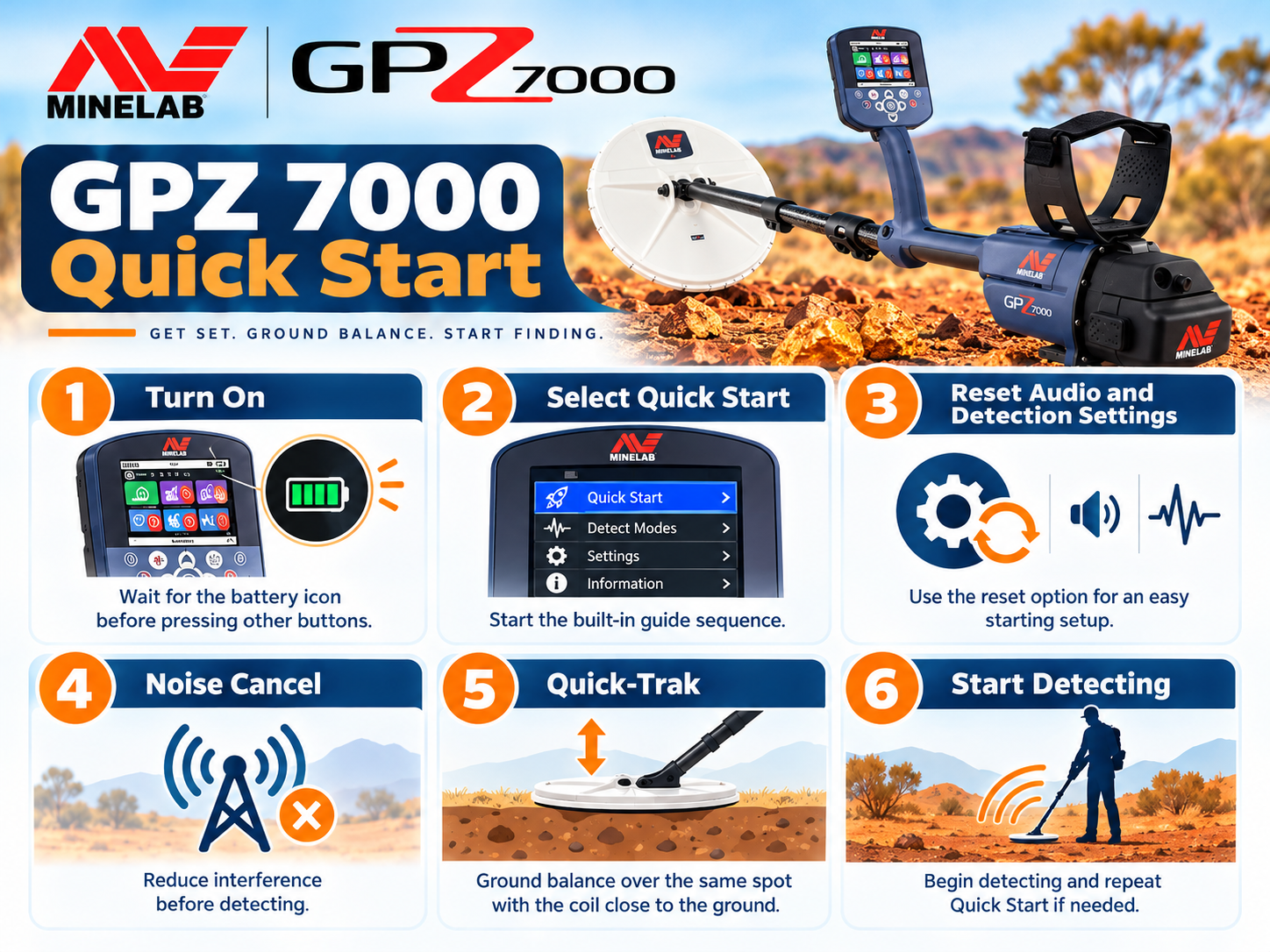
GPZ 7000 Quick Start illustrated six step setup guide
Quick Start overview — independent educational illustration.
  1. Switch the detector on and wait for the battery indicator to appear.
  2. Select Quick Start.
  3. Choose Reset Settings when following the initial setup sequence.
  4. Allow Noise Cancel to reduce interference.
  5. Perform Quick-Trak ground balancing.
  6. Begin detecting using slow, level coil sweeps.

If you are restoring a previously configured machine, record useful custom settings first. A factory reset is not a daily requirement. The same field guide describes a full factory reset as holding Power for about 10 seconds and selecting Reset All; use it only when appropriate, because it resets user settings.

The Three Gold Modes: High Yield, General and Extra Deep

The detector offers three Gold Mode choices. They are designed around target-response priorities, not promises that every target will be found at a particular depth.
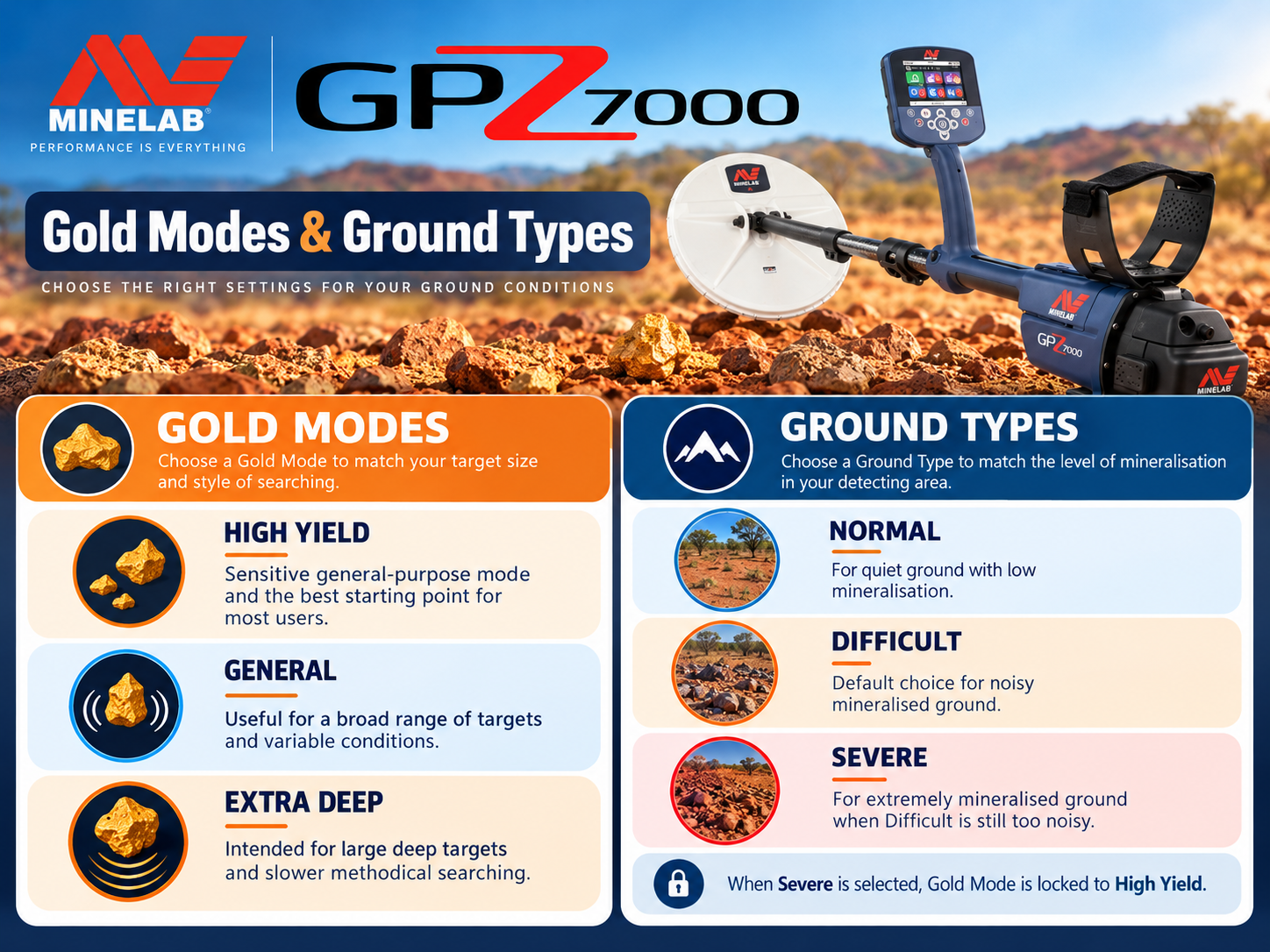
GPZ 7000 High Yield General Extra Deep gold modes and soil types
Gold modes and ground types — independent educational illustration.
Gold ModeOfficial intended targetWhen to consider itTrade-off to test
High YieldSmall and medium nuggetsWorking productive patches for smaller goldMay not be the preferred choice for some large deep targets
GeneralGeneral-purpose nuggetsWhen nugget size is unknown or variedCompare with other modes on a known test target
Extra DeepDeep, larger nuggetsTargeting deeper substantial goldNot automatically the best response to tiny shallow nuggets

Minelab’s field guide illustrates these modes with nugget-size and depth scenarios. The most useful operating habit is to verify a repeatable target in an alternative mode before making a decision; mode names alone do not establish target identity.

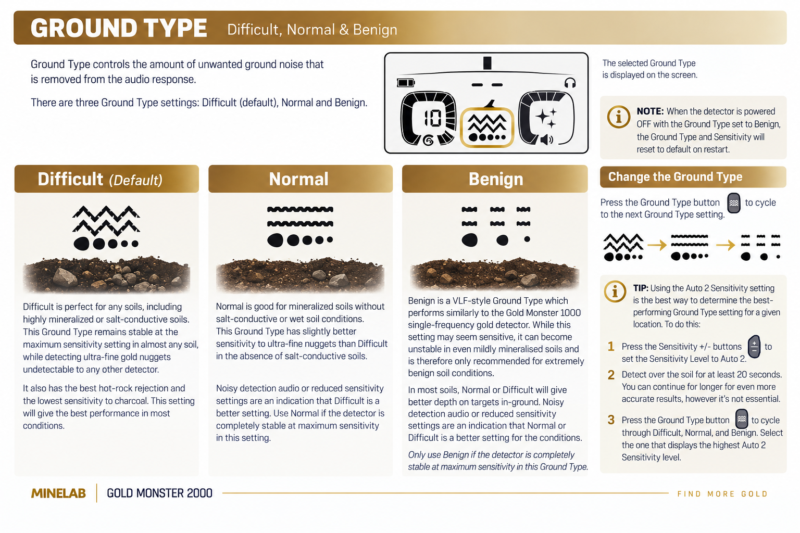
Ground Type: Normal, Difficult and Severe

Ground Type addresses a different problem from Gold Mode. Where Gold Mode prioritizes target responses, Ground Type adjusts the detector’s behavior in mineralized soil.

Ground TypeOfficial descriptionField interpretation
NormalLow soil mineralizationTest when conditions are relatively mild and stable.
DifficultHigh soil mineralizationA practical option when ground responses become distracting.
SevereSevere soil mineralizationReserved for especially challenging ground; consult the full manual for mode limitations.

Important compatibility note: Severe ground processing imposes restrictions on Gold Mode combinations; check the detector menu and official manual rather than assuming every combination is selectable. When changing soil zones, re-check background stability instead of simply increasing sensitivity.

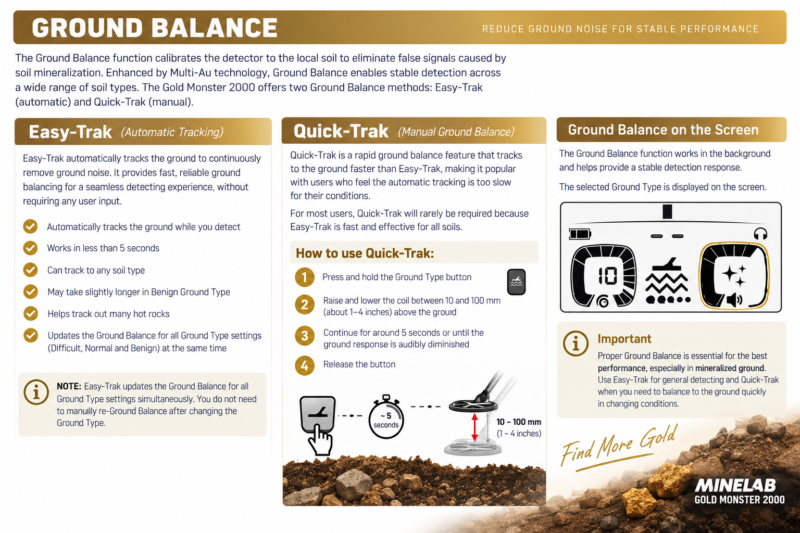
How to Use Quick-Trak Ground Balance

Quick-Trak is fundamental to successful GPZ 7000 field operation. Minelab’s illustrated process is straightforward:
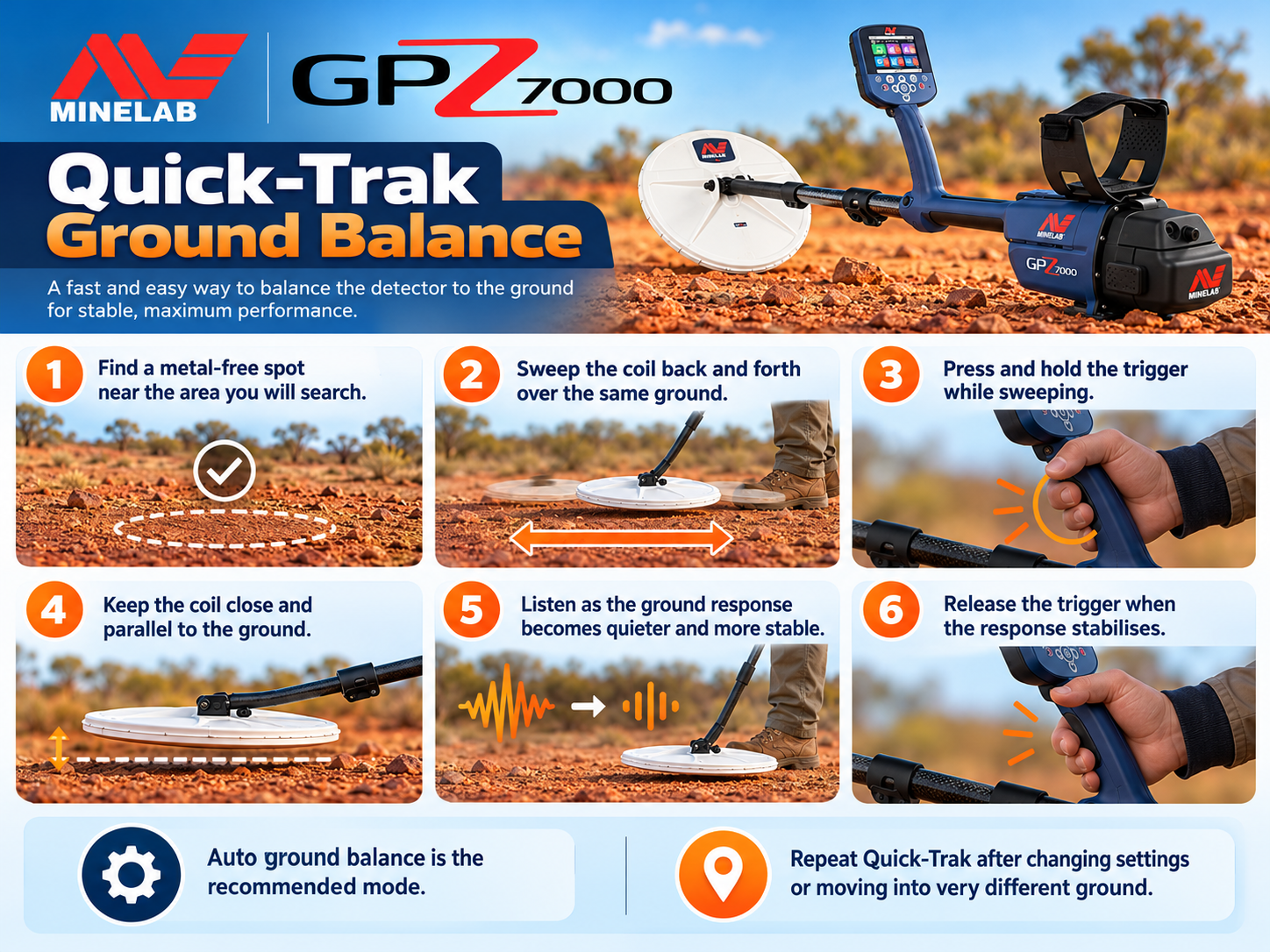
GPZ 7000 Quick-Trak ground balance illustrated instructions
Quick-Trak ground balance — independent educational illustration.
  1. Find a small patch of ground with no obvious metal target.
  2. Hold the coil close to the ground and keep it level.
  3. Sweep the coil over the same spot as shown in the official guide.
  4. Operate the Quick-Trak trigger according to the on-screen prompt and continue until the audio becomes stable.
  5. Release the trigger, then begin searching normally.

If the response continues to rise and fall with each sweep, verify that your chosen spot is free of metal, repeat the balancing procedure and consider a more appropriate Ground Type. Balancing directly over a real target can give misleading results and potentially reduce its response.

Threshold Level, Noise Cancel and Wireless Audio

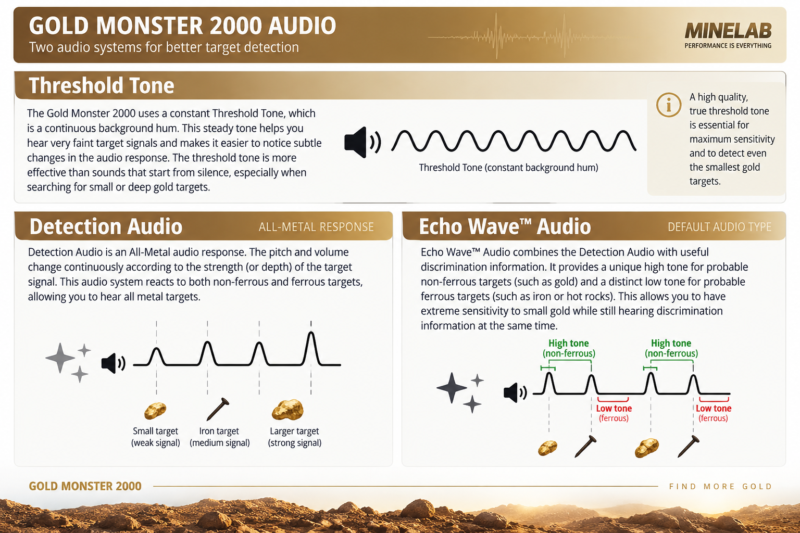
Threshold: listen for changes, not loudness

Threshold is a continuous reference tone. Set it to a comfortably audible background level so slight variations can be heard without fatigue. An excessively loud threshold can mask subtle changes; a tone set too quietly can make faint responses harder to recognize. The official field guide shows a Threshold Level adjustment example, but the pictured value should not be treated as ideal for everyone.
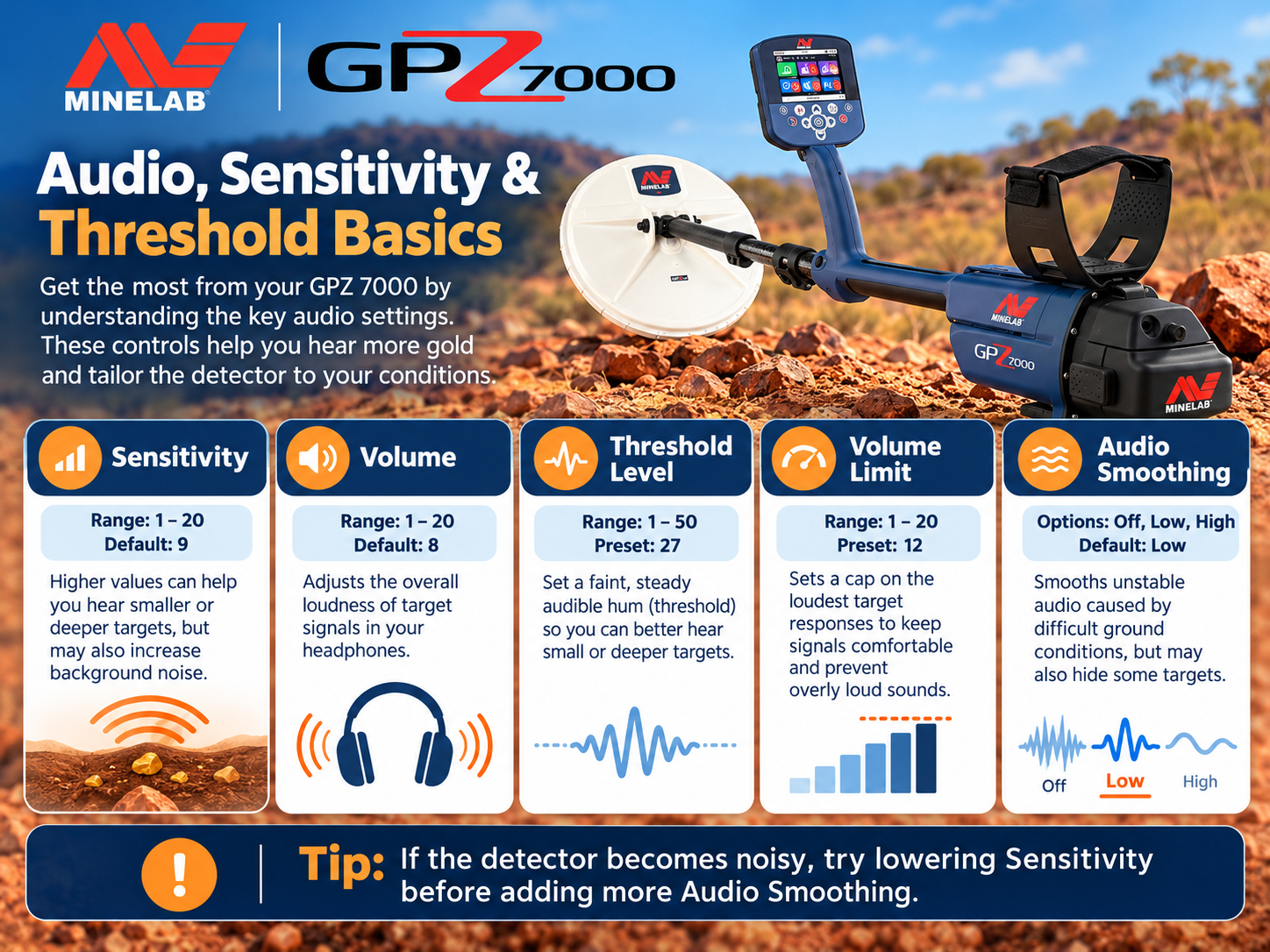
GPZ 7000 sensitivity volume threshold level and audio smoothing settings
Audio and threshold settings — independent educational illustration.

Noise Cancel versus ground balance

Noise Cancel deals primarily with external electromagnetic interference. Ground balance addresses responses associated with the ground itself. They solve different problems: if the detector is unstable while stationary, investigate interference; if noise changes with coil movement over soil, investigate ground conditions, technique and balancing. Both factors can coexist.

Connecting the WM 12

The supplied wireless audio module supports convenient listening away from the main control box. In Settings, select Connect WM 12 and follow the on-screen connection instructions. Verify that audio is working before walking away from the starting point.

Practical Starting Settings for Different Search Conditions

These are interpretive starting scenarios, not Minelab-certified universal presets. For each location, choose a stable setup and test it against local conditions or a securely controlled known target.

ScenarioGold Mode to testGround Type to testField priority
Small-nugget patch, mild groundHigh YieldNormalKeep the coil close and sweep methodically.
Mixed-size nuggets, mineralized groundGeneralDifficultBalance carefully and use a quiet, usable sensitivity.
Prospecting for larger, deeper nuggetsExtra DeepAppropriate stable ground typeCheck target repeatability from different directions.
Very noisy, heavily mineralized groundMode compatible with SevereSevere, if neededPrioritize a stable signal; verify allowed combinations.
Nearby power lines or electronicsRetain current mode initiallyRetain appropriate ground typeRun Noise Cancel and move away from interference sources.

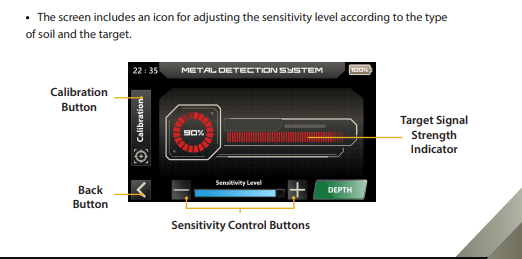
Do not assume that maximum Sensitivity delivers maximum real-world recovery. Too much instability can make soft, repeatable gold responses harder to distinguish. A setting that helps you hear targets consistently is often more useful than a higher number that creates constant false signals.

Detecting Basics: Sweeping, Spacing and Recovery

Minelab’s field illustrations reinforce several fundamentals: keep the coil level, move slowly, overlap each sweep and remove metal objects from the immediate vicinity of the coil. If another detector operator is nearby, the field guide recommends approximately 15 m of separation to reduce mutual interference. Refill holes and respect land access, mining permits and local rules.
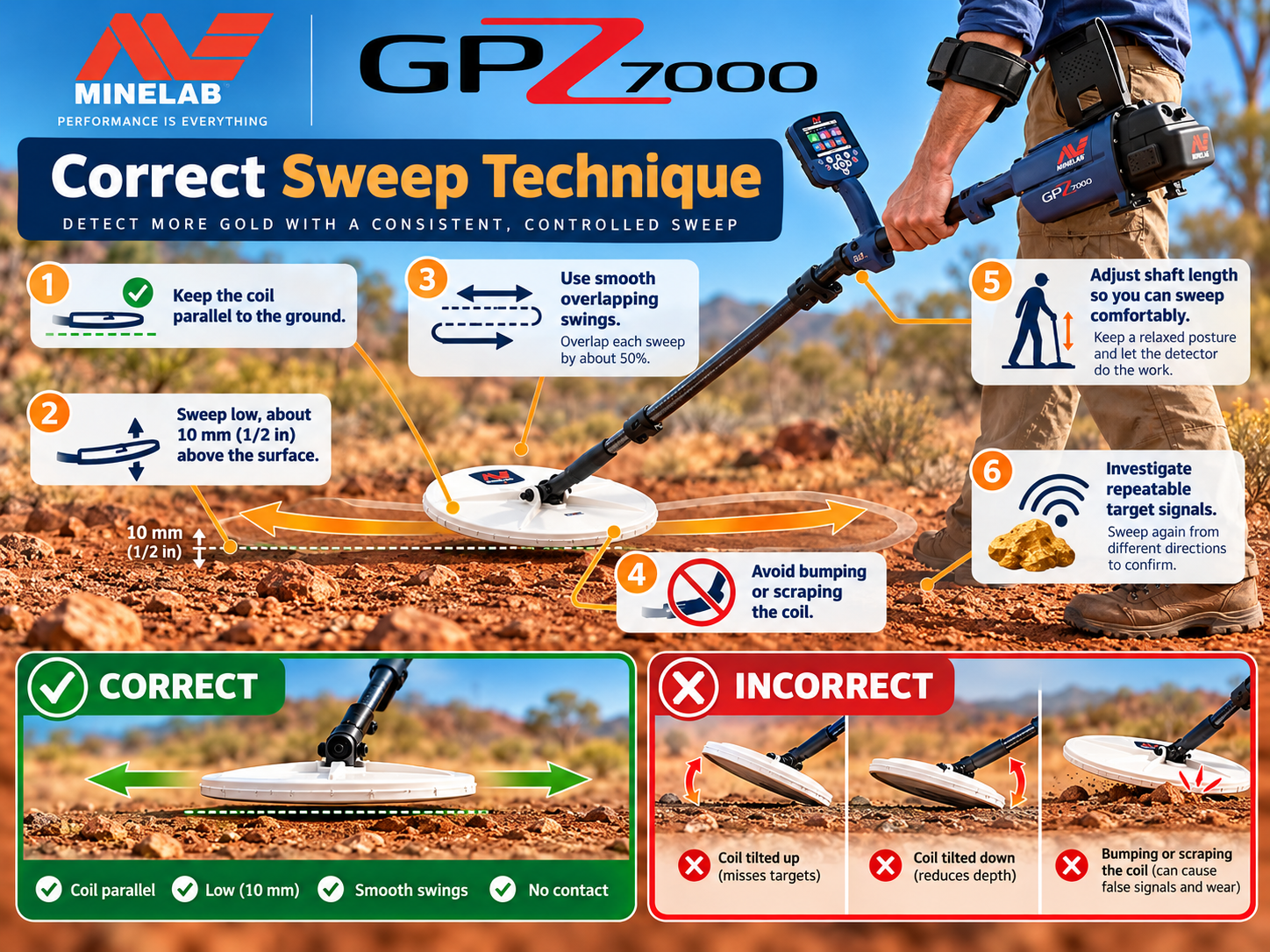
GPZ 7000 correct metal detector coil sweeping technique
Correct coil-sweeping technique — independent educational illustration.

On hearing a possible target, sweep across it several times. Rotate around the position and listen for a repeatable response. Clear loose surface debris when safe, then check again before digging. This simple cross-check is more informative than relying on one isolated tone. Avoid bringing a metal pick, phone or metal-reinforced boots near the coil during confirmation.

How Deep Can the detector Really Detect Gold?

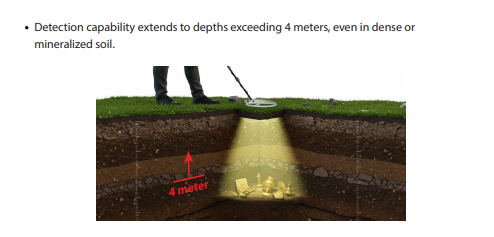
There is no reliable universal depth in meters for every gold nugget or every location. Depth depends on nugget mass, shape, orientation, composition, ground mineralization, coil, ambient interference, sweep technique and detector settings. A controlled test on one buried object does not represent a guarantee for all targets.

Minelab has promoted substantial depth advantages for its technology in specified comparisons, but marketing comparisons should not be read as a fixed field-depth claim. If a seller promises a guaranteed depth for all gold, ask for the exact test conditions and target specifications. The detector is a conventional electromagnetic metal detector—not a long-range locator or a 3D underground scanner.

GPS, Map and GeoData: Organizing a Prospecting Area

The Map screen and GeoData control help users document work rather than simply rely on memory. Mark interesting locations and revisit productive patches in planned, overlapping passes. When a location produces gold, record an approximate route, field observations, settings and ground condition in a separate log as well. GPS records help with area coverage, but satellite reception, local conditions and user setup can affect location accuracy.
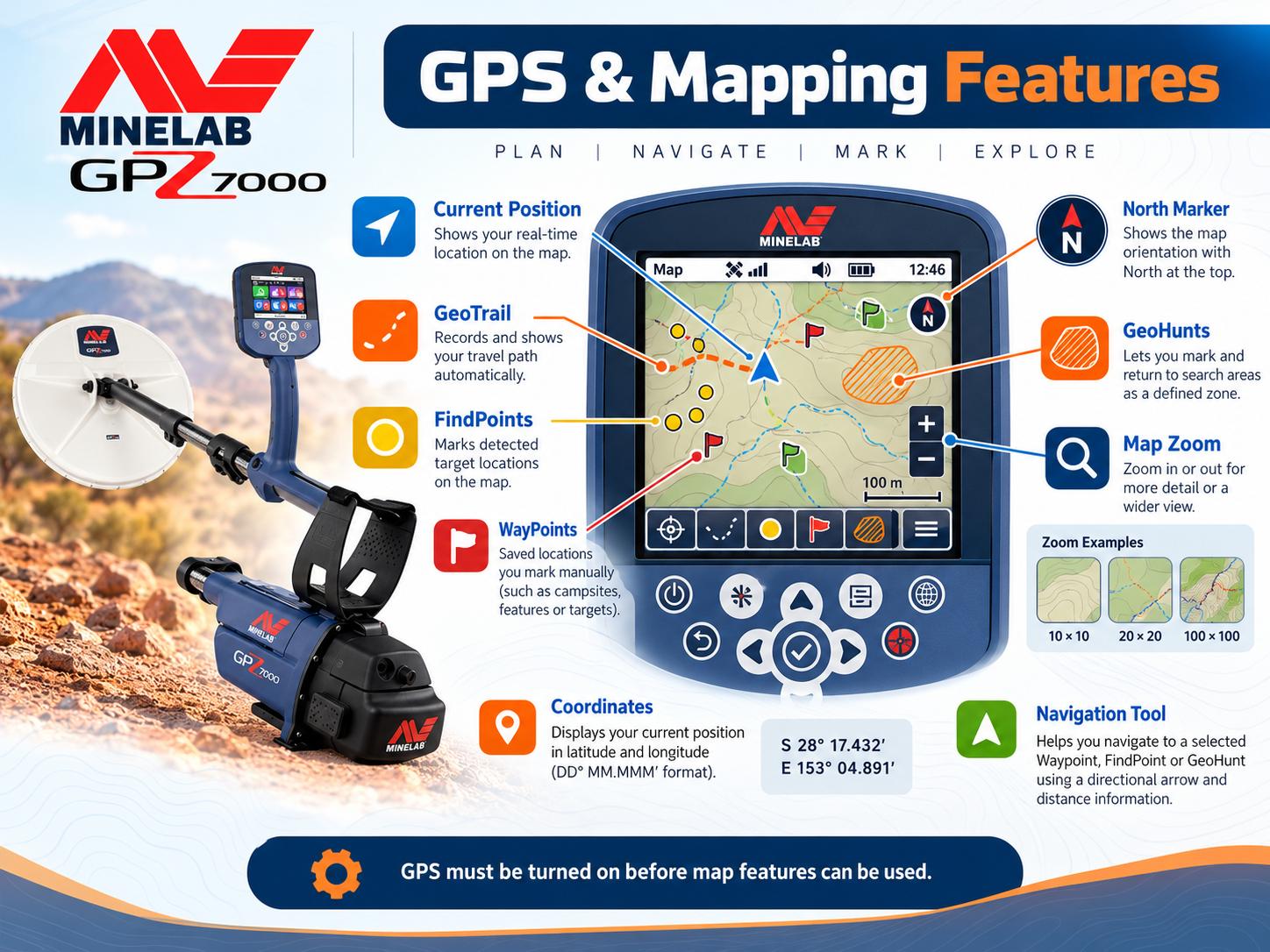
GPZ 7000 GPS and mapping features illustrated diagram
GPS and mapping capabilities — independent educational illustration.

GPZ 7000 Technical Specifications

Summary of official technical information. Package contents and regional inclusions should be checked with the seller before ordering.

SpecificationDetails
Manufacturer / modelMinelab / GPZ 7000
Main technologyZVT (Zero Voltage Transmission)
Standard search coilGPZ14 14 × 13 in Super-D
Gold ModesHigh Yield, General, Extra Deep
Ground TypesNormal, Difficult, Severe
Sensitivity range1–20
Noise CancelAutomatic and manual
DisplayFull-color LCD
Wireless audioWi-Stream via WM 12
Additional technologyGPSi, Super-D
Approximate detector weight3.32 kg (7.32 lb)
Length117 cm collapsed; 152.6 cm extended
BatteryRemovable 7.2 V / 72 Wh lithium-ion pack
Coil waterproof ratingUp to 1 m; control unit must not be submerged
Operating temperature0°C to 50°C
Manufacturer-listed warranty3 years for control box and coil, subject to applicable terms and region

For specifications and any revisions, visit the official Minelab product page. Always distinguish manufacturer warranty coverage from seller-specific terms.

Troubleshooting Common Field Problems

SymptomLikely causes to checkSuggested first action
Continuous chatter even without sweepingElectromagnetic interference, wireless or power sourcesPerform Noise Cancel; move away from interference.
Noise rises and falls over soilGround mineralization or inadequate balancingQuick-Trak on clean ground; reassess Ground Type.
Signals vanish when changing directionEdge of a target, unstable ground, nearby metalCross-sweep slowly and remove nearby equipment.
Weak target difficult to hearThreshold, sweep speed, sensitivity stabilityUse comfortable audio; reduce speed and retest.
No wireless audioWM 12 pairing, battery or volume settingReconnect via Settings and test the audio path.
Unstable performance after moving sitesDifferent ground, interference environmentRepeat Noise Cancel and Quick-Trak at the new location.

Change one setting at a time and note the result. Otherwise it becomes difficult to know which adjustment improved or worsened performance. For persistent electronic faults, consult the official user manual or qualified support rather than opening the control unit.
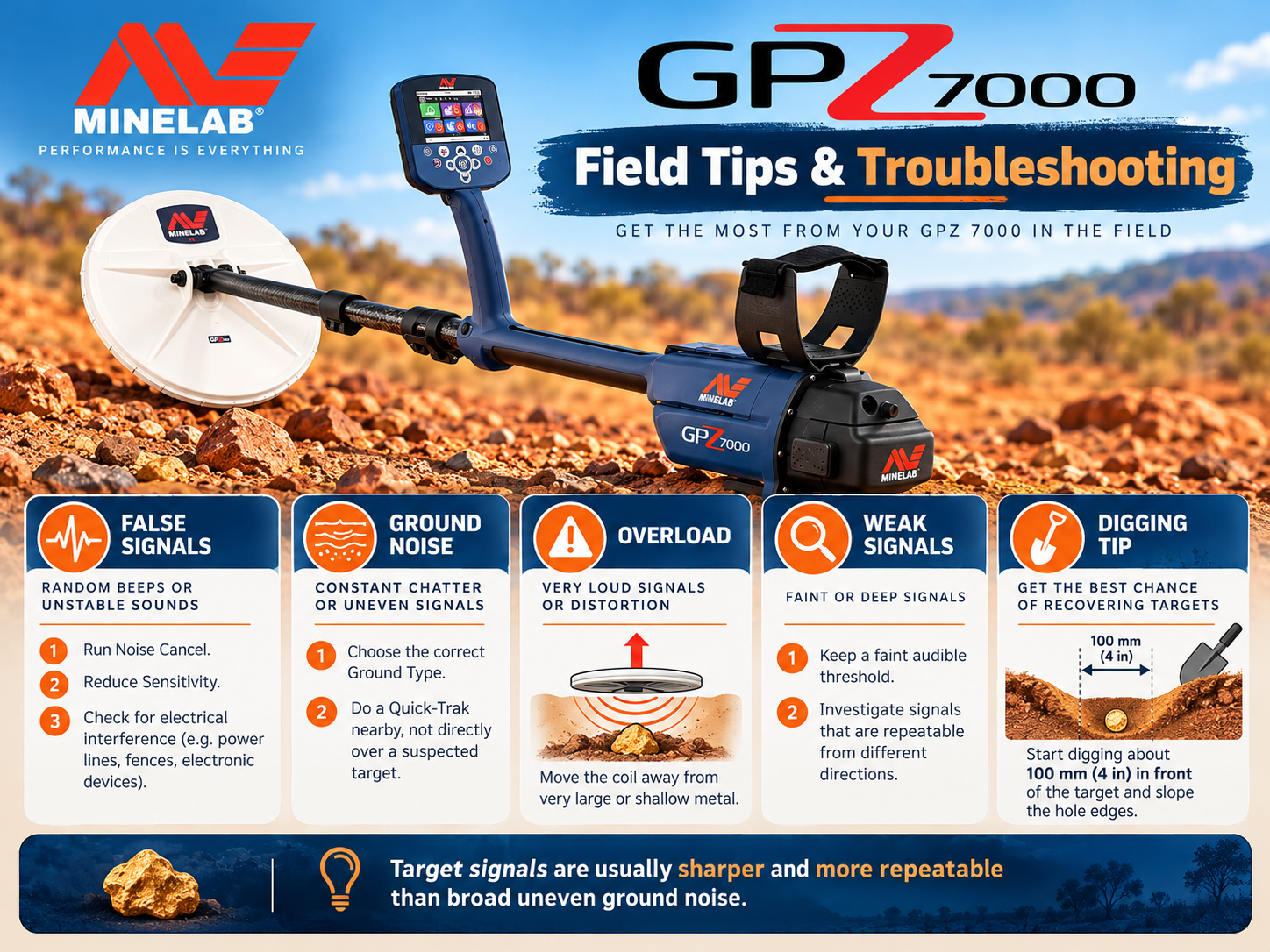
GPZ 7000 troubleshooting false signals ground noise overload and weak targets
Field tips and troubleshooting — independent educational illustration.

Who Should Buy It, and What Should You Check?

The detector is best suited to serious gold prospectors willing to invest time in ground interpretation and careful search technique. It may not be the most practical first machine for someone who wants a lighter, simpler detector for occasional shallow-gold outings. For small-gold alternatives and a different feature set, read our Gold Monster 2000 review and field guide.

Before buying a used unit

GPZ 7000 availability and purchase support

Detectors Shop provides guidance on choosing a detector and its accessories. View the GPZ 7000 at Detectors Shop, or contact our team to confirm today’s price, stock, shipping options and the applicable warranty before payment.

GPZ 7000 Frequently Asked Questions

Is the detector suitable for beginners?

It can be learned by a motivated beginner, but its weight, price and advanced ground settings make it better suited to dedicated prospectors who are prepared to practice.

What is the real detection depth of the detector?

There is no fixed maximum depth for all targets. Performance changes with gold size, shape, orientation, mineralization, equipment and operating technique.

Which Gold Mode should I use first?

High Yield is aimed at smaller or medium nuggets, General at mixed nuggets, and Extra Deep at deeper larger nuggets. Test the mode that matches your goal and local ground.

What is the difference between Normal, Difficult and Severe?

These Ground Type options are designed for low, high and especially severe soil mineralization respectively. Severe has Gold Mode compatibility restrictions.

Does the detector identify gold and reject all iron?

No. It is intended for gold prospecting, but a signal is not proof of gold, and the detector should not be treated as having a guaranteed iron-rejection system.

Is the detector fully waterproof?

No. Minelab lists the search coil as waterproof to about 1 meter. Do not submerge the control box.

When should I use Quick-Trak?

Use it during initial setup and when ground conditions change or ground-related instability becomes apparent. Balance over a metal-free patch.

How can I connect the wireless audio module?

Open Settings, choose Connect WM 12 and follow the instructions shown on the display. Check battery and volume if you cannot hear audio.

Why does the detector produce false signals?

Potential causes include electromagnetic interference, strong mineralization, a poorly balanced machine, an unstable sensitivity setting or metal close to the coil.

Where can I find official GPZ 7000 instructions?

Use the official Minelab product page and the manufacturer-issued field and instruction manuals. This independent guide is a practical companion, not a replacement for those documents.
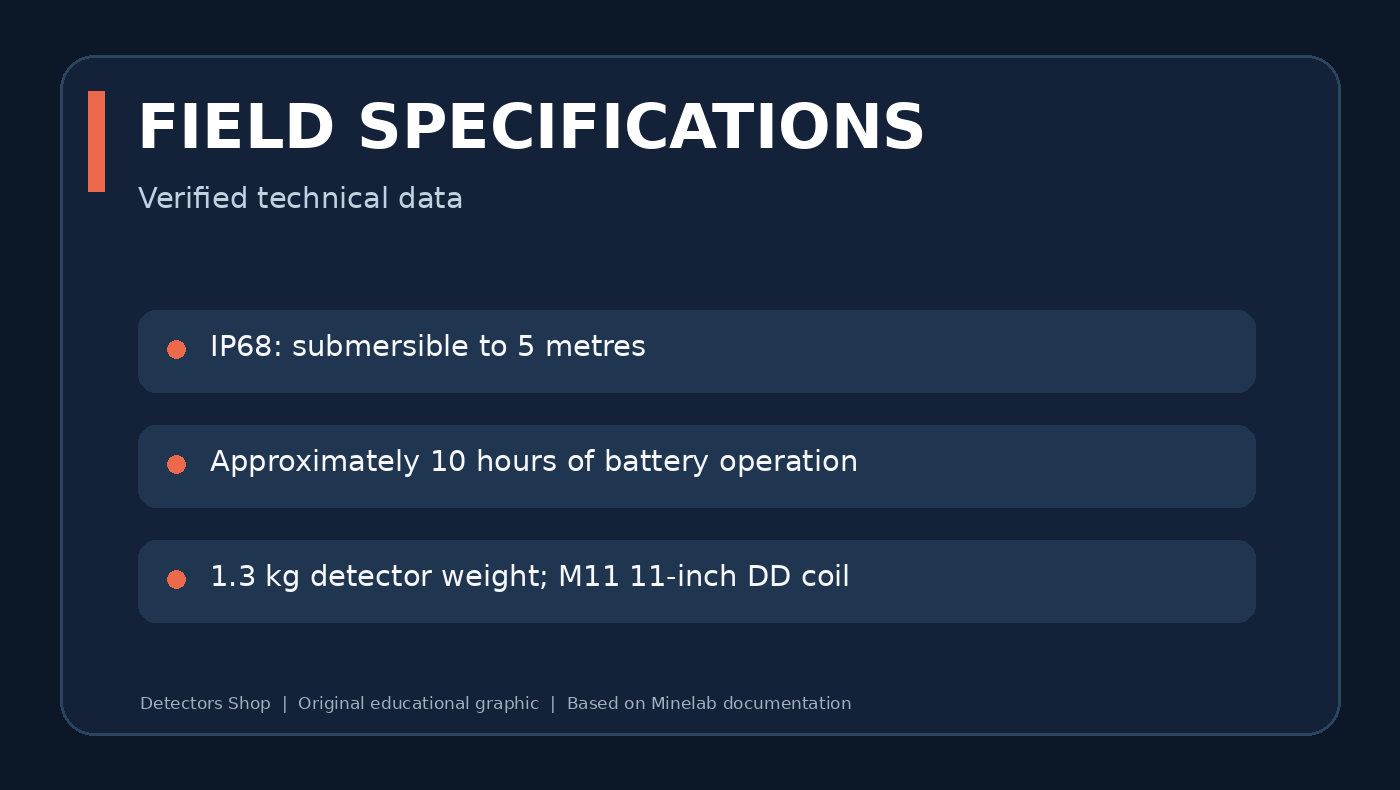
Minelab Manticore is a premium, waterproof metal detector built around Multi-IQ+ simultaneous multi-frequency technology, a two-dimensional target ID map, flexible sound settings and dedicated modes for inland terrain, beaches and natural goldfields. This in-depth guide explains how its features work, where each setting is useful and how to get started safely. It draws on Minelab’s official instruction manual and getting-started guide—not unverified field-test claims.

Looking to purchase? View the Minelab Manticore at Detectors Shop. The detector is offered through Detectors Shop in Dubai, UAE; contact our team to confirm current stock, price, shipping and training support before ordering.

Manticore at a Glance

The Minelab Manticore combines advanced target identification with an interface that remains usable for everyday coin, relic, jewellery and beach detecting. Unlike a single-purpose prospecting machine, it offers distinct Search Modes that change its response to different locations and target types.

FeatureOfficial specification
TechnologyMulti-IQ+ simultaneous multi-frequency
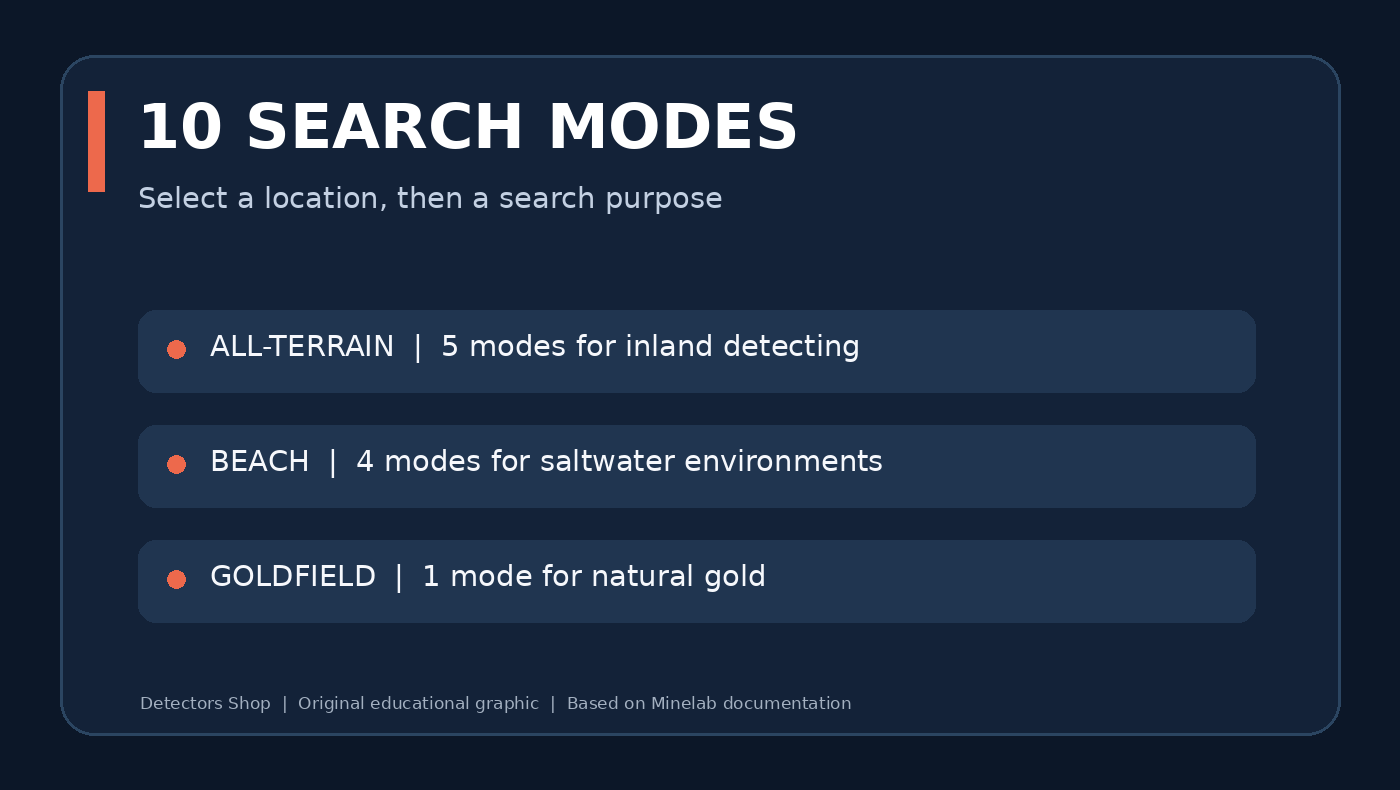
Search modes10: All-Terrain (5), Beach (4), Goldfield (1)
Target ID0–99 conductive scale with ferrous indication
Identification2D ID Map with Target Trace
Sensitivity1–35 (default 20)
Water resistanceIP68, submersible up to 5 metres
WeightApprox. 1.3 kg
Battery runtimeApproximately 10 hours
Standard coilM11 11-inch Double-D
Manticore waterproof rating, battery runtime and detector weight
Original summary graphic based on Minelab’s official technical specifications.

Minelab Manticore Videos: Overview and Field Demonstrations

Explore these three Minelab Manticore videos alongside the instructions and settings explained in this guide. Videos are supplementary demonstrations; always use Minelab’s official manual to confirm technical specifications and safe operating procedures.

Manticore Overview Video

Manticore Short Video

Manticore Additional Video

What Is Multi-IQ+ and How Does Manticore Work?

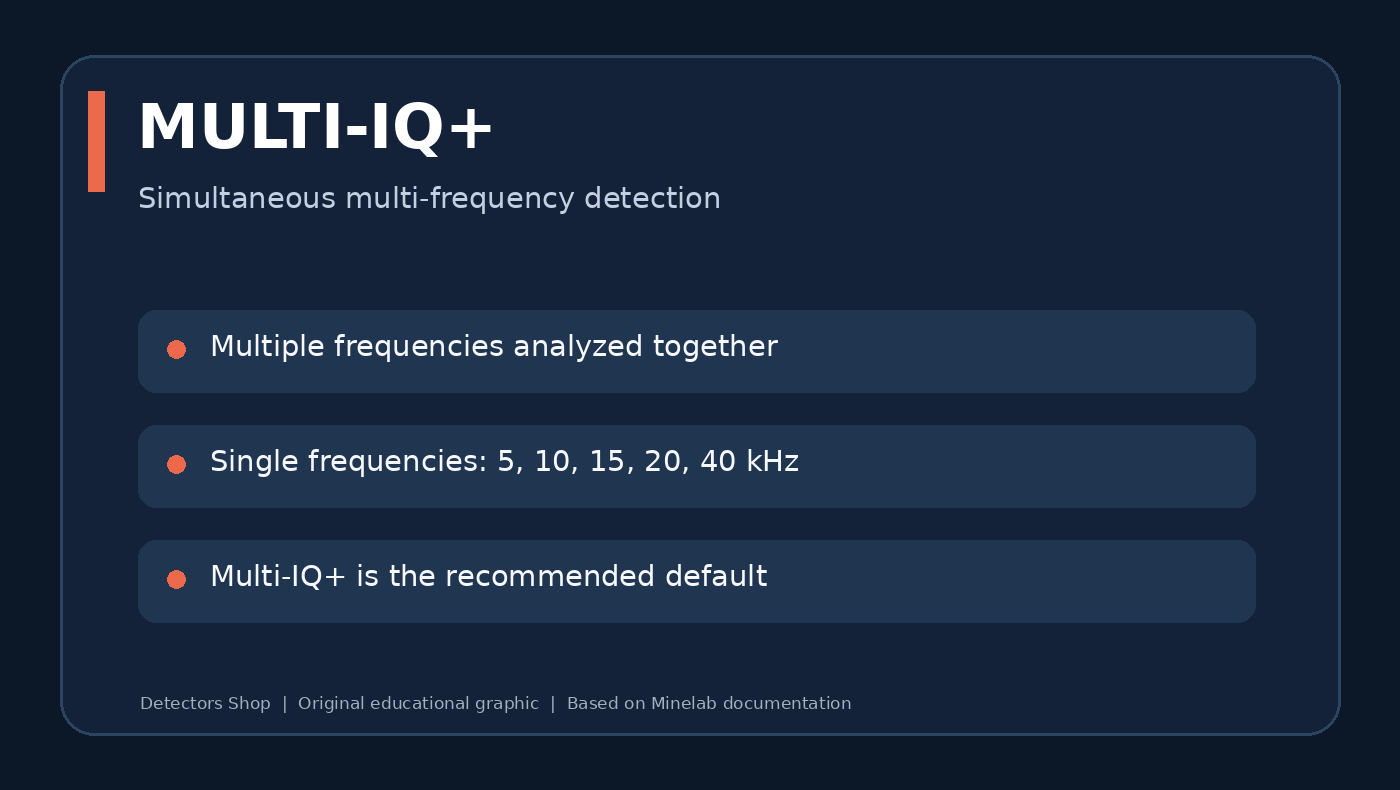
Minelab describes Multi-IQ+ as a high-power simultaneous multi-frequency engine. Instead of selecting just one transmission frequency, the detector can process multiple frequencies together, helping it respond to a broad range of targets and manage challenging ground. Minelab markets the platform as providing up to 50% more power than the EQUINOX series; this is a manufacturer comparison, not an independently measured guarantee of greater depth at every site.

The system works together with adjustable sensitivity, search modes, ground balancing and the 2D target map. Actual detection depth depends on target size, shape, composition, mineralisation, nearby metal and user settings.

Multi-IQ Plus technology and Manticore operating frequency options
Original technology summary graphic; not a diagram of proprietary internal electronics.

All 10 Manticore Search Modes Explained

Minelab Manticore groups its ten modes by environment. The best starting choice is the mode intended for the actual ground beneath your coil—not necessarily the most aggressive setting.

FamilyModeDesigned use
All-TerrainGeneralEveryday inland detecting
All-TerrainFastSeparation of closely spaced inland targets
All-TerrainLow ConductorsSmall and lower-conductivity inland finds
All-TerrainHigh ConductorsLarge or highly conductive inland targets
All-TerrainTrash RejectSites with concentrated metallic rubbish
BeachGeneralTypical dry- and wet-sand beach detecting
BeachLow ConductorsSmall or fine jewellery in saline beach conditions
BeachDeepBeach targets where greater depth is prioritised
BeachSurf & SeawaterSaltwater surf and difficult saline conditions
GoldfieldGeneralGold nuggets in suitable mineralised goldfields

The Goldfield mode is intended for natural gold nugget prospecting. According to the manual, it defaults to the Prospecting audio theme and Tracking Ground Balance. It should not be described as a guaranteed deep-gold or long-range locator.

Ten Minelab Manticore search modes grouped by All Terrain Beach and Goldfield
Quick reference: select a mode for the environment and the likely targets.

2D ID Map, Target Trace and Target ID

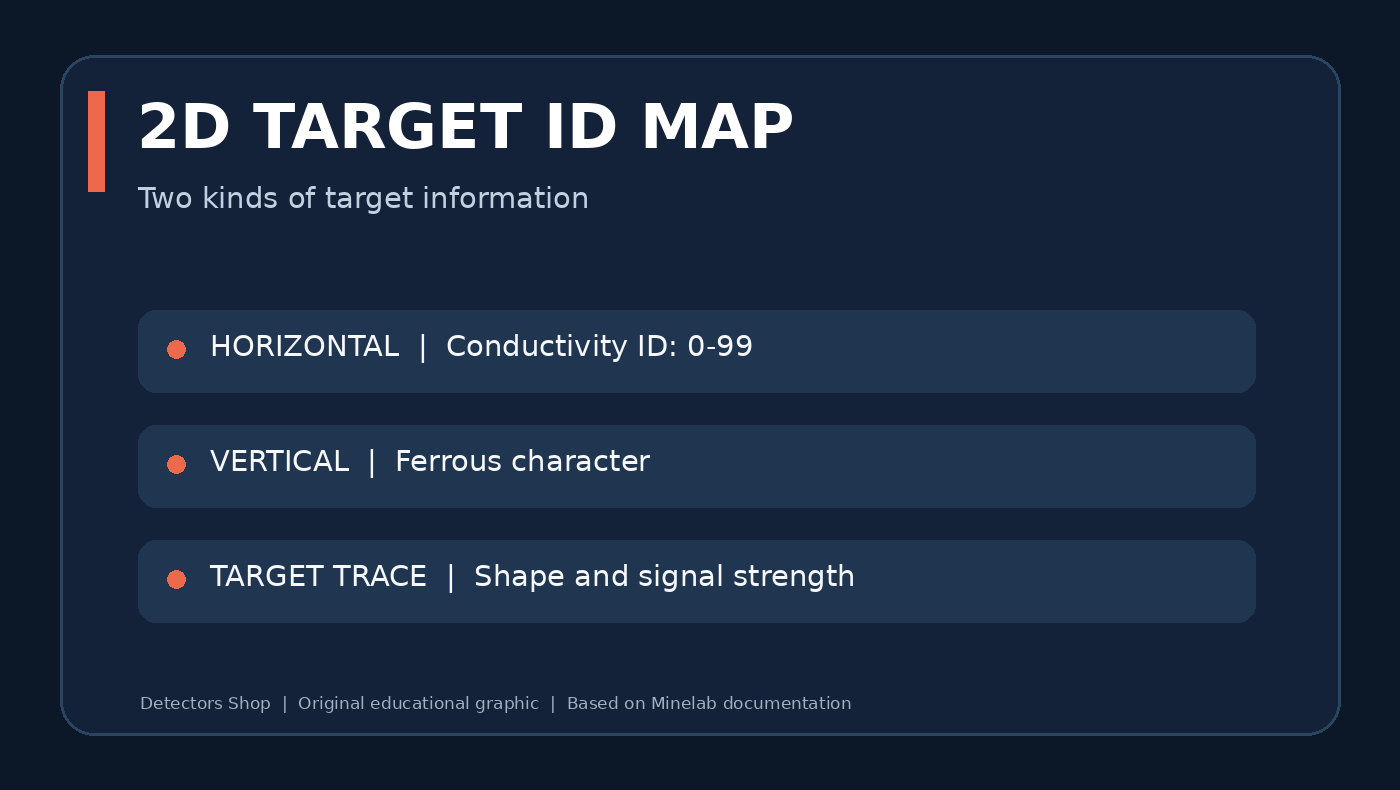
Minelab Manticore assigns a conductive Target ID from 0 to 99. The horizontal axis of the 2D ID Map represents conductivity, while the vertical position of a Target Trace gives information about the target’s ferrous character. The Trace shape and intensity can also help users spot ambiguous targets or nearby iron.

A round, consistent Trace along the centreline can be typical of a non-ferrous object, but aluminium trash can resemble desirable targets. Nails and bottle caps may plot in iron-like areas, although target orientation and ground conditions affect the result. No ID number proves that a target is gold or a particular coin.

For reliable decisions, combine repeatable audio, ID stability, Trace shape and multiple sweep directions. The manual warns that adjacent targets, depth and mineralisation can distort IDs.

How Manticore 2D target ID map combines conductivity and ferrous information
Interpret the conductive scale together with the ferrous position and trace behaviour.

Sensitivity: 1–35 and Noise Control

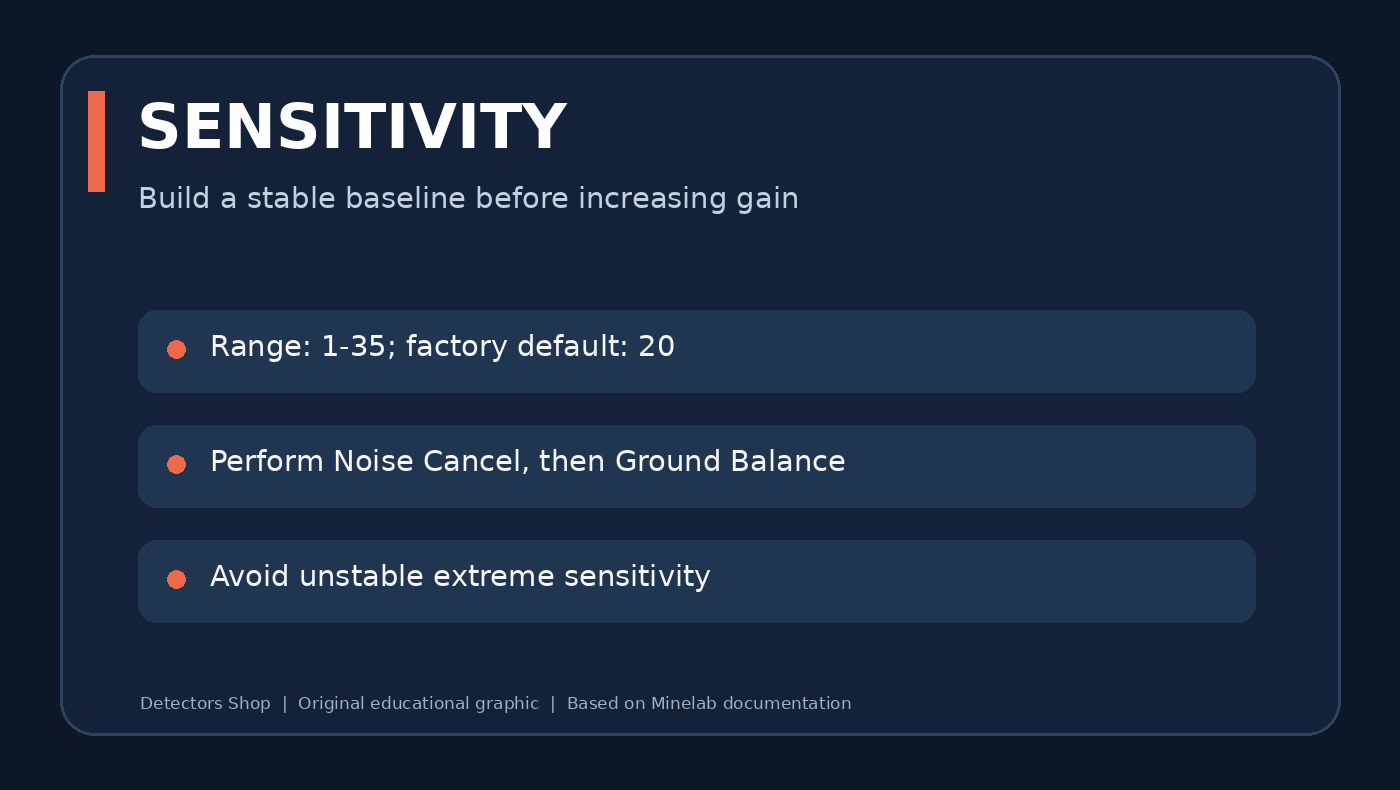
Minelab Manticore sensitivity runs from 1 to 35, with a factory default of 20. Values 31–35 are considered extreme. Maxing out sensitivity can make weak targets harder—not easier—to hear when electrical or ground noise becomes excessive.

The optional Sensitivity Boost shortcut temporarily adds five levels, up to the maximum, to investigate a questionable response. It is not a substitute for maintaining a stable search setup.

Sensitivity settings 1 to 35 noise cancel ground balance guidance
Use the highest stable sensitivity rather than the highest possible number.

Multi-Frequency vs Single-Frequency Operation

Multi-IQ+ is the recommended default. For users who want to experiment in suitable locations, Minelab Manticore also offers selectable single frequencies of 5, 10, 15, 20 and 40 kHz. These are not all available in every mode: Beach modes use Multi-IQ+ only, and Goldfield excludes lower single frequencies (5, 10 and 15 kHz).

Changing a frequency can change noise behaviour and Target ID characteristics, so re-run Noise Cancel after switching. Higher or lower frequency should not be interpreted as a simple universal depth ranking.

Ferrous Limits and Discrimination Patterns

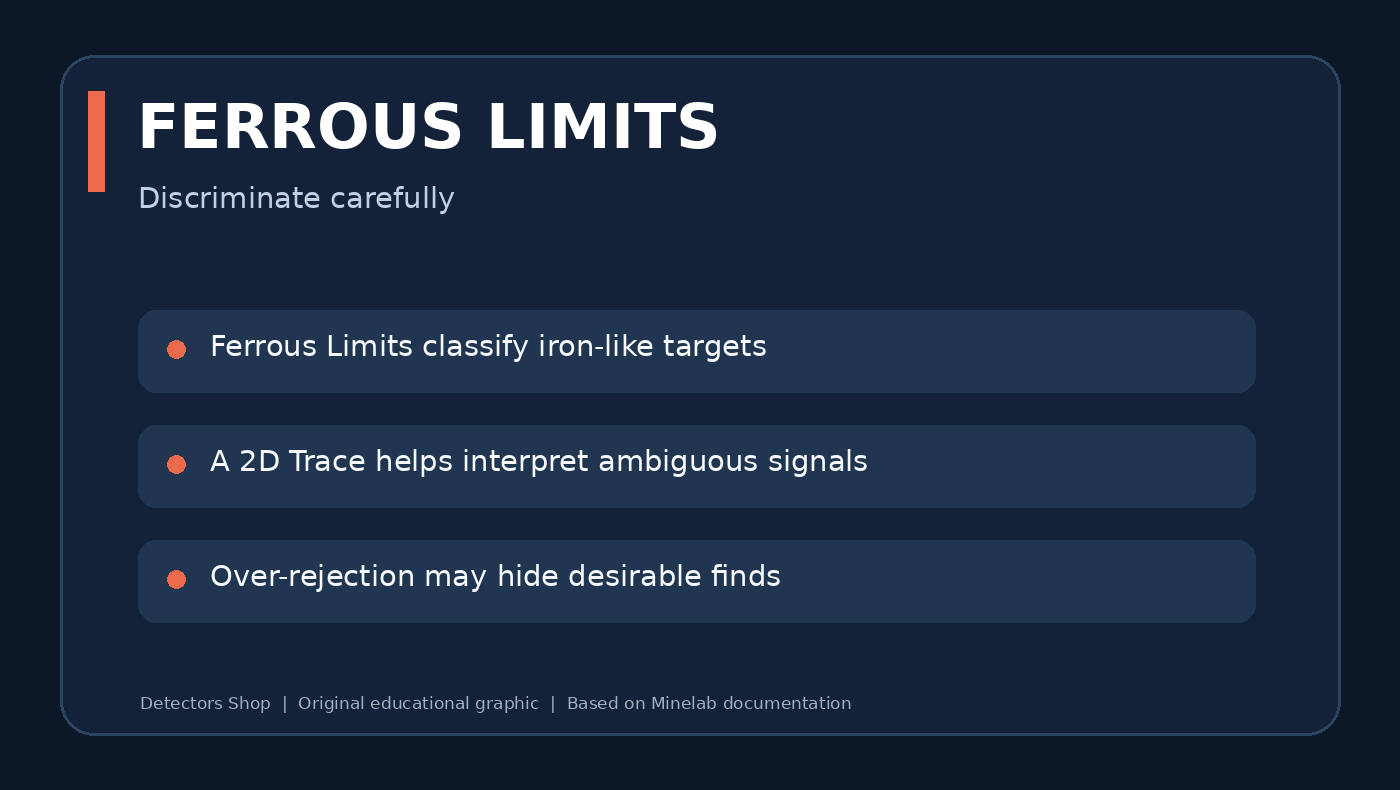
Ferrous Limits let you classify iron-like responses on the 2D map; Discrimination Patterns define which conductive IDs will be accepted or silenced. These are related but different controls. Minelab Manticore provides adjustable upper and lower limits and custom patterns.

Start conservatively. Overly aggressive rejection can silence desirable targets near rejected items, especially in iron-rich locations. When learning the machine, investigate ambiguous signals from more than one direction and compare the recovered object with its 2D Trace.

Manticore Ferrous Limits discrimination tradeoffs and Target Trace
Discrimination improves efficiency but can mask desirable finds if overused.

Recovery Speed and Target Separation

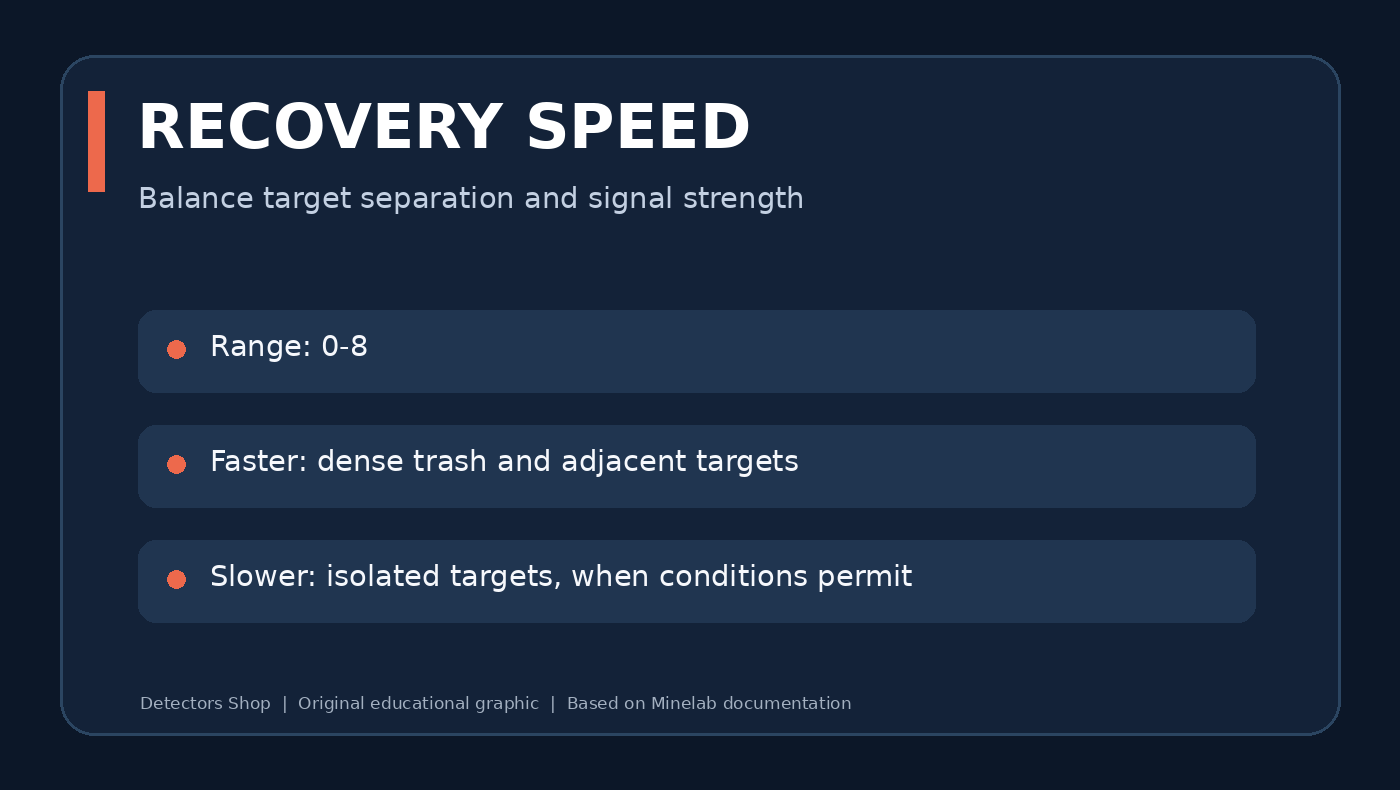
Recovery Speed is adjustable from 0 to 8. Faster recovery helps separate adjacent targets at littered sites; slower settings can be useful for stronger responses from isolated objects when ground conditions permit. Selecting the fastest or slowest level everywhere is rarely productive.

In dense iron, compare a suspected good target at two or three recovery settings and maintain a steady coil sweep. Evaluate the repeatability of the response rather than simply whether a high number appears on-screen.

Manticore recovery speed 0 to 8 and target separation
Illustrative trade-off between target separation and isolated-target response.

Audio Themes, Target Tones and Threshold

The manual lists four Audio Themes: Normal, Enhanced, Depth and Prospecting. Depending on the mode and configuration, Manticore can use one, two or five target tones and different all-tones regions, with adjustable volume, pitch, ferrous response and threshold.

Prospecting audio is particularly relevant in Goldfield mode: subtle signal variation is often more useful there than trying to reject every uncertain response. Use a comfortable volume, especially with headphones, and avoid settings that mask faint signals under constant chatter.

Ground Balance: Auto, Manual and Tracking

Minelab Manticore provides Auto, Manual and Tracking Ground Balance. Ground balance compensates for soil responses so small metallic signals remain easier to hear. The correct approach depends on soil variation, and the manual recommends performing ground balance if excessive ground noise continues after the quick-start procedure.

Tracking is enabled by default in Goldfield General because the iron mineralisation of prospecting sites often varies while walking. For other locations, choose the setting that provides stable response without suppressing repeatable target signals.

How to Set Up Manticore: Quick Start

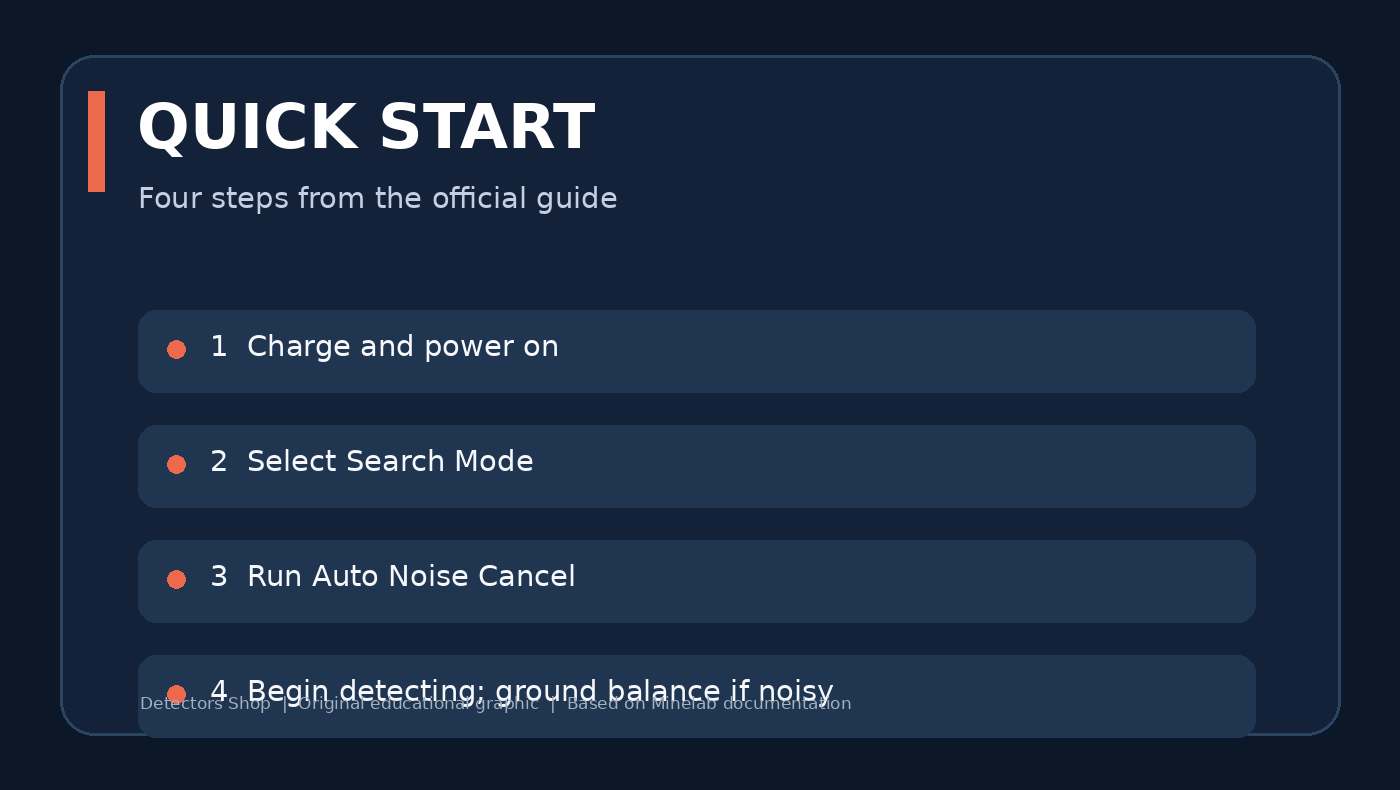
The official Getting Started Guide and instruction manual recommend a short sequence for the first detecting session.

Keep the coil low and level and overlap sweeps. Check suspicious signals in multiple directions before digging. Follow all local rules for detecting and recovering objects.

Minelab Manticore quick start charging mode selection noise cancel
Four-step quick-start summary adapted as original educational artwork.

Pinpoint Mode and Recovering Targets

Pinpoint Mode narrows the location of a detected target without requiring a moving sweep. Turn it on from the Detect Screen using the down navigation control, sweep slowly over the location and listen for the strongest response as the Pinpoint Bar converges.

You can also pinpoint manually by sweeping from two perpendicular directions and marking their intersection. Recheck the hole and removed soil before closing the excavation, and refill holes responsibly.

Practical Starting Setups by Location

EnvironmentStart withWhat to adjust next
City park or old fieldAll-Terrain GeneralRecovery Speed and discrimination only after identifying local trash
Dense iron and modern litterAll-Terrain Fast or Trash RejectTest ambiguous signals from different directions
Saltwater wet beachBeach GeneralUse Surf & Seawater when conditions are difficult
Fine jewellery on beachBeach Low ConductorsKeep stable audio; avoid excessive rejection
Mineralised natural goldfieldGoldfield GeneralStart with tracking balance and tune sensitivity to noise

These are starting points derived from each mode’s documented purpose—not universal numeric presets or claims from our own field testing.

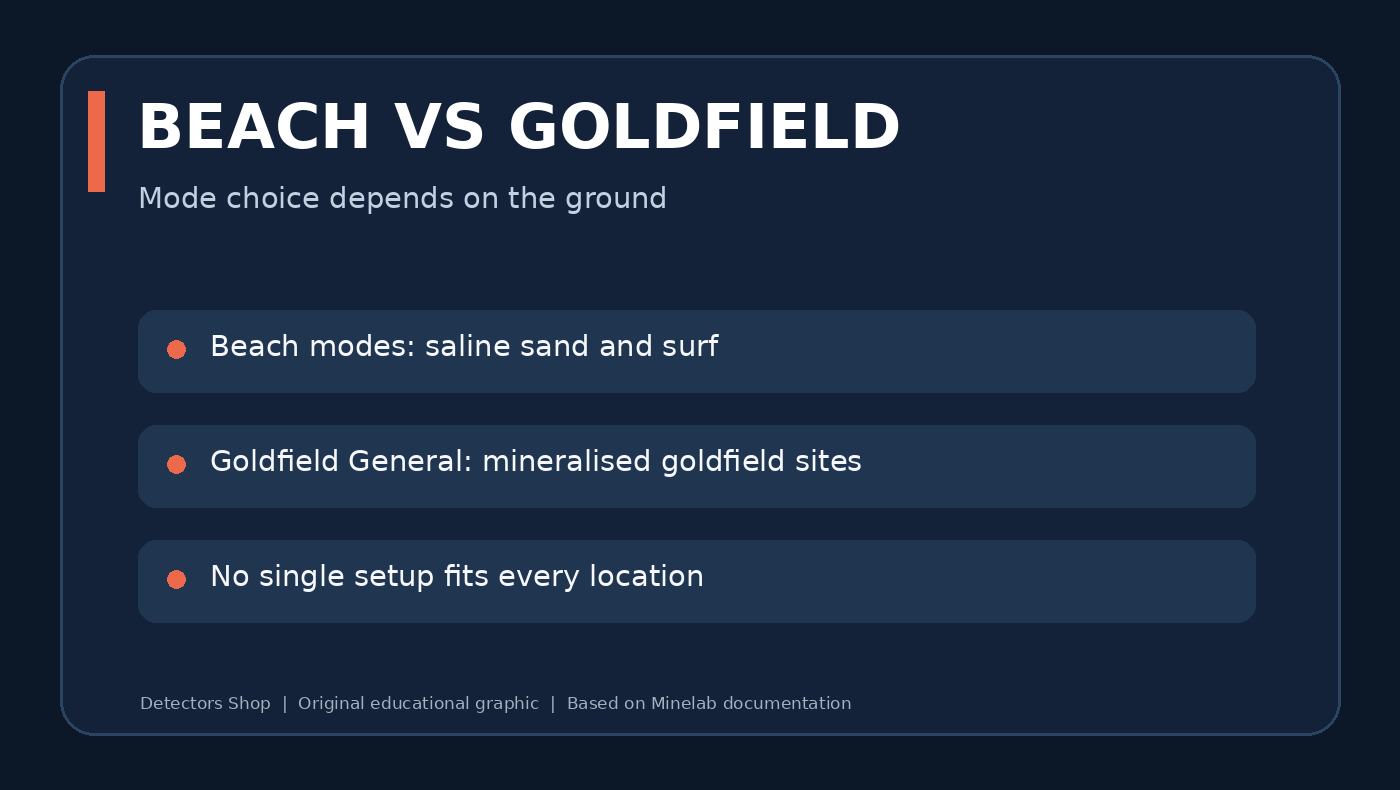
Manticore beach mode compared with Goldfield General mode
Use the search family that matches the site, salt conditions and target type.

Beach Detecting and Waterproof Use

Minelab Manticore is rated IP68 and waterproof to 5 metres (16 feet). The Beach family includes a dedicated Surf & Seawater mode for challenging salt conditions. Beach modes run on Multi-IQ+ because saline ground needs the noise-handling characteristics of simultaneous multi-frequency operation.

Waterproof detector does not mean every accessory is waterproof: the included ML 105 wireless headphones are not waterproof. For submerged detecting, use appropriately rated waterproof headphones and follow Minelab’s connector and underwater-audio instructions. Never charge the machine underwater or when wet.

Can Manticore Find Natural Gold?

Yes. Minelab Manticore includes Goldfield General, designed to find small nuggets in appropriate gold-bearing mineralised ground. Its default Prospecting audio uses a true threshold and its Tracking Ground Balance handles changing mineralisation. This makes it a practical multi-purpose option for people who also want to search beaches, fields, jewellery and relic sites.

Nevertheless, it should not be confused with a purpose-built deep gold prospecting machine for every deposit. Gold recovery depends on nugget size, depth, ground properties and coil technique. Compare with dedicated models when natural gold is the primary objective, rather than assuming one detector is best for all ground conditions.

Battery, Charging, Coils and Design

Minelab lists an internal rechargeable lithium-ion battery with approximately 10 hours of typical runtime. Charging from empty is approximately 7 hours when an appropriate USB charger is used; conditions and power sources affect charging times. The manual recommends a quality 5 V charger rated at least 2 A, and charging only between 0°C and 40°C.

The standard coil is the waterproof M11 11-inch Double-D. The detector weighs approximately 1.3 kg and uses a three-piece collapsible carbon-fibre shaft. The colour LCD, keypad illumination, control-pod flashlight, vibration feedback and customisable soft keys support different field conditions.

Minelab Manticore supports wireless audio through compatible headphones, with wired and waterproof accessory options. Check the exact contents of your retail package before purchase: markets and bundles can differ.

Minelab Manticore Technical Specifications

The following figures are taken from the Minelab Manticore Instruction Manual, Technical Specifications (page 80). Current production specifications and packages may change.

SpecificationDetails
TechnologyMulti-IQ+ high-power simultaneous multi-frequency
Search Modes10: All-Terrain 5 / Beach 4 / Goldfield 1
Single-frequency options5 / 10 / 15 / 20 / 40 kHz (mode restrictions apply)
Noise CancelAuto / Continuous Auto / Manual
Sensitivity1–35
Ground BalanceAuto / Manual / Tracking
Target ID0–99
2D target visualizationID Map with Target Trace
Recovery Speed0–8
Audio ThemesNormal / Enhanced / Depth / Prospecting
Target Tones1 / 2 / 5-tone or All Tones modes
Depth indication5-level approximate indicator
WaterproofIP68 to 5 m / 16 ft
WeightApproximately 1.3 kg
Extended / collapsed length1440 mm / 630 mm
Standard coilM11 11-inch Double-D
Display3.5-inch colour LCD
Included headphonesML 105 low-latency wireless (not waterproof)
Battery runtimeApproximately 10 hours
Charge timeApproximately 7 hours
Audio outputSpeaker / 3.5 mm / wireless
Software updatesSupported through USB data cable

Troubleshooting and Common Problems

SymptomInitial checks
Excessive electrical chatterMove away from EMI; run Noise Cancel; reduce sensitivity if necessary
Repeated responses from soilCheck Ground Balance and select an appropriate Search Mode
Uncertain or unstable Target IDRe-sweep from another direction; check for adjacent iron and mineralisation
No audio from headphonesCheck connection, output setting, charge and audio volume
Short battery lifeReduce screen brightness/vibration; consider power-hungry modes and battery condition
Detector reports an errorConsult the official manual before resetting or seeking service

For fault codes and safety warnings, use the current manual; do not infer that an error proves the coil or control unit must be replaced. Contact authorised service support if problems persist.

Care, Safety, Reset and Software Updates

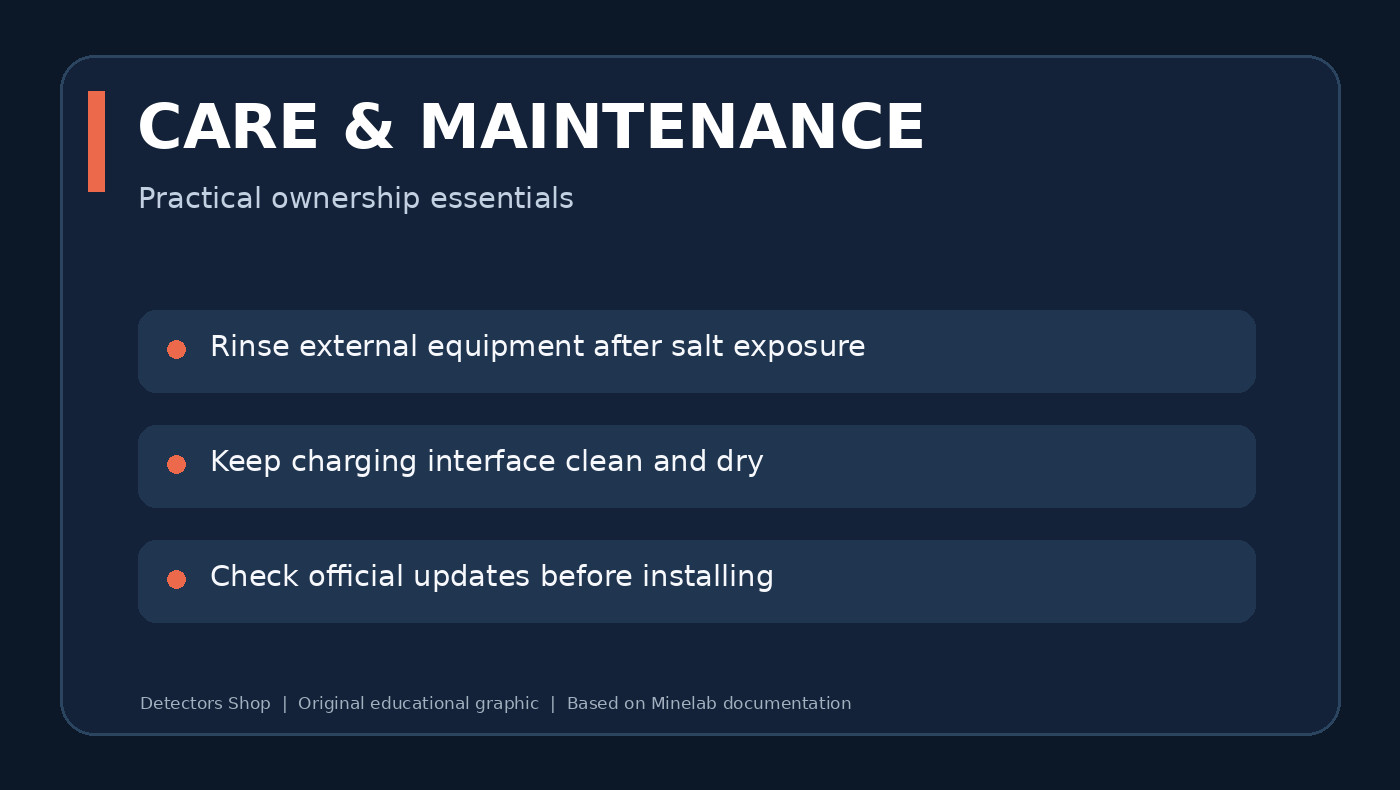
After salty or muddy use, clean the detector in accordance with Minelab’s maintenance guidance. Keep ports, coil connector and charging contacts free from debris and dry before charging. Avoid solvents and high heat.

A factory reset is available from General Settings or by holding the Power button while turning the detector on (the manual describes an approximately seven-second hold). Reset removes custom configuration; document favourite settings before proceeding.

The detector software can be updated using a compatible USB charging/data cable. Download software only from official Minelab resources, review the applicable update instructions and ensure power and connections are stable during the process.

Manticore care and maintenance checklist
Original care checklist based on official Minelab guidance.

Manticore vs Dedicated Gold Prospecting Detectors

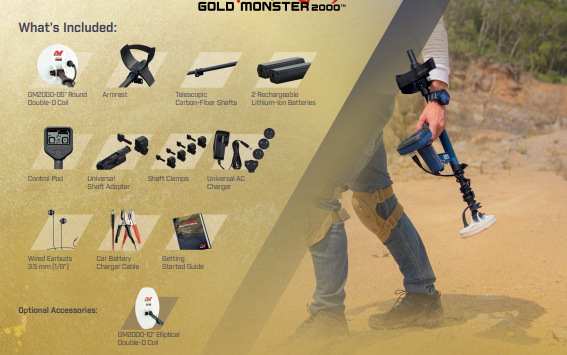
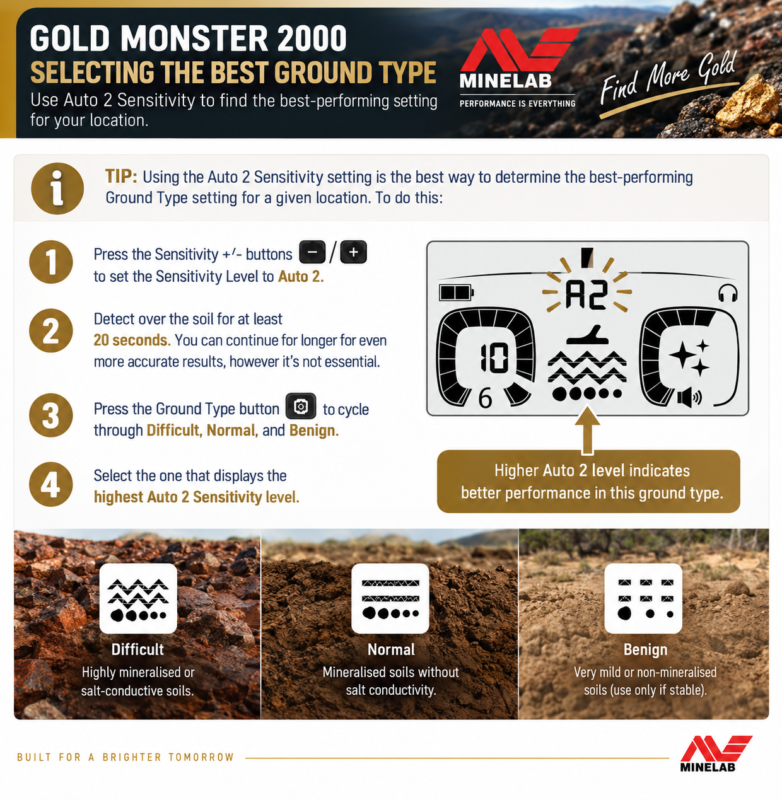
Minelab Manticore is a premium all-round detector with dedicated Goldfield capability. If your main objective is fine natural gold, compare it with Minelab’s specialist Gold Monster 2000 and GPZ 7000. Their technologies, controls, prices and intended target profiles differ.

For more background, read our Minelab gold detector comparison and the Gold Monster 2000 complete review. A multi-purpose comparison should describe trade-offs rather than promise deeper detection without testing.

Where to Buy Minelab Manticore in Dubai

Minelab Manticore is available through Detectors Shop in Dubai, UAE. Visit the Manticore product page for product information and ordering enquiries. For the latest stock status, current price, warranty details, delivery options and device-operation support, contact our team before purchase.

Browse our metal detectors homepage and gold detectors collection to compare other models for different budgets and ground conditions.

Contact our Dubai team: Contact Detectors Shop or use the contact-sales option on the product page.

Frequently Asked Questions

Does Minelab Manticore use multi-frequency technology?

Yes. Multi-IQ+ simultaneous multi-frequency is the recommended default and works alongside supported single-frequency choices.

How many search modes does Manticore have?

Ten modes: five All-Terrain, four Beach and one Goldfield.

Can Manticore detect natural gold nuggets?

Yes. Goldfield General is designed for gold nugget detecting in appropriate goldfields; performance varies with nugget size and soil.

Is Manticore waterproof?

Yes, the detector is rated IP68 to 5 metres. Included ML 105 wireless headphones are not waterproof.

What is the Target ID range?

The conductive ID scale runs from 0 to 99 with separate ferrous information on the 2D map.

What is the Manticore sensitivity range?

Sensitivity is adjustable from 1 to 35, with 20 as the factory default.

What does the 2D ID Map show?

It combines conductivity with ferrous properties and displays a Target Trace to help interpret signals.

Which frequencies can I select?

Manticore has Multi-IQ+ and supported 5, 10, 15, 20 and 40 kHz single frequencies; availability varies by mode.

How long does the battery last?

Minelab states approximately ten hours of typical operation, subject to modes and conditions.

What coil is included?

The M11 11-inch Double-D coil is standard in the official technical specifications; confirm the specific retail bundle.

Which mode should I use on a beach?

Start with Beach General and consider Surf & Seawater for more challenging saline conditions.

Where can I buy Manticore in Dubai?

Detectors Shop in Dubai offers the model; check the linked product page and contact the team to confirm live availability and price.

Official Sources and Related Reading

Official Minelab Sources

Related Reading from Detectors Shop

Editorial Note: Technical specifications and operating instructions are based on official Minelab documentation. This article is an educational guide, not an independent hands-on field test. Actual detection performance depends on ground conditions, target characteristics and detector settings. Educational diagrams were created for Detectors Shop.

This River G 3 user guide from Detectors Shop covers assembly, operation, tablet connection and result interpretation, with illustrations from the official manual, videos and specification tables.

What Is the River G 3 Groundwater Detector?

River G 3 (RIVER G 3 Systems) combines a long-range system, a geophysical system and a three-dimensional display of search data. This guide explains assembly, settings, probe connections and result screens using the official manual and manufacturer specifications.

The manual describes resistance measurement and analysis between ground probes. The 3D view represents the data processed by the device; it is not a photograph of underground water.

Visit the River G 3 groundwater detector product page for the current offer, or browse the Detectors Shop store for available equipment.

River G 3 at a Glance

Item Details
Purpose Searching for indications of groundwater, wells and underground springs
Systems Long range, geophysical and 3D result display
Site settings Language, continent, country and soil type
Probes Four geophysical probes and a separate long-range probe
Reports Main screen, tablet display and printed report
Detectors Shop warranty Five years provided by Detectors Shop, subject to warranty terms
Published depth and range Up to 1500 m depth and 3000 m front range, as advertised by the manufacturer; not guaranteed site results

Range wording varies in the manual and manufacturer page. Front range and surveyed area are different quantities and should not be used interchangeably.

River G 3 Introduction Videos

River G 3 Systems groundwater detector introduction
River G 3 Systems device overview

Detectors Shop also supplied an Arabic-language customer-use video from Somalia. It is included in the Arabic edition. No verified drilling-depth, well-yield or water-analysis records were supplied for this guide.

Package Components and Their Functions

Detectors Shop confirms that the supplied package matches the official manual. Identify the components before assembly and keep the geophysical and long-range accessories organised separately.

Component Function
Main geophysical unit Probe, battery and data connections, scanning and integrated printer
Long-range unit Search settings and direction display with handle and antennas
Transmitter, receiver and antennas Long-range assembly according to the official diagram
Four probes and their cables Measurement points around the main unit
Long-range probe and cable Ground connection through the LONG RANGE port
Tablet RIVER G software and 3D data display
Two external batteries 2500 mAh for long range and 5000 mAh for geophysical, as labelled in the manual
Data transfer cable Main-unit to display-unit connection
Charger and car charger Charging with the appropriate supplied accessory
Integrated printer and two cases Report printing, transport and protection

River G 3 Technical Specifications

The following values summarise the manufacturer’s River G 3 specifications. Main-system and long-range data are separated; total kit weight is not handheld-unit weight.

Specification Geophysical / main display Long range
Display 8-inch colour touch screen, 800 × 600 px Colour, 480 × 270 px
Published frequency 2.91 kHz Up to 500 kHz
Data processing 11 MHz 8 MHz
Battery 10.8 V, 54 Wh 10.8 V, 27 Wh
Advertised runtime 8–12 hours About 10 hours
Operating temperature 0–60°C 0–70°C
Water protection Not waterproof Not waterproof
Measurement accessories 20 m cables; published probe length 810 mm Published probe length 340 mm

Published total kit weight is 16.7 kg: 7.5 kg for the systems case and 9.2 kg for the accessories case. Each case measures 53 × 40 × 22.8 cm. The long-range device alone is listed at 500 g.

The manual refers to 65 cm probes or ground insertion, while the specification page lists a geophysical probe length of 810 mm. Do not confuse insertion depth with overall length; follow the instructions for your supplied kit. Runtime varies with use and battery condition.

River G 3 User Guide: Site and Battery Preparation

  • Charge with the original charger and inspect cables, connectors and batteries.
  • Record site boundaries, soil type, ground condition and actual distances.
  • Locate buried services before inserting probes. Keep clear of power lines, vehicles and interference sources.
  • The manual advises avoiding rain and very wet ground, and waiting at least 15 days after rainfall until the soil dries. Follow manufacturer instructions; elapsed time alone does not establish site dryness.
  • Do not force probes into hard rock. Use a rubber hammer as instructed.
  • Route cables away from walking paths and complete the required connections before measurement.
  • The manufacturer advises keeping carried metal and electronic devices away during long-range operation.
  • Stop and recharge if the battery alarms or the unit shuts down. Do not repeatedly restart on a low battery.

River G 3 User Guide: Long-Range Operation

This section follows the manufacturer’s operating sequence. Treat direction indications as initial guidance requiring repeat checks; antenna movement alone does not establish a drilling location.

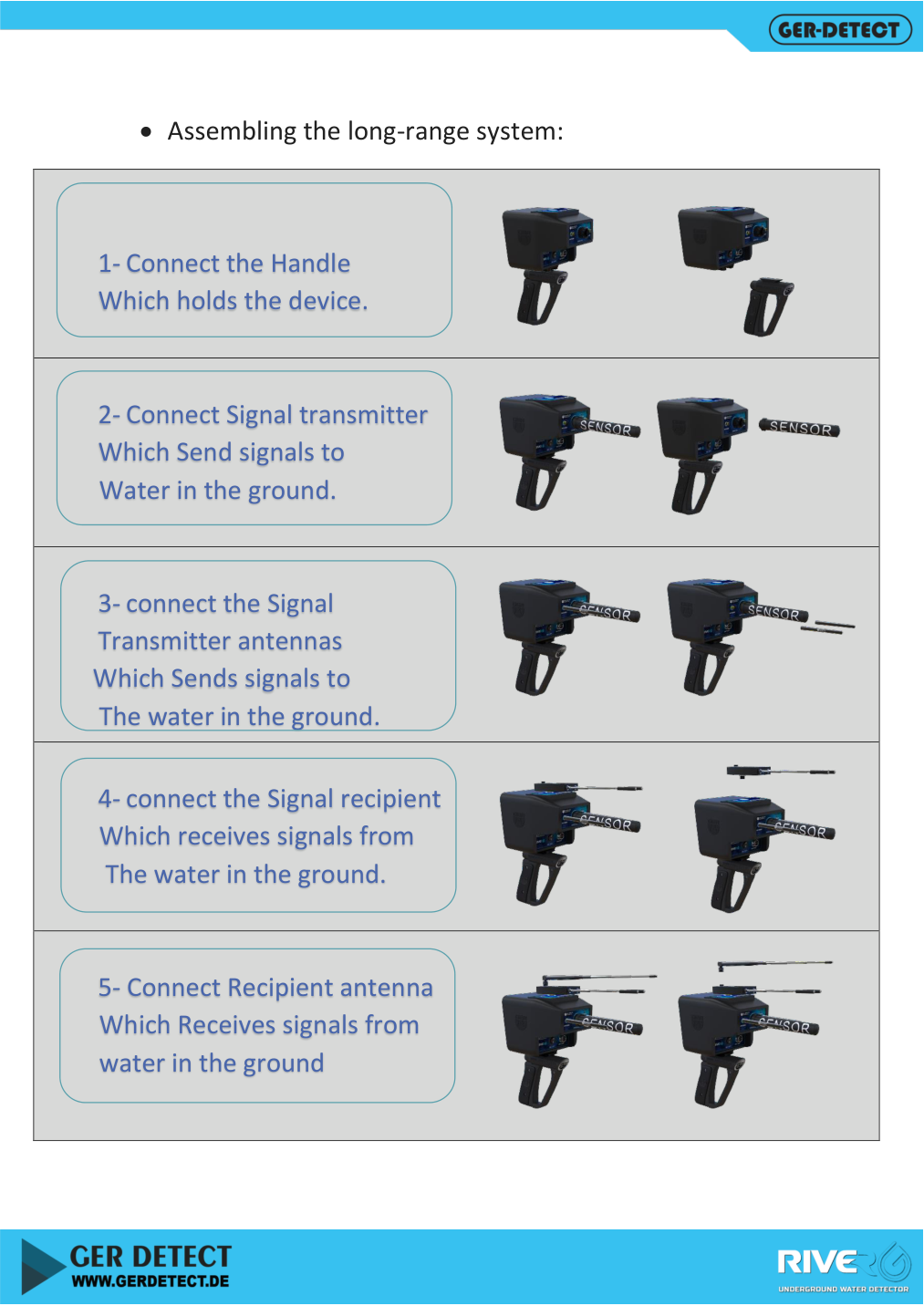
  1. Fit the handle, signal transmitter and its antennas, then the receiver and receiving antenna.
  2. Extend the receiving antenna as instructed and connect the 2500 mAh long-range battery.
  3. Connect the data cable between the main and display units. Insert the long-range probe and connect its cable to the LONG RANGE port.
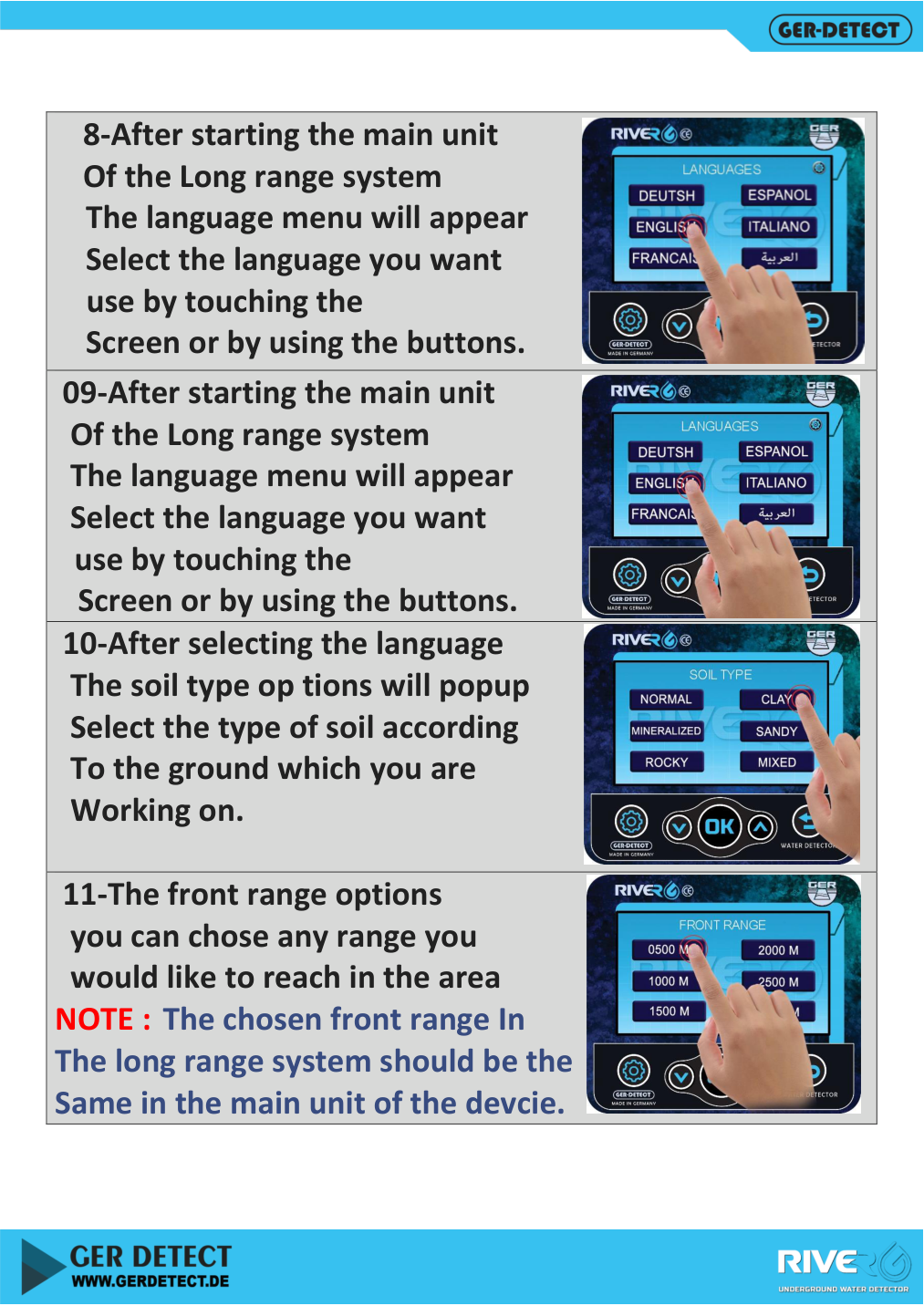
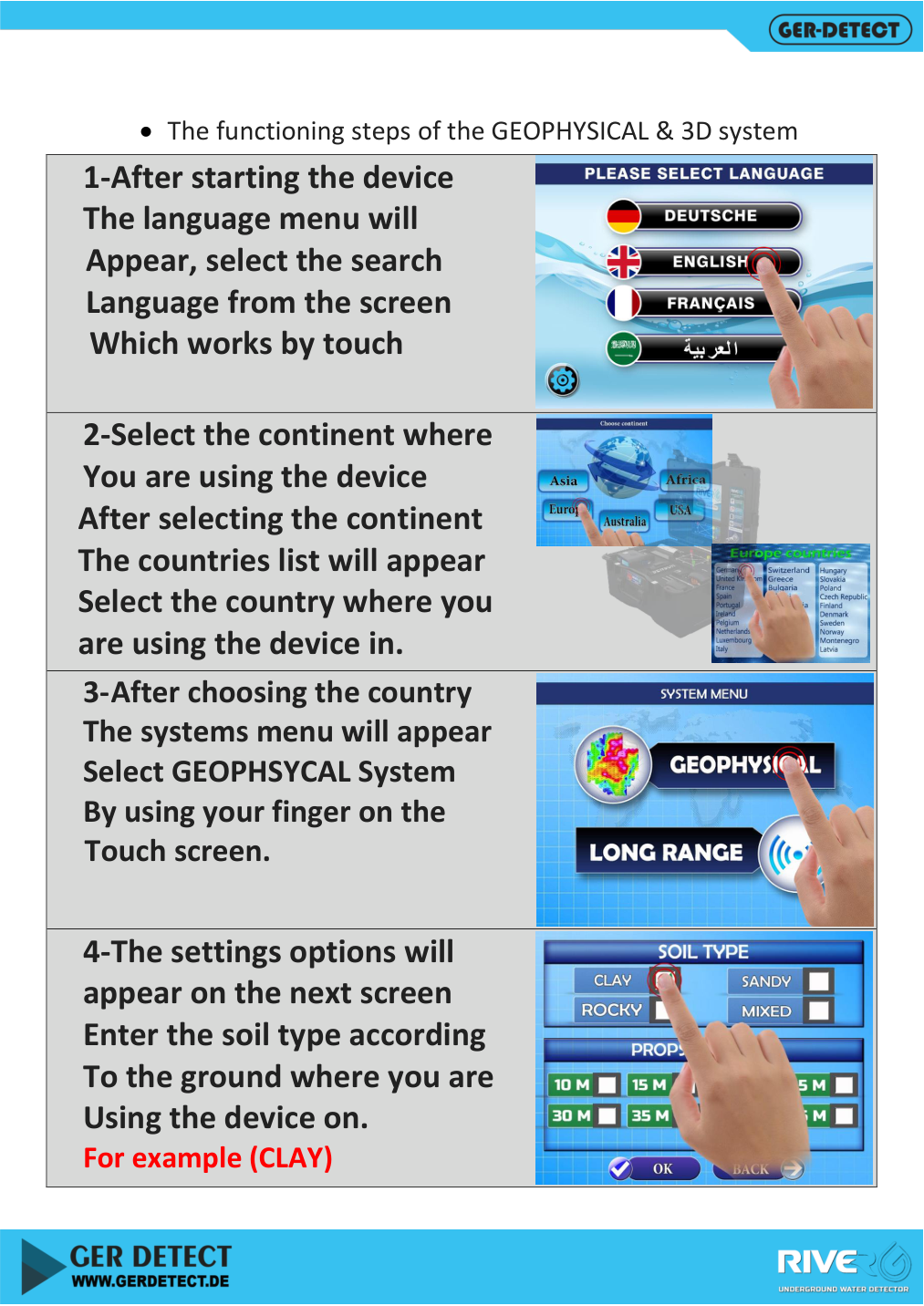
  4. Switch on the main unit, choose language, continent and country, then LONG RANGE and the required range.
  5. Switch on the long-range battery and handheld unit, then choose language and soil type.
  6. Match the handheld range setting to the main-unit setting.
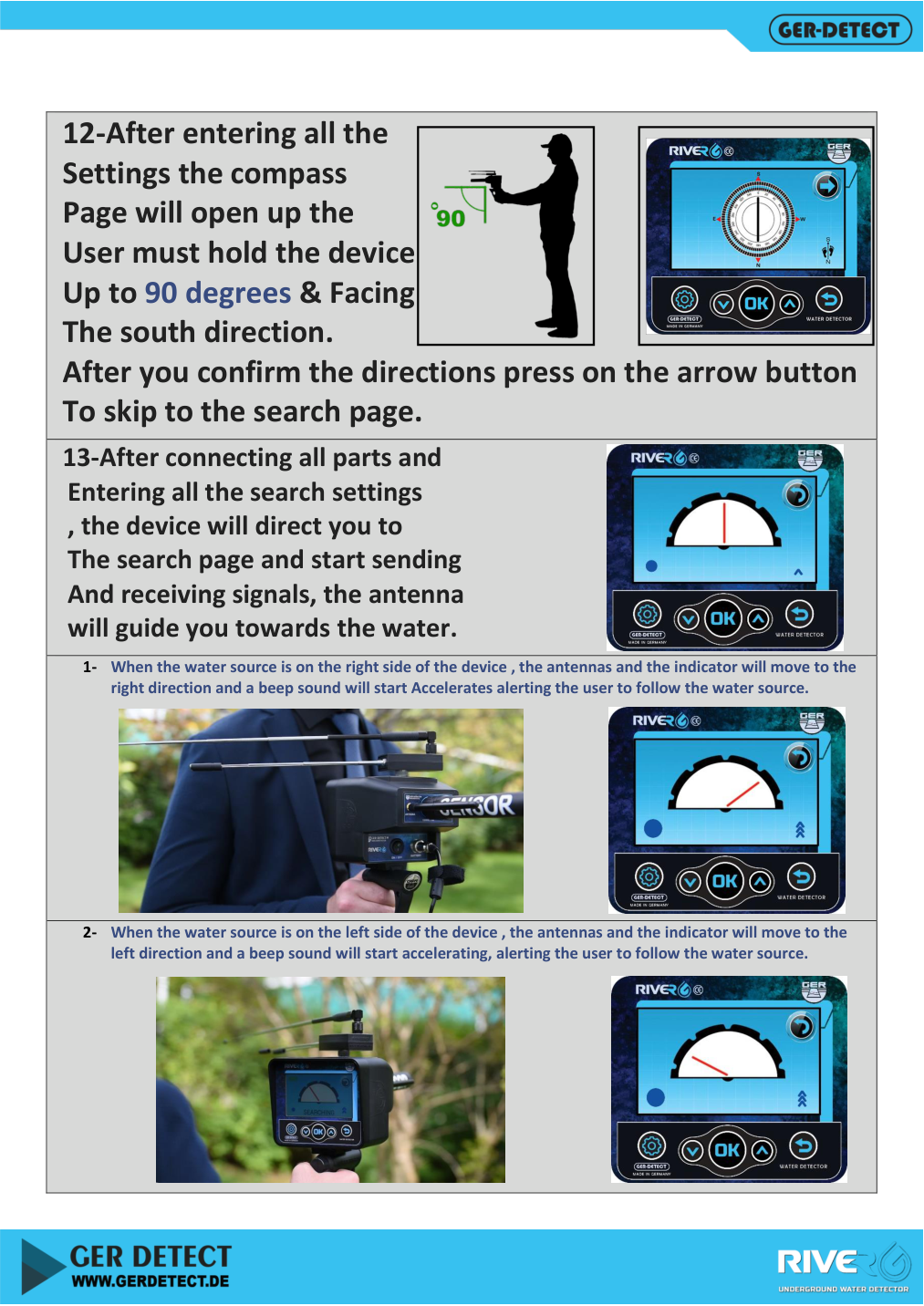
  7. At the compass screen, follow the holding position and south-facing direction shown in the manual, then proceed to search.
  8. Observe direction, audio and antenna indications. The manual describes right or left movement and a backward turn after passing the indicated location.
  9. Record the candidate area, repeat from different directions and compare it with a probe-based scan.
River G 3 user guide: assembling the handle, transmitter, receiver and antennas
Assembling the handle, transmitter, receiver and antennas — Source: official GER Detect user manual.
Selecting soil type and matching River G 3 range settings
Selecting soil type and matching range settings — Source: official GER Detect user manual.
River G 3 long-range compass and direction screen
Long-range compass and direction screen — Source: official GER Detect user manual.

Geophysical Assembly and Probe Layout

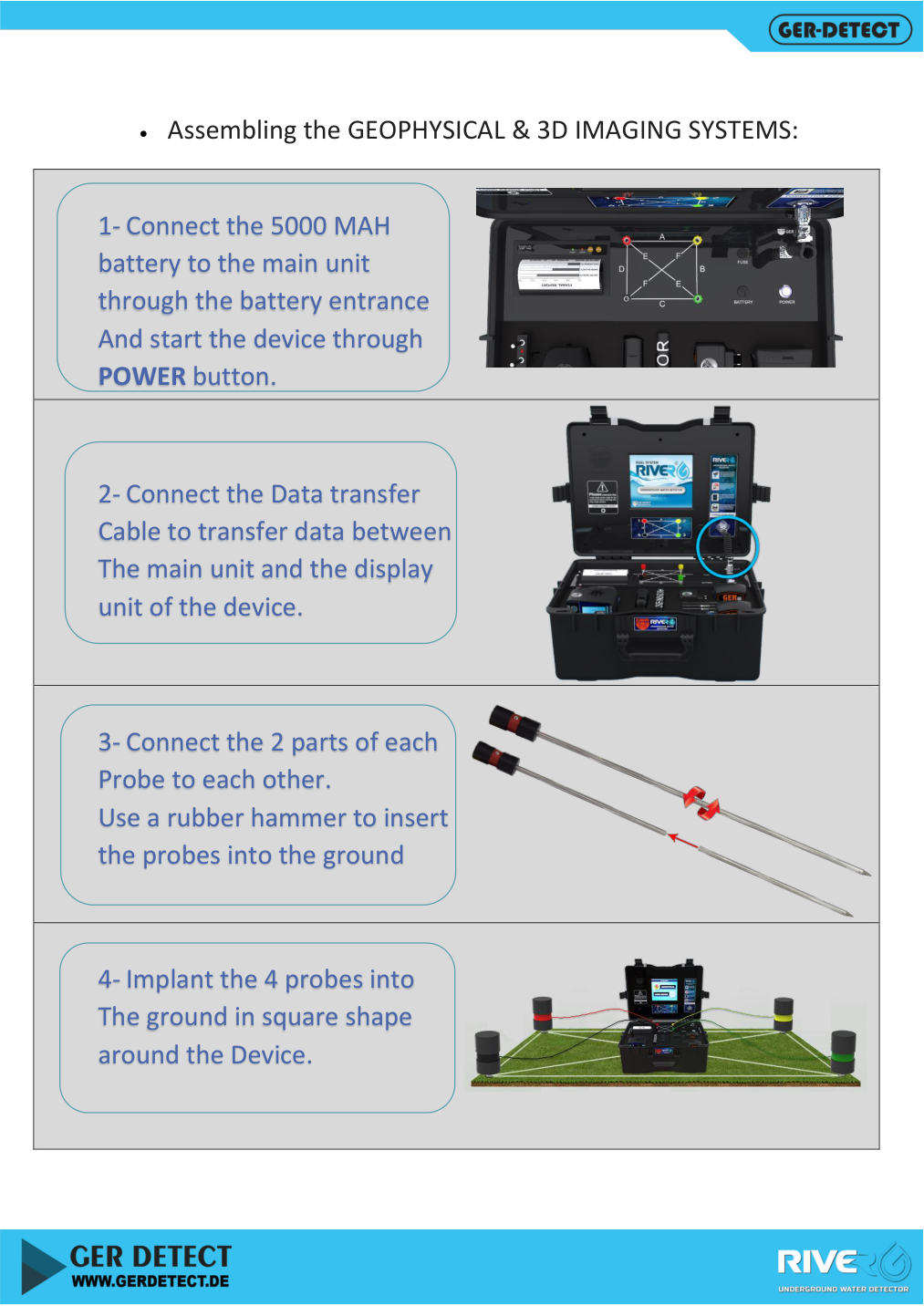
  1. Connect the 5000 mAh geophysical battery to its designated input and connect the data cable to the display.
  2. Assemble the two sections of each probe and place the four probes at the corners of a square around the main unit.
  3. Insert probes as instructed, maintaining ground contact without forcing them into solid rock.
  4. Connect the four cables to the numbered inputs and corresponding probes. Preserve numbering when repositioning.
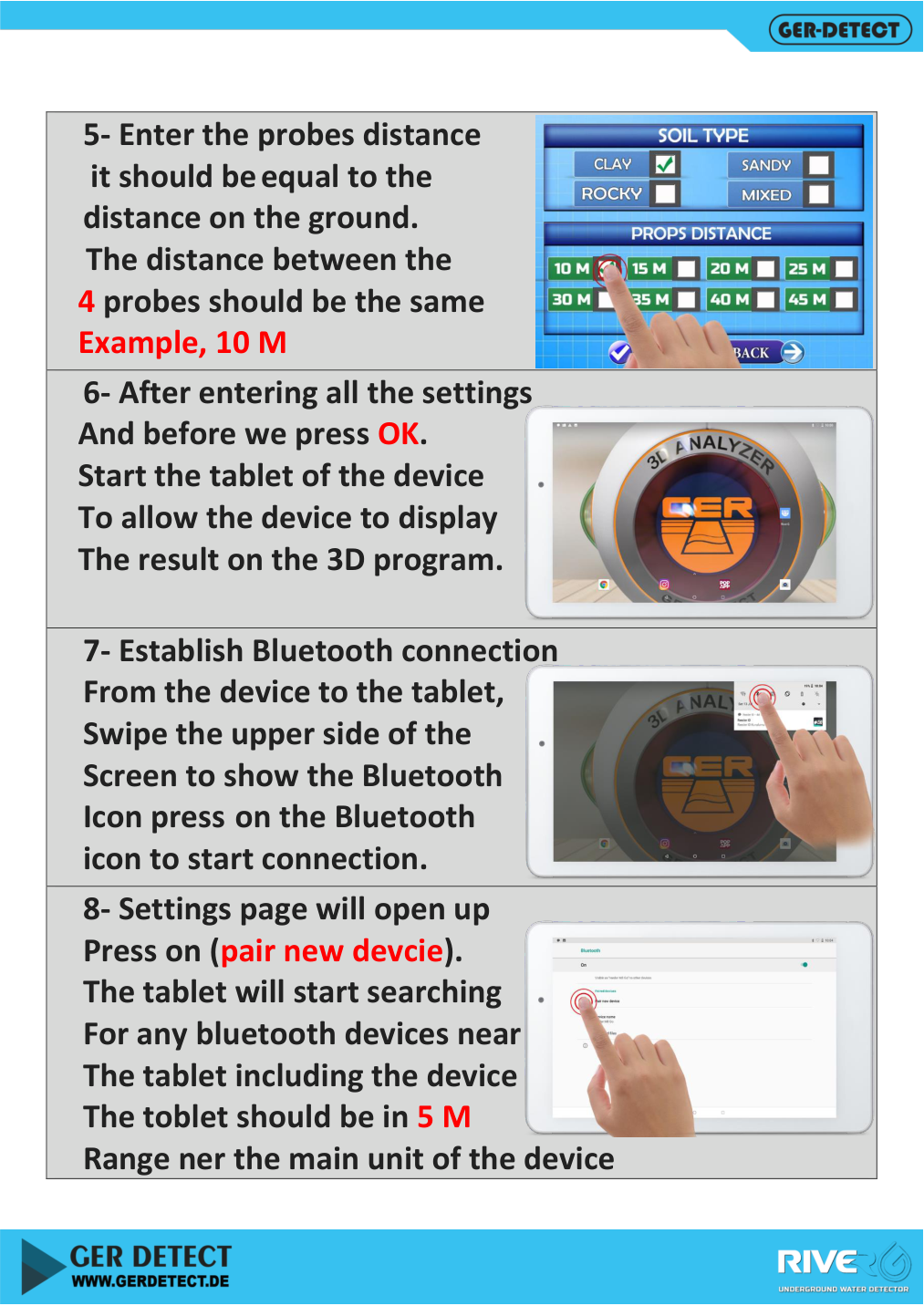
  5. Measure the square side: for a 10 m side, enter 10 m in the probe-distance setting. This is adjacent-probe spacing, not the square diagonal.
  6. Switch on the unit and select language, continent, country, GEOPHYSICAL, soil type and the actual probe distance.
Assembling four River G 3 probes and arranging a square layout
Assembling four probes and arranging a square layout — Source: official GER Detect user manual.
Selecting region, geophysical system and soil type
Selecting region, system and soil type — Source: official GER Detect user manual.
Entering actual probe spacing and preparing the River G 3 tablet connection
Entering actual probe spacing and preparing the tablet — Source: official GER Detect user manual.

Example: A square with a 10 m side has four equal sides. Its diagonal is longer; do not substitute diagonal length for side spacing. Check numbering and connections before scanning.

Connecting the Tablet and Starting the 3D Display

  1. Switch on the tablet before confirming the soil and probe-distance screen.
  2. Enable Bluetooth and choose Pair new device. Keep the tablet within 5 m, as instructed.
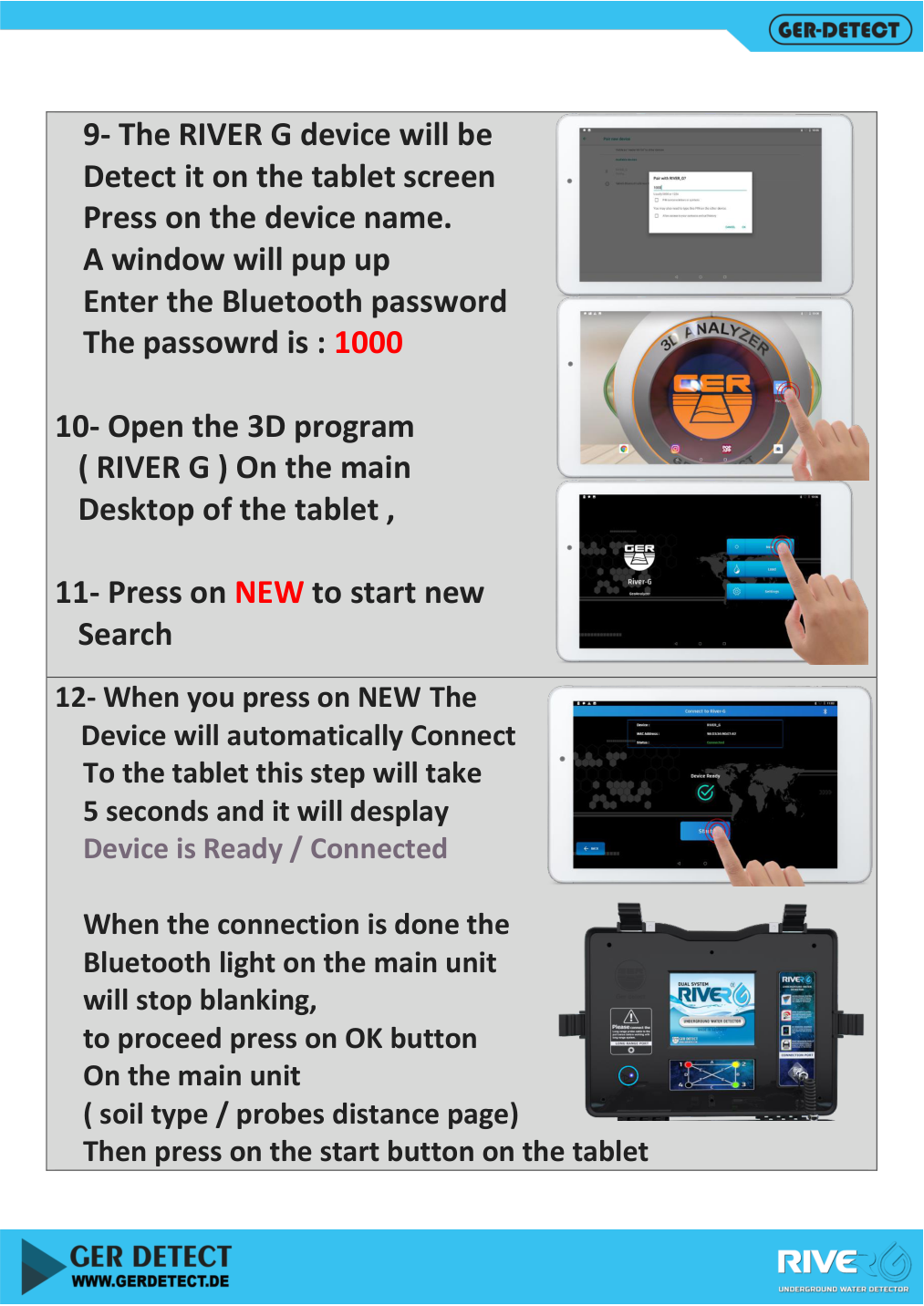
  3. Select RIVER G and enter pairing code 1000 when prompted.
  4. Open the RIVER G application and select NEW.
  5. Wait for connection confirmation. The manual mentions about five seconds; actual timing may vary. The main-unit Bluetooth light becomes steady after connection.
  6. Confirm settings with OK on the main unit, then press START on the tablet.
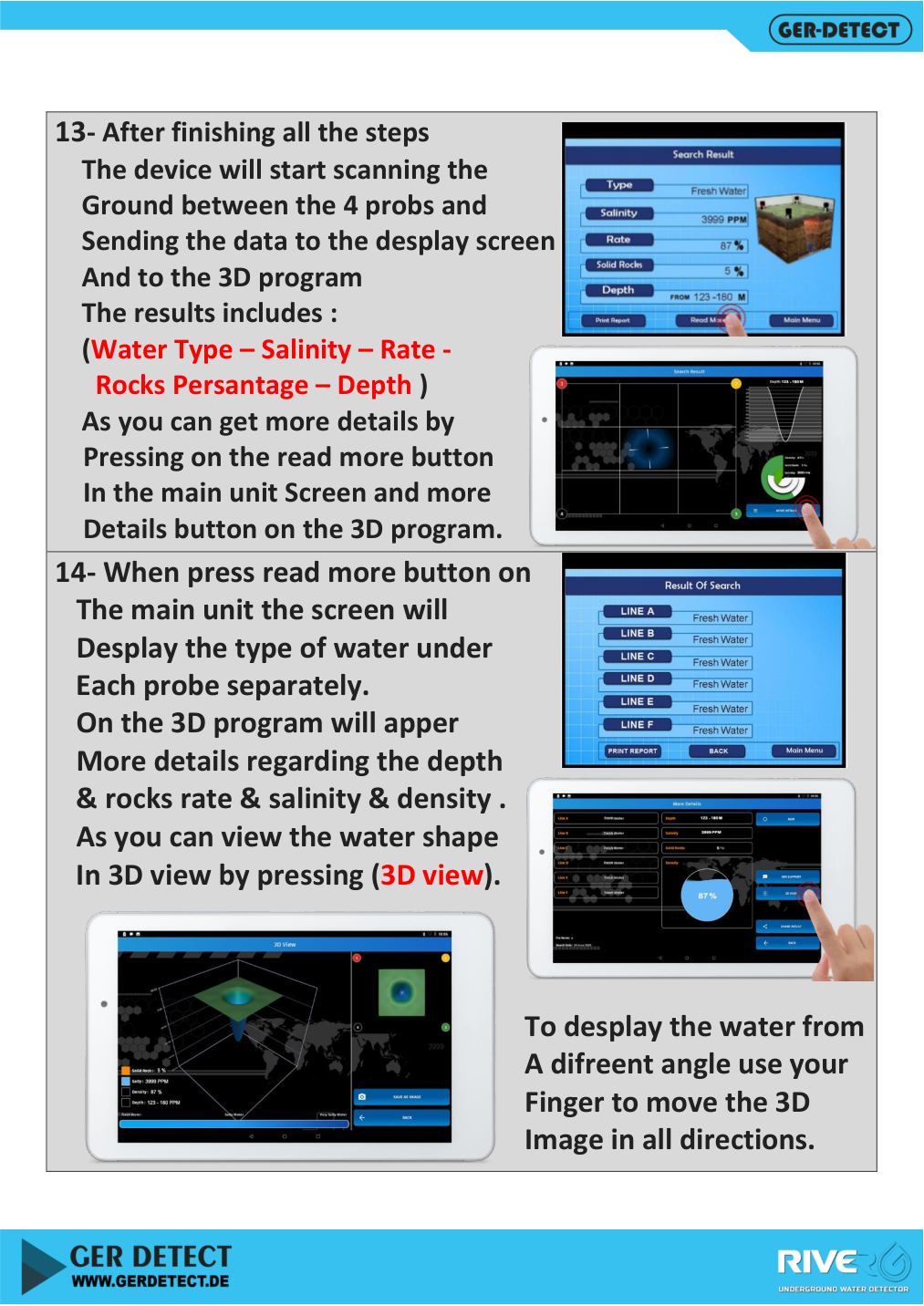
  7. Wait for the scan to complete, then open additional details and the 3D view.
River G 3 user guide: Bluetooth pairing and starting a new search
Pairing RIVER G with the tablet and starting a new search — Source: official GER Detect user manual.

The 3D display uses geophysical-system data. Rotate the view with your finger and compare numeric readings across scans rather than relying on the shape alone.

River G 3 User Guide: Reading and Interpreting Results

Field How to interpret it
Water type A device classification, not laboratory certification of drinking suitability
Depth An estimated value or interval requiring repeat comparison and geological verification
Salinity A displayed indicator, not analysis of a recovered water sample
Water rate / density A relative software indicator, not litres or well pumping yield
Rock percentage A report indicator, not a confirmed description of all underground layers
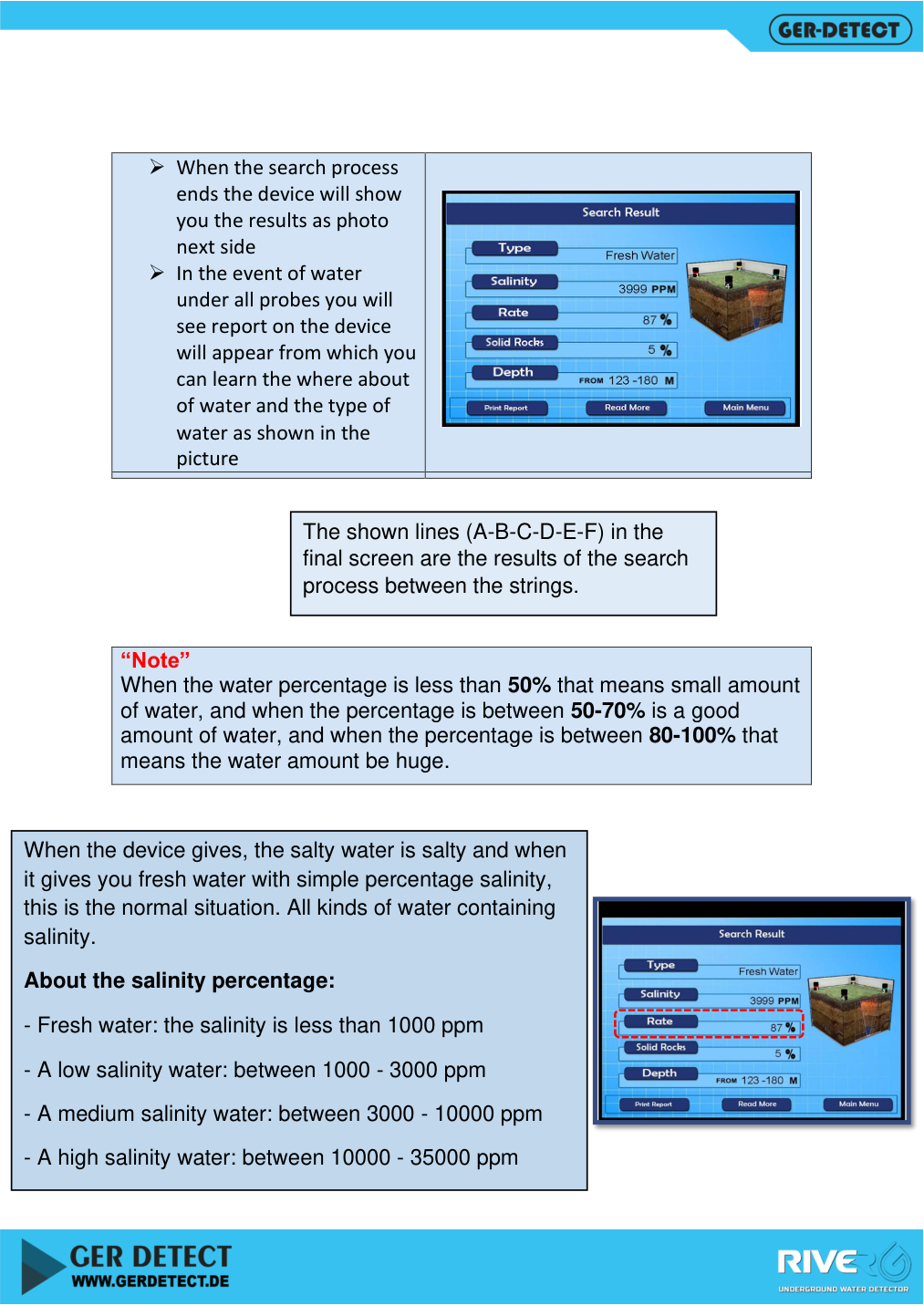
Lines A–F Six measurement paths between four probes, as shown in the manual
3D VIEW A visual representation of processed scan data
River G 3 result screen, additional details and 3D view
Result screen, additional details and 3D view — Source: official GER Detect user manual.
River G 3 measurement lines A to F and manual salinity classifications
Lines A to F and manual salinity classifications — Source: official GER Detect user manual.

The manual uses salinity categories below 1000 ppm, then 1000–3000, 3000–10000 and 10000–35000. These are manual classifications, not a drinking-water suitability standard. Confirm water quality with analysis of an actual sample.

Water-density percentage bands differ within the manual. This guide therefore does not impose one apparently precise quantity scale. Use the indicator for comparison within the device; do not convert it into well yield or aquifer storage.

Handling No Result and Repositioning Probes

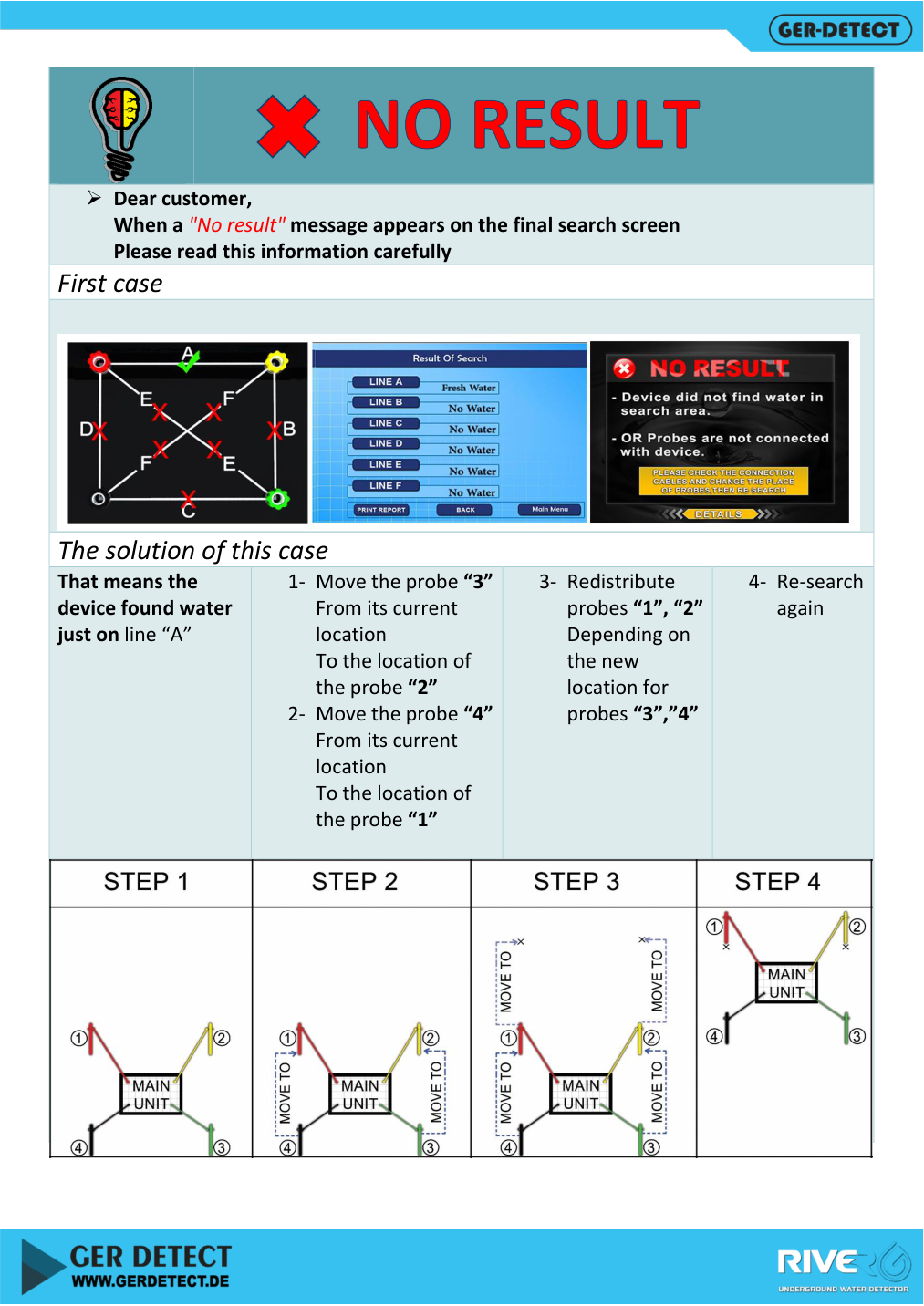
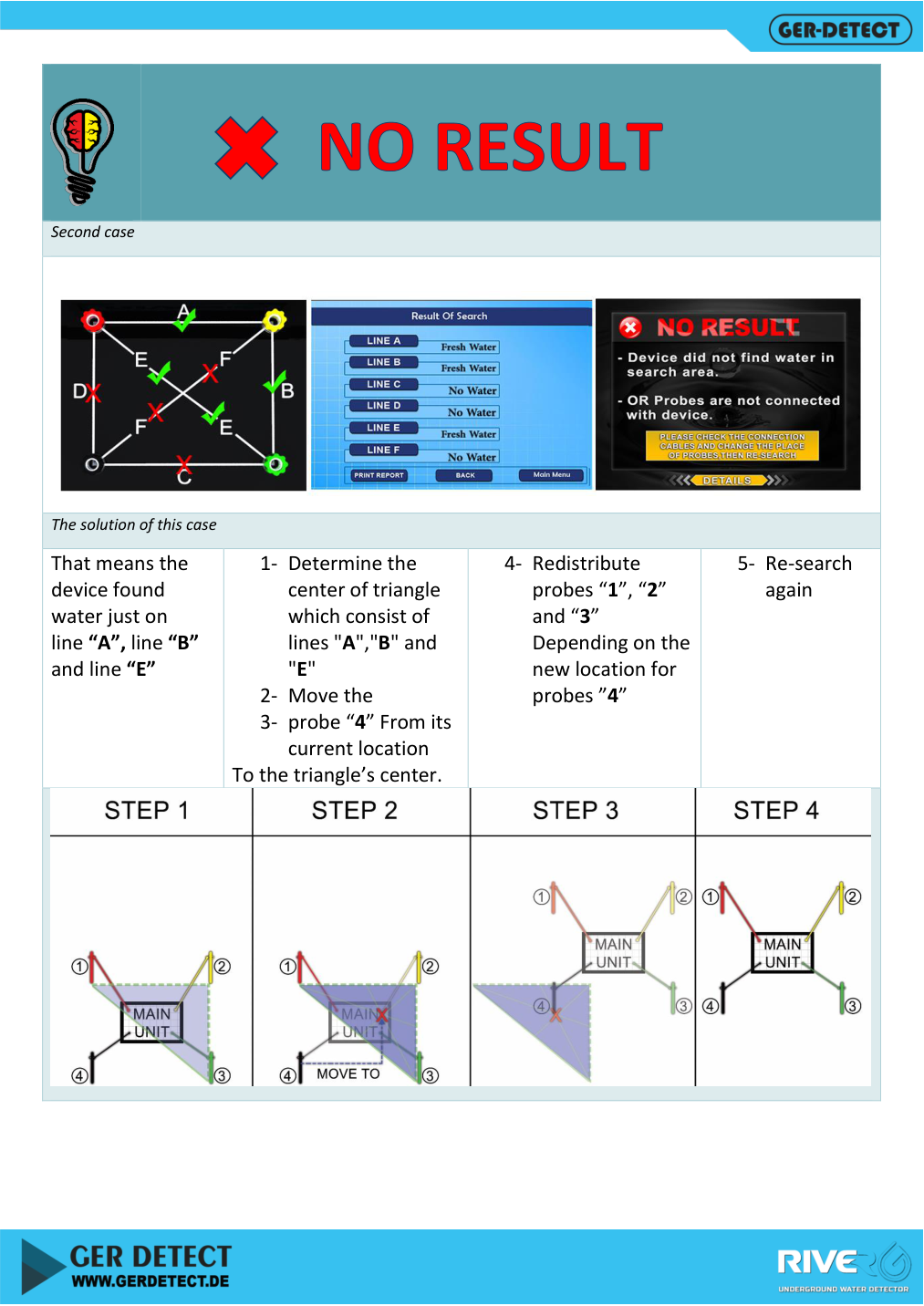
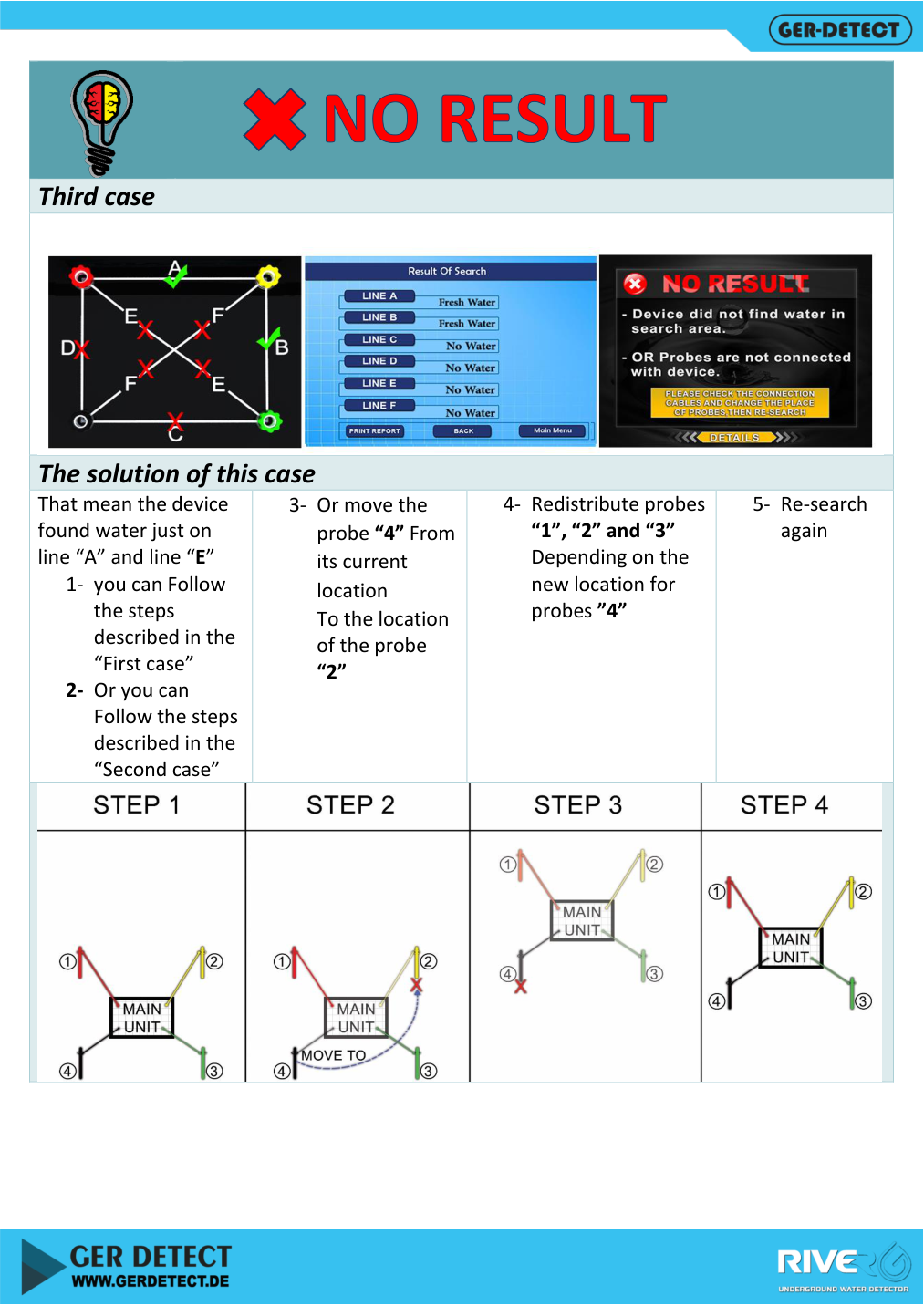
If No Result appears, inspect the report and A–F paths. The following procedures come from the manual and must be used with its numbered-probe diagrams. Remeasure spacing and update settings before repeating.

Manual case Described action
Indication on A only Move probe 3 to position 2 and probe 4 to position 1, then reposition 1 and 2 to form a new square and rescan
Indications on A, B and E Find the indicated triangle centre, move probe 4 there, then reposition probes 1, 2 and 3 to form a square and rescan
Indications on A and E Use one of the preceding procedures, or move 4 to position 2 and reposition the remaining probes as illustrated
No Result case one: repositioning when only path A shows an indication
Case one: repositioning when only path A shows an indication — Source: official GER Detect user manual.
No Result case two: triangle centre and probe repositioning
Case two: triangle centre and probe repositioning — Source: official GER Detect user manual.
No Result case three: alternative River G 3 probe layouts
Case three: alternative probe layouts — Source: official GER Detect user manual.

For No Water, the manual mentions incorrect cable connections or very saline water. These are not an exhaustive diagnosis. Check connections, contact and settings, repeat measurements and consider that the scan may not provide sufficient evidence of groundwater.

Common Operating Problems and Checks

Problem What to check
Readings vary between scans Ground condition, probe spacing, connections, soil setting and location changes; varying depth alone does not prove several water channels
Range differs between units Match long-range and main-unit range settings
Bluetooth will not connect Power, Bluetooth activation, tablet proximity, RIVER G selection and code 1000
Limited depth information Repeat after checking connections, distances and site condition
Alarm followed by shutdown Stop and recharge the correct battery with the original charger
Poor probe contact Check insertion according to the manual and avoid unsuitable solid-rock locations
Connected tablet but no scan Check NEW, main-unit OK confirmation and application START

Printing Reports and Recording a Survey Before Drilling

The device includes a printer and a PRINT REPORT option on the result screens illustrated in the manual. After a completed scan, check the fields and use the printing option. Do not assume a particular save or export format unless it is available in your software version.

  • Record survey date, location, soil type and ground condition.
  • Sketch numbered probe positions and spacing.
  • Record settings, depth interval and water, salinity and rock indicators for each scan.
  • Keep screen photographs and printed reports; compare initial and repeat scans.
  • Have a groundwater or geological specialist assess the findings before drilling. Well yield and water quality require independent verification.

River G 3 Warranty and Detectors Shop Support

When purchased from Detectors Shop, River G 3 comes with a five-year warranty provided by Detectors Shop, subject to its terms. This is the retailer’s warranty; the manufacturer manual specifies a different term, so the five years are not presented as a factory warranty.

For the current price, package and training enquiries, visit the River G 3 page at Detectors Shop. Contact the team for connection and setup guidance before first use, and keep your invoice and warranty documents.
RIVER G 3

View River G 3 and its current price

Refer back to this River G 3 user guide when preparing the detector to check connections, probe spacing and tablet pairing steps. For help applying the instructions to your equipment, contact Detectors Shop through the River G 3 product page.

Frequently Asked Questions About River G 3

Is River G 3 a water detector or a gold detector?

This model is intended for groundwater, wells and springs according to the manufacturer. It is not presented here as a gold detector.

Can a beginner use it?

Yes, after training in assembly, probe layout and settings. Result interpretation and drilling decisions require additional expertise and verification.

What probe spacing should I enter?

Enter the actual distance between adjacent probes in the square, not its diagonal. Keep the four sides equal.

What is the River G Bluetooth pairing code?

The manual pairing code is 1000. Keep the tablet within five metres of the main unit as instructed.

Does water percentage indicate well yield?

No. It is a device indicator, not pumping yield in litres or groundwater storage. Yield requires actual well testing.

Does a fresh-water label mean the water is safe to drink?

The label alone is insufficient. Drinking suitability requires testing an actual sample against applicable requirements.
Is a 1500 m detection depth guaranteed?

It is a manufacturer-advertised figure, not a guarantee for every site. Displayed values require repeat checks and site assessment.

Is the device waterproof?

The specifications state that it is not waterproof. Do not submerge units or use them in rain or very wet ground; follow manufacturer guidance.

What warranty does Detectors Shop provide?

A five-year warranty provided by Detectors Shop, subject to its warranty terms.

Guide Sources

Detectors Shop prepared this guide using the English manual, cross-checking the Arabic edition and the UIG Detectors River G 3 Systems page. Operating illustrations are extracted from the GER Detect manual with source attribution. Detectors Shop supplied the retail warranty, package confirmation and customer-video country.

Need help choosing or setting up a groundwater detector?

Contact Detectors Shop through the product page

The XP ICON X is a lightweight wireless multi-frequency metal detector developed and manufactured in France by XP Metal Detectors. It combines XP’s FMF simultaneous multi-frequency platform with six factory programs, six user-program slots, three selectable single frequencies, detailed audio controls and a waterproof architecture designed for land, beach and shallow-water detecting.

This guide is designed as a practical reference for setting up and using the ICON X in real field conditions. It explains the controls, programs, sensitivity, tones, discrimination, Notch, FMF frequency choices, ground balance, Reactivity, Pinpoint, wireless accessories, beach use, charging, troubleshooting and the main differences between ICON and ICON X.

The article is based primarily on the official XP ICON / ICON X user manual supplied with the device and is cross-checked against XP’s current product information. Where current XP web specifications differ from the supplied manual, the difference is identified rather than silently reconciled.

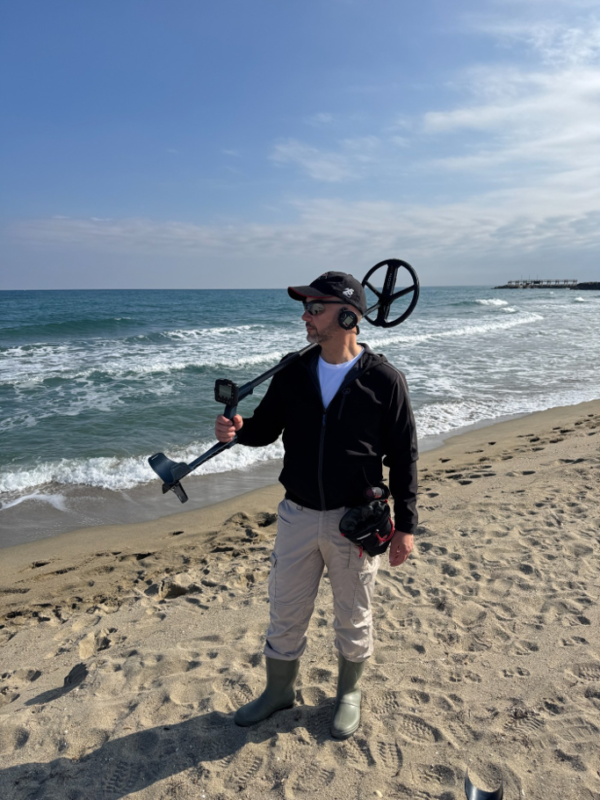
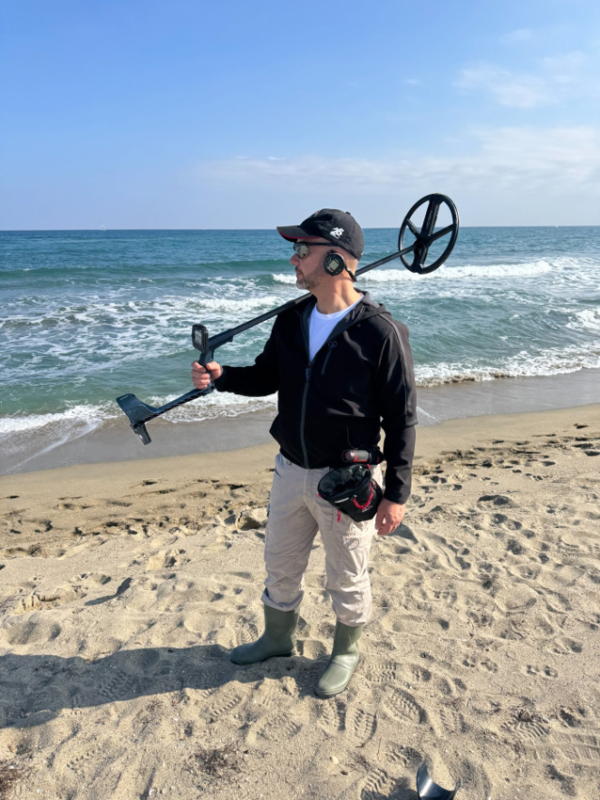
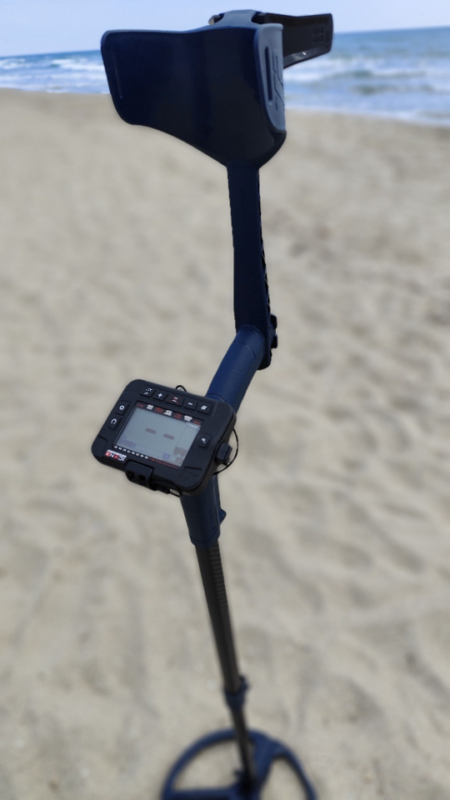
XP ICON X metal detector on the beach

XP ICON X at a Glance

FeatureICON X
Detection technologyFMF simultaneous multi-frequency; automatic/manual frequency shift
Single-frequency choices4, 14 and 28 kHz on ICON X
Factory programs6
User programs6 – one custom slot linked to each factory program
Sensitivity25 levels
Reactivity7 levels: 0-6
TonesPitch, 2, 3, 5 and Full Tones
Audio typesPWM and SQUARE; ICON X also offers enhanced audio-response options
Ground balanceGrab, Tracking, Standard and Pro modes
Notch28-segment Multi-Notch
WaterproofingUp to 5 m with the required underwater setup; see the dedicated diving section
Battery lifeAbout 11 h for the remote and coil under the manual’s stated conditions
WeightApprox. 710 g without the remote on the stem; manual lists ~830 g total with batteries

What Is the XP ICON X?

ICON X is the more adjustable model in the ICON range. It keeps the simplified user interface and wireless architecture of the standard ICON, but adds more factory programs, more Reactivity levels, finer discrimination resolution in the ferrous range, an extra 28 kHz single-frequency option and additional audio-response choices. The result is a detector that can be simple at startup but still gives experienced users room to tune the machine for contaminated ground, mineralized soil, parks and beaches.

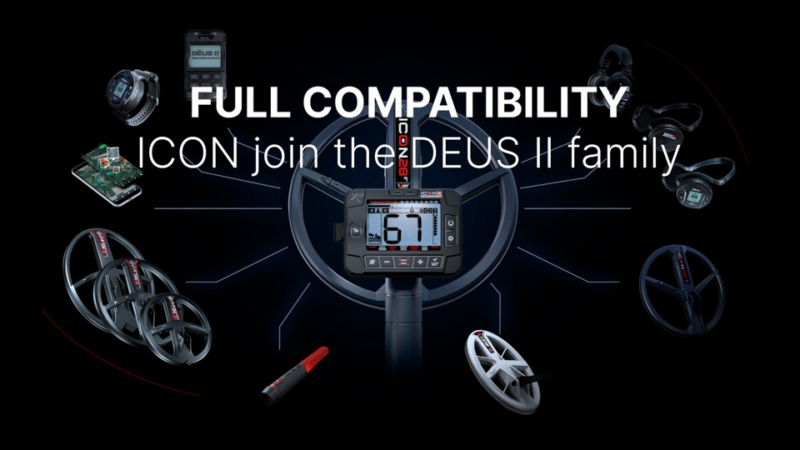
XP positions the ICON range as a gateway into its wider ecosystem. The ICON X can work with compatible FMF coils, the HF2 Search Coil, XP wireless headphones, the MI-6 pinpointer and the Go Terrain app, which makes the platform more expandable than a closed detector package.

XP ICON X compatibility with DEUS II FMF coils, headphones and MI-6

XP ICON vs XP ICON X: Key Differences

SpecificationICONICON X
Factory + user programs3 + 36 + 6
Single frequencies4 and 14 kHz4, 14 and 28 kHz
Reactivity1-50-6
Ferrous-area discrimination resolution1 point0.5 point
Audio response3 standard settings6 settings including enhanced response
StemS-Telescopic LiteS-Telescopic Lite Carbon
Approx. weight without remote on stem~735 g~710 g

If you are comparing ICON X with the standard XP ICON, the main differences are in the number of programs, single-frequency options, Reactivity range, discrimination resolution and audio flexibility rather than a completely different detection platform.

Components and Assembly

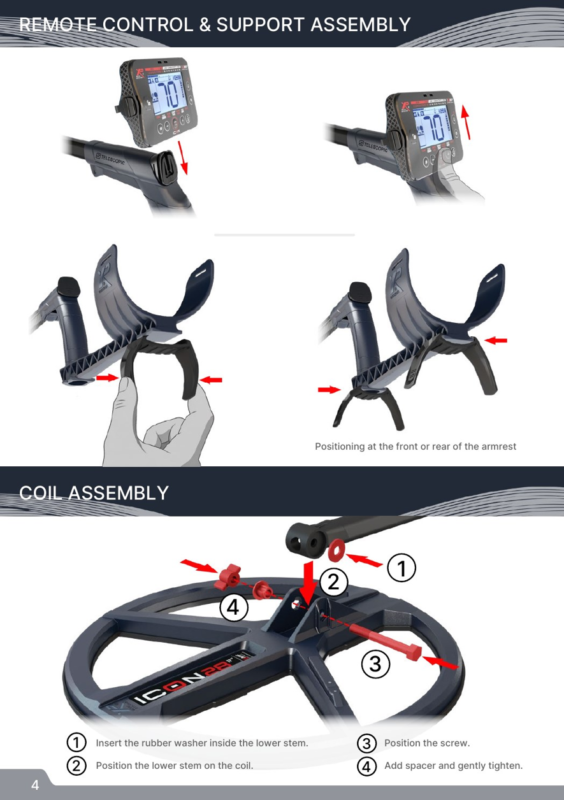
The ICON X follows XP’s modular wireless layout: search coil, telescopic stem, removable remote control and compatible audio output. The supplied coil is already paired with the remote, so normal first-time setup is mostly mechanical. The lower stem uses a rubber washer at the coil mount, followed by the screw and spacer, while the remote slides onto its support. The armrest support can be positioned to suit the user’s forearm length.

XP ICON X user guide
Complete XP ICON X field setup on the beach.

Remote Control and Screen: What Each Area Means

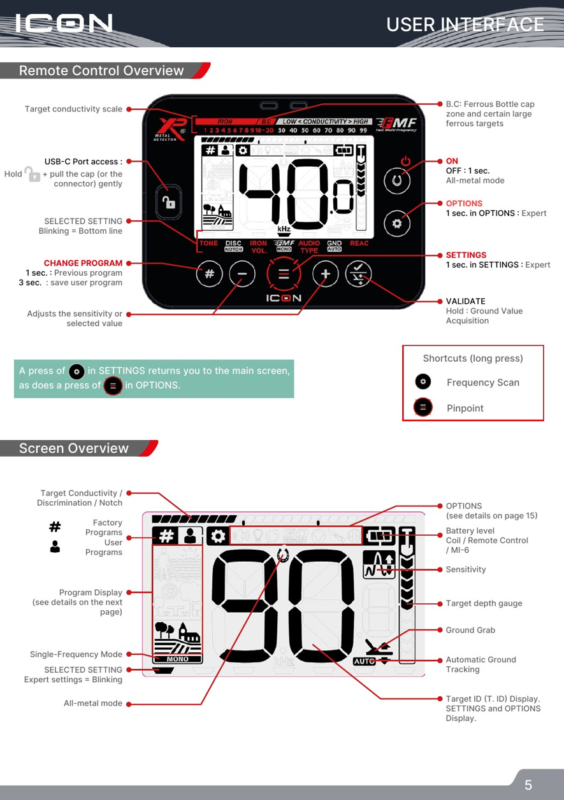
The remote control is designed around direct access to the most-used settings. The display shows the active program, target ID, conductivity/discrimination information, sensitivity, target-depth gauge, battery status, ground information and whether the detector is in single-frequency or all-metal mode. The settings button cycles through detection controls, while the options button opens system functions such as volume, backlight, updates, Go Terrain, headphone pairing, MI-6 pairing and coil management.

Long-press shortcuts reduce menu navigation in the field. The manual identifies long-press shortcuts for Frequency Scan and Pinpoint, while the validate key is also used for Ground Grab. Becoming familiar with these shortcuts is one of the fastest ways to make Xp ICON X feel simple rather than menu-heavy.

XP ICON X remote control mounted on the detector
Close-up of the Xp ICON X remote control mounted on the detector.
XP ICON X settings
Annotated remote-control and screen overview. Source: XP ICON / ICON X user manual

Quick Start: First Setup in the Field

Charge the remote, coil and headphones before the first session. Turn on the remote control, choose the factory program that best matches the site and adjust the speaker or headphone volume to a comfortable level. When the detector starts, it automatically performs a frequency scan, which helps it select a cleaner operating channel before you begin sweeping.

Before serious detecting, keep the coil parallel to the ground and as close to the surface as practical without striking it. On mineralized or variable ground, perform a Ground Grab before you begin. Practice with known objects in a clean test area so you can hear the relationship between target conductivity, audio tone and target ID before relying on the detector in a more complex site.

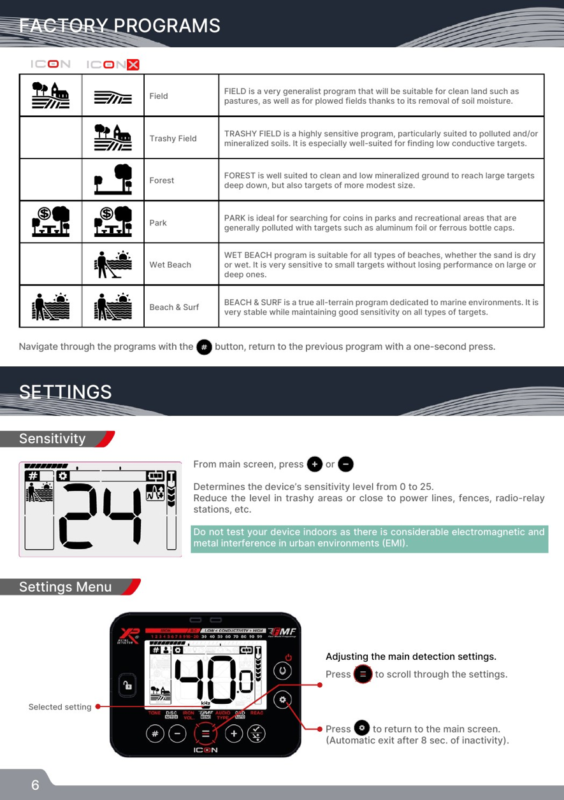
The Six Factory Programs on ICON X

Xp ICON X has six factory programs. Each program changes several underlying parameters together, so choosing the correct starting program is usually more effective than changing individual settings immediately. The table below keeps XP’s intended use for each program but translates it into a practical starting point.

ProgramBest starting environmentPractical use
FieldClean ground, pastures and ploughed fieldsGeneral-purpose starting program.
Trashy FieldPolluted and/or mineralized soilSensitive to low-conductive targets and useful where target separation matters.
ForestClean, low-mineralized groundSuited to large/deep targets while retaining response to medium targets.
ParkParks and recreational areasDesigned for sites with foil and ferrous bottle-cap contamination.
Wet BeachDry or wet beach sandHigh sensitivity to small targets while retaining performance on larger/deeper targets.
Beach & SurfMarine environment, surf and variable salinityStable all-terrain marine program with broad target sensitivity.
XP ICON X programs
Official factory-program overview. Source: XP ICON / ICON X user manual

Sensitivity

Sensitivity runs from 0 to 25. Higher sensitivity can improve response to weak targets, but it also increases susceptibility to electromagnetic interference, nearby metal and difficult ground. If the detector becomes unstable near power lines, electric fences or radio sources, reduce sensitivity rather than assuming maximum

sensitivity is always the deepest setting. XP also warns that indoor testing is a poor benchmark because buildings contain large amounts of metal and electrical interference.

Tones: 2, 3, 5, Pitch and Full Tones

The tone system determines how target conductivity is translated into sound. Multi-tone modes divide the conductivity scale into a small number of audio categories, while Full Tones maps more of the target-ID range to changing pitch. Pitch mode works differently: signal strength drives both volume and pitch, giving a dynamic response that many users find fast and expressive.

ModeHow it behavesWhen it helps
2 / 3 / 5 TonesSimple conductivity groupsGood for users who prefer clear audio categories.
PitchSignal strength changes pitch and volumeUseful for a dynamic, fast-feeling response.
Full TonesTone rises with target conductivityUseful when you want more audio information from the ID scale.

Discrimination and Target ID

Discrimination can be adjusted from -6 to 99 on inland programs, while beach programs use 0 to 99. Raising the discrimination threshold progressively rejects targets below the selected conductivity value. XP’s manual also explains that rejected ferrous targets do not display a target ID, so excessive discrimination can remove information that would otherwise help you interpret a mixed or questionable signal.

Use discrimination as a site-management tool rather than a “valuable target” filter. Conductivity overlaps between different objects, and depth, soil, target orientation and nearby metal can change the reading. For difficult targets, sweep from more than one direction and listen for repeatability instead of relying on a single ID number.

Notch and Bottle-Cap Rejection

Notch rejects selected conductivity windows rather than everything below a threshold. This is useful when one recurring unwanted target occupies a narrow ID range. The manual also identifies a ferrous bottle-cap behavior on the conductivity scale and explains that the Notch settings can be used to make this contamination easier to reject in multi-frequency mode.

Avoid building an overly aggressive Notch pattern at a new site. Start with the factory program, identify the trash that is genuinely repetitive, and only then reject the narrowest useful range. This helps reduce the risk of silencing wanted targets that share similar conductivity.

Iron Volume

Iron Volume controls the low-pitched audio assigned to signals below the discrimination setting. A value of 0 silences those low tones, while the upper end of the scale makes them more prominent. Keeping some iron audio can be useful in contaminated ground because it gives context about the amount of ferrous material around a non-ferrous target.

FMF Multi-Frequency and Single Frequencies

All factory programs use XP’s FMF simultaneous multi-frequency technology. ICON X also lets you work in single-frequency mode on inland programs when a difficult electromagnetic environment compromises multi-frequency operation or when you deliberately want to emphasize a specific response range. ICON X offers 4, 14 and 28 kHz single-frequency choices, with 28 kHz being the additional option not available on the standard ICON.

Frequency modePractical interpretation
FMFGeneral use across mixed targets and changing ground; default basis of factory programs.
4 kHzLower-frequency option; can suit higher-conductive or larger targets in some conditions.
14 kHzBalanced general-purpose single frequency.
28 kHzHigher single-frequency option on ICON X; useful when greater response to smaller/lower-conductive targets is desired.

Audio Type: PWM, SQUARE and Enhanced Response

PWM is XP’s traditional dynamic audio style, with harmonic content that changes with signal amplitude and therefore helps convey distance from the target. SQUARE has a softer, more fixed harmonic character, while volume still varies with target distance. ICON X expands the audio-type choices with enhanced audio-response settings and Stereo Audio Morphing, which can add a second sound to surface targets to help recognize proximity.

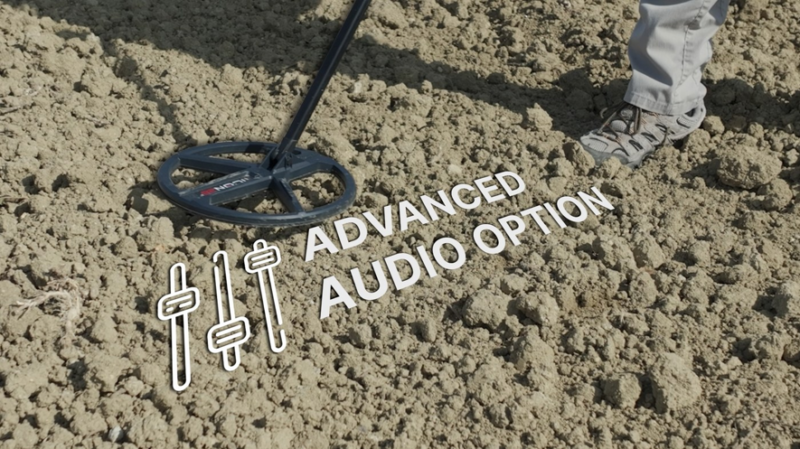
XP ICON X advanced audio options and settings
XP ICON X advanced audio options.

Ground Balance: Standard, Pro, Grab and Tracking

Ground mineralization can reduce depth and create false responses. XP recommends beginning with the default ground behavior and performing a Ground Grab to calibrate the detector to the site. In Standard ground mode, the detector rejects the ground zone above the selected value while using multi-frequency analysis to recover targets that might otherwise be masked.

Pro ground mode is an expert setting because it intentionally allows more of the ground response to remain audible. On inland programs this can expose deep responses that are masked by mineralization, while on beach programs it can make a wider ground zone audible. That extra information comes with more noise and requires experience to interpret.

Tracking continuously estimates the average ground value and can work well when mineralization is relatively uniform and changes slowly. XP specifically warns that Tracking is less suitable where old human activity has created rapidly changing ground effects; in those conditions, the manual recommends preferring Grab.

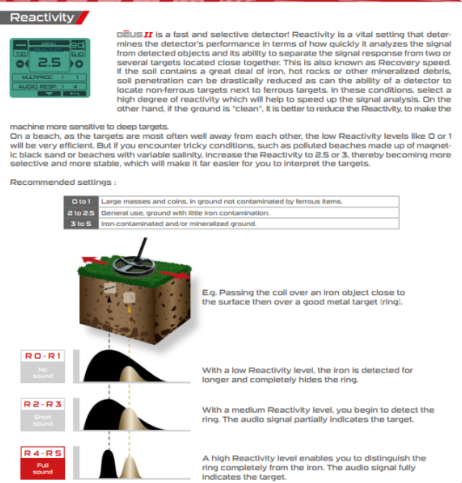
Reactivity: Target Separation vs Maximum Raw Depth

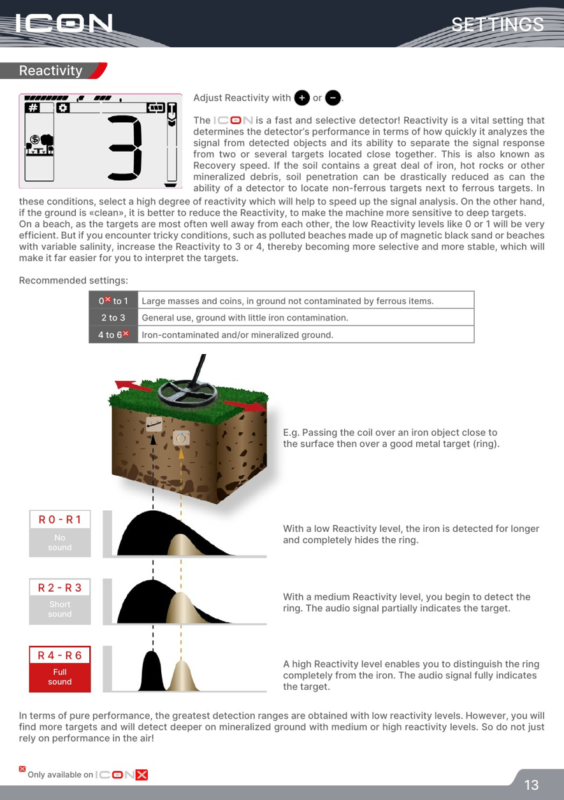
Reactivity is one of the most important Xp ICON X controls. It determines how quickly the detector analyzes one signal and becomes ready for the next. Low Reactivity lengthens the response and can maximize detection range in clean ground, while higher Reactivity shortens the response and improves separation when non-ferrous targets sit close to iron, hot rocks or other mineralized debris.

ReactivityManual guidance
0-1Clean ground; large targets and coins; maximum raw range when target spacing is generous.
2-3General use; light iron contamination; balanced starting point.
4-6Iron-contaminated and/or mineralized ground; stronger target separation and stability.
Reactivity and target separation illustrated in the official manual. Source: XP ICON / ICON X user manual

Pinpoint Mode

Pinpoint is a non-motion mode: the coil can remain still above a target while the audio and visual response increase as you approach the target center. The manual recommends calibrating the threshold with the coil just off the ground and to the side of the target, then moving across the area to find the strongest and highest-pitched response at the center of the coil. Re-tuning near the target narrows the detection field for more precise recovery.

Saving a User Program

Xp ICON X lets you modify a factory program and save a custom version. The manual states that one user program can be created for each factory program, giving six custom slots on ICON X. This is useful for keeping a preferred park setup, a quiet beach setup or a high-Reactivity contaminated-ground setup without changing the factory program itself.

Wireless Headphones and the MI-6 Pinpointer

Compatible XP wireless headphones can be paired from the Options menu and then switch on and off with the detector. XP recommends moderate listening levels; the manual specifically advises level 5 or below for hearing protection.

The XP MI-6 pinpointer can also pair with Xp ICON X. When connected, its audio and target-strength information are sent through the detector system. The manual also includes a lost-accessory search function that can make a paired MI-6 ring and flash remotely within the stated range even when it is switched off.

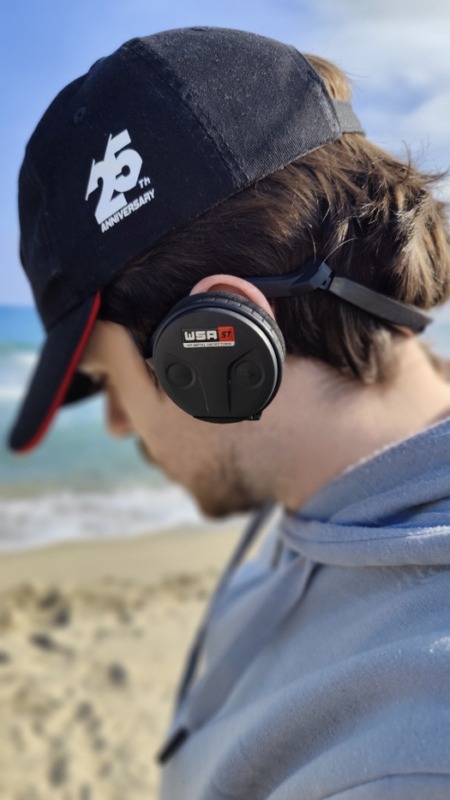
XP WSA ST wireless headphones for XP ICON X
WSA ST wireless headphones used during a beach detecting session.

Pairing and Selecting Search Coils

The original coil is already paired. To add another compatible coil, select a free coil slot and enter pairing mode. XP recommends automatic pairing: once serial-number entry mode is active, place the new coil on charge and it sends its serial number to the remote. Manual serial-number entry is also available. After pairing, coils can be selected from the remote without repeating the first-time process.

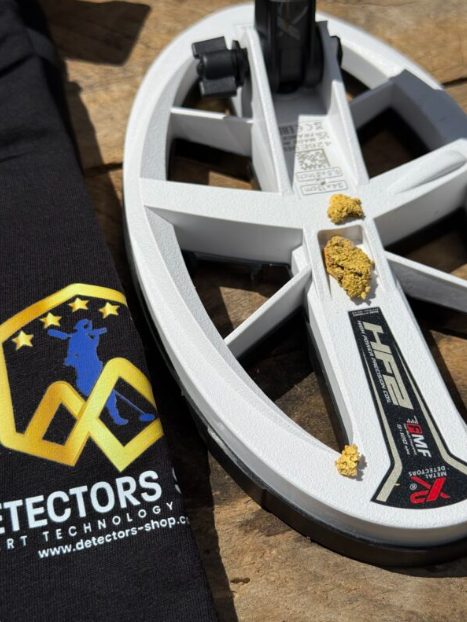
For users who want a smaller high-frequency option, Detectors Shop also carries the HF2 Search Coil, and XP’s official documentation lists HF2 among the FMF ecosystem coils compatible with the ICON range.

Go Terrain and Software Updates

The Go Terrain app can receive target data from the detector, map a route with the phone’s GPS and record detected targets along a search path. The remote also supports software updates through USB-C and an internet-connected computer, allowing XP to deliver firmware improvements and new functions over time.

For firmware instructions and the latest updater, use the official XP updates page.

Beach, Salt Water and Underwater Use

Xp ICON X includes two dedicated marine programs: Wet Beach and Beach & Surf. Wet Beach is designed for dry or wet sand and is especially sensitive to small targets, while Beach & Surf is intended as a stable all-terrain marine program for conditions that can include changing salinity. On beaches, low Reactivity can work well when targets are widely spaced, but the manual recommends increasing Reactivity when black sand, trash or variable salinity makes the detector difficult to interpret.

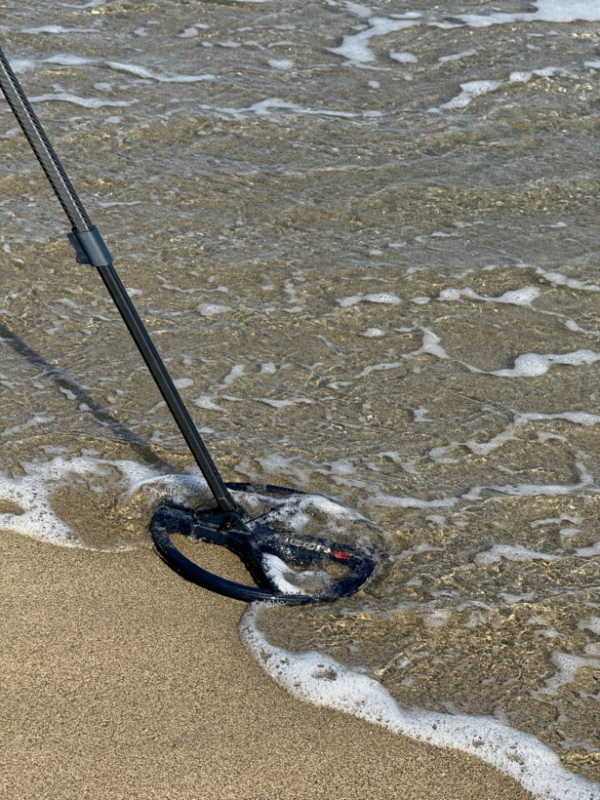
XP ICON X metal detector search coil in salt water
XP ICON X search coil working at the waterline

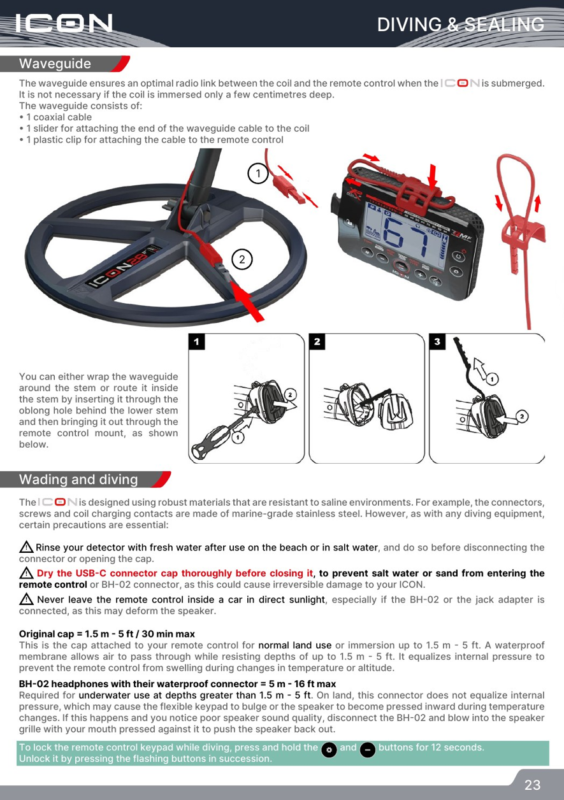
Waterproofing needs one important distinction. With the original remote-control cap, the manual specifies immersion up to 1.5 m for a maximum of 30 minutes. For deeper underwater use up to 5 m, the manual requires the BH-02 waterproof connector/headphones and a waveguide so the coil and remote maintain an effective radio link underwater. After salt-water use, rinse the detector with fresh water before disconnecting the connector or opening the cap, and dry the USB-C cap completely before closing it.

Waveguide, waterproof connector and underwater precautions. Source: XP ICON / ICON X user manual

Battery Life, Charging and Storage

The supplied manual lists about 11 hours for the remote control and about 11 hours for the ICON28 coil in multi-frequency mode. The coil can reach longer runtimes in some single-frequency conditions. The manual lists approximately four hours for charging the remote, headphones and coil; XP’s current product page lists approximately three hours. Because these two official references differ, publish a conservative “approximately 3-4 hours” statement or verify the latest firmware/hardware specification immediately before publication.

For long-term battery health, XP recommends not storing LiPo batteries completely empty or fully charged for long periods. The manual suggests storing them around 40-80% charge and checking them periodically during extended storage. Use a certified 5 V USB power supply that meets XP’s stated requirements.
Troubleshooting Common ICON X Problems

ProblemLikely causeWhat to try
Unstable / false signalsSensitivity too high, EMI, storm activity, nearby detector, incorrect ground setting, heavy iron contaminationLower sensitivity; run Frequency Scan; try single frequency; move away from interference; perform Ground Grab; increase Reactivity in heavy contamination.
Coil does not switch onWrong coil selected, pairing problem, discharged batterySelect the correct coil, re-pair it, recharge and check the charging source.
Headphones power on but no target audioWrong coil/headphone pairing or firmware mismatchRe-select the correct coil/headphones; re-pair; update the remote and headphones to compatible versions.
Very noisy beachBlack sand, variable salinity, excessive sensitivityUse a beach program, perform ground setup, reduce sensitivity and increase Reactivity when needed.

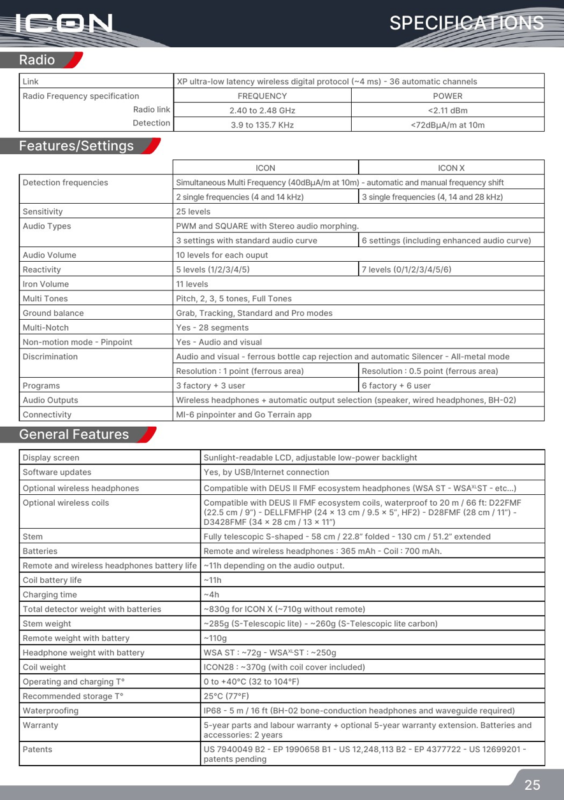
XP ICON X Technical Specifications

SpecificationOfficial-manual value / note
Wireless protocolXP ultra-low-latency digital protocol (~4 ms), 36 automatic channels
FMF / radio detection rangeDetection specification in the manual: 3.9 to 135.7 kHz radio-frequency range; ICON X mono choices 4, 14, 28 kHz
DisplaySunlight-readable LCD with adjustable low-power backlight
Sensitivity25 levels
Reactivity7 levels (0-6)
Iron volume11 levels
Notch28 segments
Programs6 factory + 6 user
Compatible coilsD22FMF, HF2 (DELLFMFHP), D28FMF, D3428FMF listed in the manual
StemS-shaped telescopic; about 58 cm folded / 130 cm extended
Remote battery365 mAh
Coil battery700 mAh
Battery life~11 h remote; ~11 h coil in multi-frequency
Remote weight~110 g
ICON28 coil weight~370 g with cover
Operating / charging temperature0 to +40 C
Recommended storage temperature25 C
WaterproofingIP68; up to 5 m with BH-02/waveguide underwater configuration
Warranty in supplied manual5-year parts and labour with registration/terms; batteries and connectors 2 years; optional extension described by XP
Official ICON / ICON X specification table. Source: XP ICON / ICON X user manual

Who Is the XP ICON X For?

Xp ICON X is well suited to users who want a light wireless detector that can be switched on and used with factory programs, but that also offers enough control to grow into more technical detecting. Its six programs cover clean fields, contaminated sites, parks and marine environments, while the wider Reactivity range and 28 kHz mono option give the X model more flexibility than the standard ICON.

It should not be presented as a ground scanner, long-range locator or a machine with a guaranteed fixed detection depth. XP does not publish one universal maximum target depth for ICON X because depth changes with target size, conductivity, coil, soil mineralization, salinity, EMI, settings and sweep technique.

XP ICON X in active beach detecting use.

Frequently Asked Questions

What is the difference between XP ICON and ICON X?

ICON X has 6 factory + 6 user programs, 4/14/28 kHz mono options, Reactivity 0-6, finer ferrous-area discrimination and more audio-response settings. The standard ICON has fewer programs and settings while using the same broader FMF platform.

What is the best XP ICON X program for the beach?

Wet Beach is the starting choice for dry or wet sand, while Beach & Surf is designed for marine environments and surf conditions. Final settings should be adjusted for black sand, salinity, trash and local EMI.

Is XP ICON X waterproof?

Yes, but the underwater setup matters. The supplied manual specifies the original remote cap for up to 1.5 m / 30 minutes and requires the BH-02 waterproof connector/headphones plus the waveguide for deeper use up to 5 m.

Which single frequencies does ICON X have?

ICON X offers 4, 14 and 28 kHz single-frequency choices in addition to FMF multi-frequency operation.

How long does the XP ICON X battery last?

The supplied manual lists about 11 hours for the remote and about 11 hours for the coil in multi-frequency operation. Runtime varies with audio output, frequency mode and battery condition.

Does ICON X work with the MI-6 pinpointer?

Yes. The MI-6 can pair with the detector so its audio and target-strength information are integrated with the XP wireless system.

Can ICON X use DEUS II FMF coils?

XP lists ICON / ICON X as compatible with key DEUS II FMF ecosystem coils, including D22FMF, D28FMF, D3428FMF and HF2 in the supplied manual.

What Reactivity setting should I use?

Use low values in clean ground when targets are well separated, 2-3 for general detecting, and higher values in iron-contaminated or mineralized ground when target separation is more important.

How deep can XP ICON X detect?

XP does not publish one fixed maximum target depth. Actual depth depends on target size and conductivity, soil, mineralization, salinity, coil, settings, EMI and sweep technique.

How do I reduce false signals on ICON X?

Lower sensitivity, run Frequency Scan, move away from EMI, perform Ground Grab, try a suitable single frequency and increase Reactivity if the ground is heavily contaminated.

Conclusion

The XP ICON X combines a simple startup experience with a surprisingly complete set of field controls. The best way to learn it is to start with the correct factory program, perform ground setup when needed, keep sensitivity stable rather than maximized, and then learn Reactivity, tones and discrimination one setting at a time.

For long-term SEO value, keep this guide updated when XP releases firmware changes or revises the product specification. Add a visible “Last updated” date after meaningful updates and refresh the screenshots only when the interface or operating procedure changes.

Official Sources and Further Reading

XP ICON / ICON X official product page

XP user manuals

XP software updates

Official XP ICON / ICON X field-test video

Official XP ICON introduction video

If you use DEUS Gold to search for natural gold and gold nuggets, this guide explains how to prepare the detector, choose the right search program, and adjust the most important settings such as Sensitivity, Ground Balance, Reactivity, and frequencies to get the best possible performance from the white XP HF2 coil under different detecting conditions.


What Is DEUS Gold and How Is It Different from DEUS II?

DEUS Gold is a specialized configuration based on the French XP DEUS II platform and equipped with the white high-frequency XP HF2 coil. The purpose of this configuration is to focus the capabilities of DEUS II more strongly on natural gold prospecting, gold nuggets, and small metallic targets while taking advantage of the Gold Field program, FMF technology, and the higher frequencies available with the HF2 coil.

It is important to clarify that DEUS Gold is not a separate official model launched by XP. It is the name used by Detectors Shop for this specialized configuration based on DEUS II with the white HF2 coil.

Deus Gold

Why Is the HF2 Coil Suitable for Raw Gold Prospecting?

The XP HF2 coil is the key component that distinguishes the DEUS Gold configuration from traditional DEUS II setups because it provides higher frequency ranges that can improve sensitivity to small metallic targets and fine gold nuggets.

With the HF2 coil, FMF programs can operate at higher frequencies reaching approximately 89–90 kHz, depending on the program, while DEUS MONO mode can reach frequencies of up to approximately 120 kHz.

This gives users greater flexibility when searching for small targets in mineralized ground.

XP’s own documentation explains that higher frequencies are relatively more sensitive to smaller targets and indicates that the higher frequency ranges are particularly suitable for natural gold and small nuggets in highly mineralized soils.

Deus Gold
XP HF2 coil for DEUS Gold raw gold prospecting.


Best Program for Raw Gold with DEUS Gold: Gold Field

The Gold Field program is one of the most important starting points when using DEUS Gold for raw gold prospecting, especially in highly mineralized ground.

XP describes this program as being designed for gold-bearing and highly mineralized soils, environments where small gold nuggets may produce responses close to ground signals or certain ferrous targets.

Gold Field operates in a way that is close to an All Metal mode, so it does not rely on broad target rejection like some other programs.

Instead, it relies heavily on correct ground adjustment to reduce the effect of mineralized soil while maintaining sensitivity to small targets.

When Should You Use Gold Field?

  • When searching for natural gold.
  • When searching for small gold nuggets.
  • In mineralized soils.
  • In areas containing iron oxides or hot rocks.
  • When ground signals are strong and variable.

Best DEUS Gold Settings for Raw Gold Prospecting

When using DEUS Gold for natural gold prospecting, there is no single group of settings that will work perfectly in every type of soil.

Mineralization, electromagnetic interference, iron contamination, and target size can vary significantly from one location to another.

The best approach is to start with balanced settings and then adjust them according to detector stability and ground response.

Start with the Gold Field program, then set Sensitivity to a high but stable level.

If the detector begins producing excessive or unstable signals, reduce Sensitivity slightly rather than automatically increasing it to the maximum value.

It is also recommended to use Ground Grab to adjust Ground Balance and repeat the adjustment whenever ground conditions change.

For Reactivity, a practical starting point is approximately 2 to 3.

In clean ground, it can be reduced slightly to provide a longer target response, while in mineralized or iron-contaminated soils, increasing Reactivity can improve target separation and stability.

For IAR, it is generally better to keep the setting low at first because excessive iron rejection could cause some weak or small signals to be missed in mineralized ground.

FMF is also recommended as the initial frequency mode. Single-frequency operation can then be tested when you need to focus on extremely small targets or deal with specific interference.

A practical starting setup is:

SettingRecommended Starting Point
ProgramGold Field
SensitivityHigh but stable
Ground BalanceGRAB
Reactivity2–3
IARLow
FrequencyFMF
Audio ResponseMedium

The key is not to focus on achieving the highest possible number for every setting.

Instead, focus on keeping the detector stable while maintaining a clear response to small targets.


Ground Balance Settings on DEUS Gold

Ground Balance is one of the most important adjustments when using DEUS Gold for raw gold prospecting because mineralized soil can directly affect detector stability and sensitivity to small targets.

As ground mineralization increases, accurate adjustment becomes increasingly important so that soil responses are not confused with genuine target signals.

A good starting point is GRAB mode.

Pump the coil up and down over an area free of metallic targets while maintaining a consistent movement until the detector identifies the ground value and stabilizes.

Whenever the color or composition of the soil changes, or ground signals become more noticeable, it is a good idea to perform GRAB again.

Ground adjustment is particularly important in the Gold Field program because the program is designed to work in highly mineralized and gold-bearing ground and depends heavily on compensating for the local ground response while preserving sensitivity to natural gold.

If the ground is heavily mineralized, do not force the detector to operate at extremely high Sensitivity.

It is better to find a balance between Ground Balance, Sensitivity, and Reactivity so that the detector remains stable and produces signals that are easier to interpret.

A practical rule is simple:

Whenever ground conditions change, perform Ground Balance again instead of continuing for a long period with the same ground setting.


Sensitivity Settings on DEUS Gold

Sensitivity controls how strongly the detector responds to weak and small signals.

It is one of the most important settings when searching for natural gold and small gold nuggets.

However, increasing Sensitivity to the maximum value does not always produce better results.

The detector can become unstable and begin producing false signals caused by mineralized ground or electromagnetic interference.

XP indicates that Sensitivity is commonly operated at relatively high levels, but it should be reduced in areas with significant interference, near power lines, or whenever the detector becomes unstable.

With Gold Field in particular, XP recommends reducing Sensitivity in highly mineralized ground and setting it just below the instability threshold.

The goal is to achieve the highest usable Sensitivity while maintaining a stable and clear signal.

How Should You Adjust Sensitivity in Practice?

  • Start with a high setting, but not the maximum.
  • If the detector remains stable, increase Sensitivity gradually.
  • If false or broken signals begin appearing, reduce it slightly.
  • In highly mineralized ground, prioritize stability over high numbers.
  • After changing Sensitivity, also monitor Ground Balance and Reactivity because these settings work together.

Reactivity Settings on DEUS Gold

Reactivity, or recovery speed, controls how quickly the detector analyzes signals and separates targets located close together.

This setting is especially important in areas containing a lot of iron or mineralized soil because small targets may be located close to other signals or ground effects.

When Reactivity is low, the target response is longer and performance on deeper targets may improve in clean ground.

When Reactivity is increased, the detector becomes faster at separating nearby targets and can become more stable in environments with heavy iron contamination or mineralization.

XP generally suggests:

  • 0 to 1: Large targets or clean ground.
  • 2 to 2.5: General-purpose detecting.
  • 3 to 5: Iron-contaminated or highly mineralized ground.

When using Gold Field in heavy mineralization, XP also indicates that increasing Reactivity may help provide better stability.

Practical Starting Point

For raw gold prospecting, start at approximately 2 to 3, then adjust according to the ground:

  • Clean ground: reduce it slightly.
  • Moderate mineralization: approximately 2 to 2.5.
  • Heavy mineralization or dense iron: increase it gradually.

Frequencies on DEUS Gold and the HF2 Coil

One of the main reasons DEUS Gold performs strongly when prospecting for natural gold is the white XP HF2 coil.

It provides access to higher frequencies than many traditional coils, increasing the detector’s sensitivity to small metallic targets and fine gold nuggets, particularly in mineralized ground.

With the HF2 coil, users can operate FMF with multiple frequencies simultaneously, while DEUS MONO allows a single frequency to be selected according to the target type and ground conditions.

According to XP documentation, the HF2 single-frequency range can reach approximately 120 kHz, while certain FMF settings can reach approximately 89–90 kHz, depending on the selected program.

Higher frequencies are relatively more sensitive to small and low-conductivity targets.

For this reason, XP indicates that higher frequency ranges can be particularly useful for detecting small gold nuggets in highly mineralized soils.

When Should You Use Higher Frequencies?

  • When searching for very small gold nuggets.
  • In highly mineralized ground.
  • When the target is small and close to the surface.
  • When higher sensitivity to low-conductivity targets is required.

However, the highest frequency is not automatically the best choice in every situation.

Larger targets may respond better at lower or medium frequencies, so it is better to test different ranges according to target size and site conditions.

The XP HF2 coil provides high operating frequencies that can improve sensitivity to gold nuggets and small metallic targets.


How to Sweep the DEUS Gold Coil Correctly

Coil movement has a direct effect on how DEUS Gold responds to small targets.

During detection, keep the HF2 coil as close and parallel to the ground as possible without lifting it excessively at the end of each sweep.

The sweep should be smooth and consistent, with slight overlap between each pass and the next so that no unsearched gaps are left behind.

In areas with strong mineralization or numerous targets, slowing the sweep can give the detector more time to analyze the signals.

When you hear a weak or unclear response, do not immediately ignore it.

Sweep over the same point again from another direction because small targets may become clearer when the sweep angle changes.

To locate the target more accurately, sweep across the signal from one direction and then repeat at approximately a 90-degree angle.

The intersection of the strongest responses will often be the closest point to the target’s actual location.


Why Is DEUS Gold Suitable for Raw Gold Prospecting?

DEUS Gold is built around the XP DEUS II platform and the white HF2 coil to take advantage of the sensitivity of higher frequencies to small targets and gold nuggets.

This configuration allows the user to combine FMF multi-frequency technology, the Gold Field program, and the higher frequency ranges provided by HF2.

One of the main challenges in natural gold prospecting is that small nuggets may produce weak responses, particularly in mineralized ground.

The HF2 coil and higher frequencies can increase sensitivity to these targets, while Gold Field helps the detector operate more effectively in highly mineralized soils.

XP explains that higher frequencies are relatively more sensitive to smaller targets, including gold nuggets in mineralized ground.

The underlying XP DEUS II platform also uses FMF technology and fully wireless communication, making the detector lightweight and suitable for long detecting sessions and movement across difficult terrain. detectors shop


XP DEUS II vs DEUS Gold

DEUS Gold is fundamentally based on the XP DEUS II platform, so it retains the main characteristics of the original detector, including FMF technology, wireless operation, lightweight construction, and multiple detecting programs.

The primary difference is that the DEUS Gold configuration uses the white XP HF2 coil and is presented as a configuration more specifically oriented toward natural gold, gold nuggets, and small targets.

FeatureXP DEUS IIDEUS Gold
Base PlatformXP DEUS IIXP DEUS II
Search CoilDepends on selected configurationWhite XP HF2
TechnologyFMF / WirelessFMF / Wireless
Main FocusMultipurpose metal detectingRaw gold, nuggets and small targets
Frequencies with HF2Depends on coil and programUp to about 89–90 kHz in some FMF programs and up to 120 kHz in DEUS MONO
Recommended Raw Gold ProgramGold Field availableGold Field combined with HF2
ConfigurationOriginal XP detector platformSpecialized configuration offered by Detectors Shop

The HF2 coil is capable of operating across high frequency ranges, which can be especially useful for small and low-conductivity targets such as gold nuggets in mineralized soil.

XP also explains that higher frequencies can increase the proportion of small targets detected, especially when HF2 is used under these conditions.


Common Mistakes When Using DEUS Gold for Raw Gold Prospecting

Even with the correct settings, users may still miss small targets because of detecting technique rather than detector performance.

For this reason, several common mistakes should be avoided when working with DEUS Gold and the XP HF2 coil.

One of the most common mistakes is setting Sensitivity to its maximum level in every type of ground.

In highly mineralized soil, this can increase false signals and detector instability.

The better approach is to use the highest Sensitivity level that still allows the detector to remain stable and produce a clear response.

Another common mistake is ignoring Ground Balance.

When moving from one soil type to another, or whenever the ground response changes significantly, it is better to perform GRAB again so the detector can adapt to the new conditions, particularly when using Gold Field.

It is also not recommended to sweep the HF2 coil too quickly or lift it significantly at the end of each pass.

Keep the coil close and parallel to the ground with slight overlap between search paths so that the entire area is covered.

Another mistake is assuming that the highest frequency is always the best.

Higher frequencies are excellent for small targets and gold nuggets, but they are not automatically the best choice for every target or ground condition.

Frequency selection should depend on target size, mineralization, interference, and detector stability.

Finally, do not immediately ignore weak or broken signals.

Recheck the location from another direction, particularly at approximately 90 degrees, before deciding whether to dig or move on.

ديوس جولد

How to Set Up DEUS Gold for the First Time

When using DEUS Gold for the first time, it is better to begin with a simple and stable setup rather than changing several settings at once.

Turn on the remote control, confirm that the HF2 coil is connected correctly, and then select Gold Field as the initial program for natural gold prospecting.

Before beginning the search, move away from visible metallic objects on the ground and perform Ground Grab over a clean area so the detector can identify the soil conditions and adjust Ground Balance.

This step is particularly important in mineralized ground because incorrect Ground Balance may increase false ground responses and make small targets harder to identify.

Next, set Sensitivity to a high but stable level and begin sweeping the coil slowly and parallel to the ground.

If you experience interference or unstable responses, reduce Sensitivity slightly or gradually increase Reactivity until you achieve a good balance between sensitivity and stability.

During the search, do not rely on only one pass over a signal.

If you hear a weak target, scan it again from another direction and try to identify the center of the response before digging.

XP recommends crossed sweeps as a practical method for improving target location.


How Do You Know if a Signal Is Worth Digging?

While searching with DEUS Gold, you may hear clear, strong signals as well as weak or broken responses.

A signal worth investigating is not necessarily the loudest one, particularly when searching for small gold nuggets or fine targets.

When you receive a signal, sweep over the same point from several directions.

If the response repeats in the same location, even if it is weak, it is worth stopping and investigating.

If the signal disappears completely when the sweep angle changes, it may be caused by the soil or an irregular target.

A crossed sweep at approximately 90 degrees can also be helpful.

When the strongest response repeats at the intersection point, locating the target before digging becomes easier.

XP describes this method as a practical way to locate the center of a target more accurately.

In mineralized ground, do not rely solely on the Target ID number or audio strength.

Some small targets may produce unstable responses, so it is better to consider signal repeatability, sweep direction, and detector response after readjusting Ground Balance when necessary.


How to Use DEUS Gold in Highly Mineralized Ground

When using DEUS Gold in highly mineralized ground, you may experience increased ground signals or unstable responses, particularly when searching for very small targets.

In these conditions, increasing Sensitivity is not always the solution.

Instead, balance the detector settings so that you can search for small gold nuggets without excessive interference.

Start with Gold Field and perform Ground Grab over an area free of metal.

Then adjust Sensitivity to a high but stable level.

If false signals continue, Reactivity can be increased gradually to improve stability and target separation.

The XP HF2 coil provides an important advantage in this type of ground because higher frequencies are more sensitive to small and low-conductivity targets, including fine gold nuggets.

However, frequency must always be balanced against detector stability and ground conditions.

If the soil continues producing strong responses, do not hesitate to reduce Sensitivity slightly.

When searching for natural gold, stability is more important than achieving the highest possible setting value.


DEUS Gold Field Tests for Raw Gold Prospecting

Field testing provides a clearer picture of how DEUS Gold performs outside theoretical settings, particularly when the XP HF2 coil is used to search for small targets and natural gold.

Images and tests performed with this configuration demonstrate the importance of correct detector adjustment.

Performance does not depend on frequency alone, but on the balance between Sensitivity, Ground Balance, and Reactivity.

When searching for gold nuggets, the target may be extremely small, so its signal may be shorter or weaker than the signal generated by larger metallic objects.

This is where HF2 and higher frequencies become particularly useful, especially when combined with Gold Field and accurate Ground Balance before detecting.

In real-world field conditions, it is important to recheck small signals from several directions and not rely on only one sweep.

Some fine targets may become clearer when the sweep angle is changed or the coil is moved more slowly across the area.

DEUS Gold performance is also directly affected by site conditions.

In clean ground, more sensitive settings may be possible, while in mineralized ground stability becomes more important and you may need to reduce Sensitivity or adjust Reactivity for a clearer response.


DEUS Gold and HF2 Coil Maintenance and Charging

To maintain the performance of DEUS Gold and the XP HF2 coil over time, proper cleaning, charging, and storage are important after each detecting trip, particularly when the detector has been used in damp soil or areas containing fine dust and sand.

After detecting, gently clean the HF2 coil and remove any soil from its surface and from the stem attachment area.

Avoid sharp tools or aggressive cleaning products.

A soft cloth and clean water are generally sufficient when cleaning is required.

Also make sure the detector components are charged before long detecting sessions because the XP DEUS II platform uses a wireless system and integrated batteries in its components.
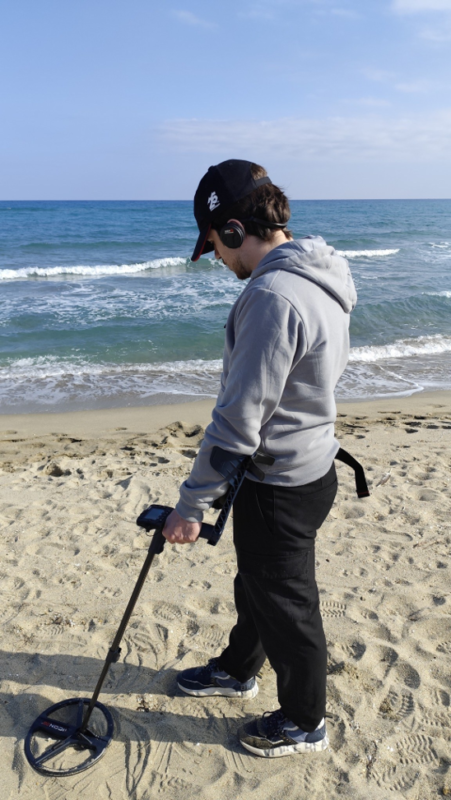
XP’s official documentation includes battery and charging information for the system.

If DEUS Gold will not be used for an extended period, store it in a dry location away from direct heat and avoid leaving the coil or remote control inside a vehicle exposed to direct sunlight for long periods.


Is DEUS Gold Suitable for Raw Gold?

Yes. This configuration is suitable for this type of detecting because it combines the Gold Field program with the high-frequency HF2 coil.

XP identifies Gold Field as a program intended for gold-bearing and highly mineralized ground, while higher frequencies can improve sensitivity to smaller targets.
What Is the Best DEUS Gold Program for Gold Prospecting?

Gold Field is the best starting point for natural gold prospecting, particularly in highly mineralized soil.

After selecting the program, Ground Balance, Sensitivity, and Reactivity should be adjusted according to site conditions rather than relying only on the default settings.
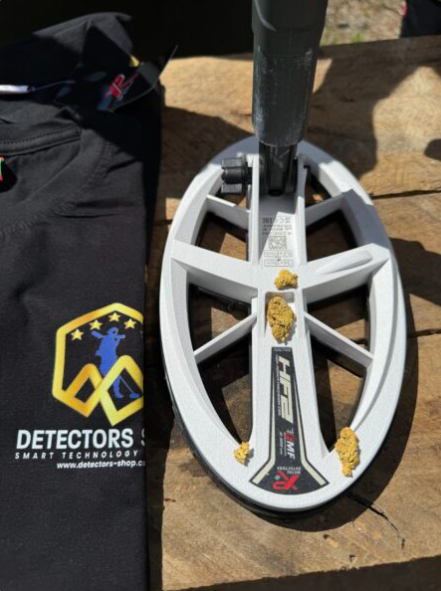
What Is the Benefit of the XP HF2 Coil on DEUS Gold?

The XP HF2 coil provides access to high frequency ranges that can improve response to small and low-conductivity targets.
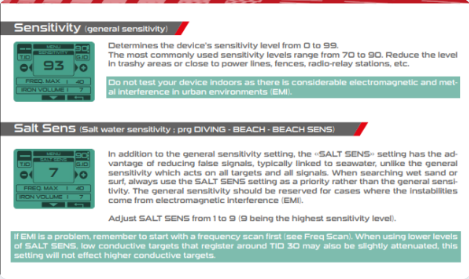
With HF2, some FMF settings can reach approximately 89–90 kHz, while DEUS MONO can reach approximately 120 kHz.

Is the Highest Frequency Always Best for Detecting Gold Nuggets?

No.

Higher frequencies are extremely useful for small targets, but they are not the best option in every situation.

Target size, mineralization, interference, and detector stability should all be considered when choosing the frequency.

What Are the Best DEUS Gold Settings?

There is no single setup that works for every type of ground.

As a starting point, you can use Gold Field, high but stable Sensitivity, Ground Balance using GRAB, and moderate Reactivity, then adjust the settings according to the site.

Should Ground Balance Be Performed at Every Site?

It is recommended, particularly when soil conditions change or when moving to a different area.

Mineralized soil can strongly affect detector response during natural gold prospecting, so repeating GRAB can improve stability.

Is DEUS Gold Suitable for Beginners?

Beginners can use DEUS Gold, but achieving its best performance requires understanding basic settings such as Sensitivity, Ground Balance, Reactivity, and Gold Field.

Once these settings are understood, adjusting the detector in the field becomes much easier.


Conclusion: Is DEUS Gold Right for You?

If your main focus is searching for natural gold, gold nuggets, and small metallic targets, DEUS Gold provides a configuration oriented toward this type of detecting by combining the XP DEUS II platform, the white XP HF2 coil, and the Gold Field program.

The real strength of this configuration does not come simply from increasing Sensitivity or choosing the highest frequency.

It comes from balancing the detector according to ground conditions.

Correct Ground Balance, appropriate Reactivity, and a stable Sensitivity level can make a significant difference in real field performance.

For complete product details and specifications, visit the DEUS II HF2 GOLD product page. The live English product page confirms that your English version is already available at /product/deus_hf

If you are still comparing different options and want to better understand the available choices before buying, you can read our guide to Gold Detectors.

A stable setup can make a significant difference in real-world detecting performance.

Introduction

Buying a gold detector in the UAE is not simply about finding the lowest price. Different machines are designed for very different search conditions, target types, depths, and technologies, so the final cost can vary significantly from one detector to another.

A compact professional detector for natural gold may cost far less than a multi-system device designed for deep underground targets, long-range search, or advanced ground scanning. This is why the gold detector machine price in UAE can range from around one thousand dollars to more than ten thousand dollars for high-end professional systems.

In this guide, we will compare gold detector prices in the UAE and Dubai, explain what affects the final cost, review the main detector technologies, and look at real examples from professional brands such as GER Detect and XP Metal Detectors.

We will also compare models by budget, technology, search application, warranty, and overall value, helping buyers understand which type of gold detector and metal Detectors best suits their actual field requirements.
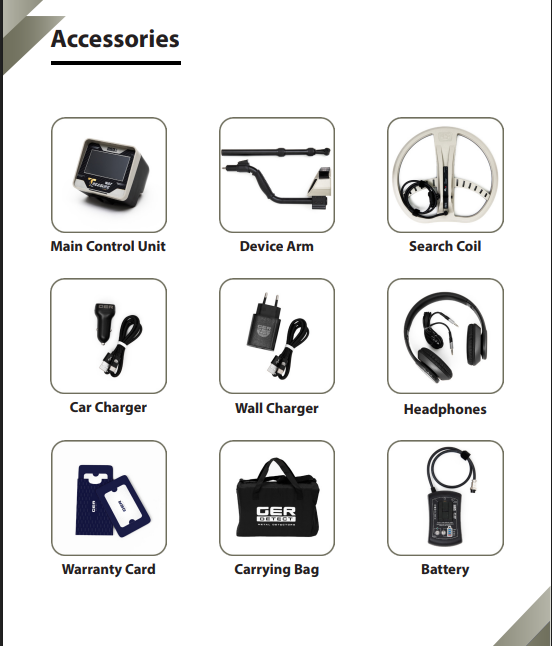
gold detector machine price in UAE

What Is the Average Gold Detector Machine Price in UAE?

The average gold detector machine price in UAE depends heavily on the type of technology and the level of performance the buyer needs. Professional gold detectors generally start from around $1,200 to $2,000, while more advanced multi-system and deep-detection devices can cost $3,000 to $8,000 or more.

For example, compact professional detectors designed for natural gold and general prospecting are usually more affordable than systems built for deep underground targets, long-range searching, or advanced ground scanning.

High-end detectors can exceed $10,000 when they combine several search technologies in one device or are designed for specialized professional applications.

Typical Gold Detector Price Range in UAE

Detector CategoryTypical Price Range
Entry-level professional gold detectors$1,200 – $2,000
Mid-range gold detection systems$2,000 – $4,000
Advanced multi-system detectors$4,000 – $8,000
High-end professional systems$8,000 – $13,000+

The final gold detector price in UAE can vary depending on the manufacturer, number of search systems, included accessories, warranty, and technical support.

Gold detector price in UAE by category

Why Do Gold Detector Prices Vary?

The price of a gold detector is influenced by more than the brand name alone. The biggest differences usually come from the technology inside the device, the number of search systems, the type of targets it is designed to detect, and the level of depth and accuracy it can provide.

A detector designed mainly for surface prospecting and small natural gold targets will usually cost less than a professional system built for deep underground objects, long-range locating, or advanced 3D ground scanning.

Other factors such as accessories, software, warranty, training, and after-sales support can also affect the final gold detector price in Dubai and the UAE.

Main Factors That Affect Gold Detector Price

FactorHow It Affects the Price
Detection technologyMore advanced technologies generally increase the device cost
Search depthSystems designed for deeper targets are usually more expensive
Number of search systemsMulti-system detectors normally cost more than single-system models
Target specializationDevices built for natural gold, deep targets, or underground scanning may use different technologies
Ground balancingAdvanced ground compensation can improve performance in mineralized soil
Display and imaging3D visualization and advanced interfaces usually increase the price
AccessoriesAdditional coils, probes, antennas, tablets, and carrying cases can affect the final package price
Warranty and supportOfficial warranty, training, and technical support can add value to the purchase

Other factors such as accessories, software, warranty, training, and after-sales support can also affect the final gold detector price in Dubai and the UAE. Buyers who want to understand the technology in more detail can also read our guide on how gold and metal detectors work

how gold and metal detectors work

Gold Detector Prices by Technology

The technology used inside a detector is one of the biggest factors that determines its final price. Different gold detection systems are designed for different search conditions, target sizes, soil types, and depths, which is why two devices can have very different prices even when both are marketed as professional gold detectors.

VLF detectors are often used for natural gold, coins, and small metal targets, while pulse induction systems are generally chosen for difficult ground and deeper detection. Long-range systems focus on locating targets across wider areas, while 3D ground scanners are designed to analyze underground structures and provide visual data.

Gold Detector Price by Technology

TechnologyTypical UseTypical Price Range
VLFNatural gold, coins, small targets$1,000 – $2,500
Pulse InductionDeeper targets and mineralized ground$1,800 – $5,000
Long-Range DetectionWide-area target locating$2,000 – $8,000
3D Ground ScanningUnderground imaging and structure analysis$3,000 – $10,000+
Multi-System DetectorsMultiple search methods in one device$3,500 – $13,000+

The right technology should be chosen according to the search objective rather than price alone. A lower-cost detector can be the better choice for natural gold prospecting, while a more advanced system may be more suitable for deep targets or underground scanning.

Gold Detector Price Comparison in UAE

Looking at real products makes it easier to understand how the gold detector machine price in UAE changes from one model to another. The final price depends on the device technology, number of systems, intended search depth, and the type of targets it is designed to locate.

Below are examples of professional models currently offered by Detectors Shop.

Gold Detector Price Comparison

ModelBrandMain UsePrice
Gold Hunter SmartGER DetectGold, metals, long-range search$2,500
Titan 500 SmartGER DetectGold, treasures, deep targets$4,000
Deep SeekerGER DetectDeep underground targets$5,500
Titan GER 1000GER DetectLong-range and deep detection$8,000
Titan X13GER DetectAdvanced multi-system detection$13,000
XP DEUS IIXP Metal DetectorsNatural gold, coins, metals$1,800
XP DEUS GoldXP Metal DetectorsNatural gold prospecting$1,800

Buyers looking for a mid-range professional option can consider the Gold Hunter Smart, while users who need more advanced search capabilities may compare it with the Titan 500 Smart and other multi-system detectors.

These examples show why the gold detector price UAE market covers a wide range, from compact professional detectors to advanced systems designed for deeper and more specialized search applications.

Gold detector price comparison in UAE
Titan X 13

Best Gold Detectors by Budget

Choosing the right detector becomes easier when buyers first decide how much they want to spend and what type of search they actually need. The best option is not always the most expensive device; it is the one that matches the target type, soil conditions, required depth, and level of experience.

Under $2,000

This budget is suitable for users looking for professional detectors for natural gold, coins, and general metal detection without moving into advanced multi-system technology.

Good options in this range include:

  • XP DEUS II — around $1,800
  • XP DEUS Gold — around $1,800

These models are suitable for users who want lightweight, professional detectors focused on field search and natural gold prospecting.

From $2,000 to $5,000

This is one of the most popular price ranges for buyers looking for more advanced gold detectors in UAE.

Examples include:

This range gives buyers access to more specialized search systems, wider search applications, and more advanced detection capabilities.

Above $5,000

High-end professional systems are designed for users who need deeper search, advanced technologies, multiple systems, or specialized underground detection.

Examples include:

  • Deep Seeker — $5,500
  • River G 3 — $7,000
  • Titan GER 1000 — $8,000
  • Titan X13 — $13,000

These devices are generally intended for experienced users and professional search applications where more advanced technology is required.

Buyers interested in deeper detection can explore the Deep Seeker, while users focused on lightweight field prospecting can compare models such as the XP DEUS II according to their target type, terrain, and preferred search technology.

Gold Detector Machine Price in UAE
Deus Gold

Gold Detector Price vs Performance

A higher price does not automatically mean a detector is the best choice for every user. Performance depends on how well the detector matches the search objective, soil conditions, target size, required depth, and the technology being used.

For example, a lightweight detector designed for natural gold prospecting may perform better for small shallow targets than a much more expensive deep-search system. On the other hand, users searching for deeper underground targets may need advanced technologies that naturally increase the overall gold detector cost.

The best way to compare gold detector price and performance is to look at what each machine is actually designed to do rather than focusing only on the number of systems or the highest advertised depth.

Price vs Performance Comparison

Price LevelBest ForTypical Advantage
$1,000 – $2,000Natural gold, coins, general detectionLightweight, simple operation, lower cost
$2,000 – $5,000Professional prospecting and wider applicationsMore search options and specialized systems
$5,000 – $8,000Deep targets and advanced detectionGreater specialization and deeper-search technologies
$8,000+Professional multi-system applicationsMultiple technologies and advanced search capabilities

A buyer searching mainly for natural gold should therefore not choose a high-end device only because it is more expensive. Likewise, a professional user who needs deep-search capability should not expect an entry-level detector to provide the same type of performance.

Buyers who want a closer look at the relationship between features, systems, and real-world use can read our complete Gold Hunter Smart review

The UAE market includes a wide range of professional gold detectors, but two brands that stand out in the Detectors Shop lineup are GER Detect and XP Metal Detectors. Each brand focuses on different technologies and search applications, which gives buyers more flexibility when comparing performance and price.

GER Detect offers multi-system devices designed for long-range search, deep targets, underground structures, and specialized gold detection. Models such as Gold Hunter Smart, Titan 500 Smart, Deep Seeker, and Titan X13 cover several price levels and search requirements.

XP Metal Detectors focuses strongly on lightweight, wireless, and highly responsive field detectors for natural gold, coins, relics, and general metal detection. Models such as XP DEUS II and XP DEUS Gold are popular with users who prefer portable systems with advanced target response and field performance.

Example Price Comparison by Brand

ModelBrandPrice
Gold Hunter SmartGER Detect$2,500
Titan 500 SmartGER Detect$4,000
Deep SeekerGER Detect$5,500
Titan X13GER Detect$13,000
XP DEUS IIXP Metal Detectors$1,800
XP DEUS GoldXP Metal Detectors$1,800

Buyers looking for a more advanced multi-system option can explore the Titan 500 Smart, while users focused on lightweight field prospecting may prefer XP models.

Why Buy from an Authorized Gold Detector Dealer in Dubai?

When comparing gold detector price in Dubai, the purchase price should not be the only factor. Buying from an authorized dealer can provide important advantages such as genuine products, official warranty coverage, product training, technical support, and access to compatible accessories and spare parts.

Professional detectors can be complex, especially when they include multiple search systems or advanced ground settings. Proper setup and training can help users understand the device correctly and avoid many common mistakes during field use.

Detectors Shop supplies professional detection equipment in Dubai and supports customers with product guidance, training, warranty assistance, and after-sales service. Buyers can also visit the showroom to compare different detector technologies before choosing the system that best matches their requirements.

What You Should Receive from an Authorized Dealer

ServiceWhy It Matters
Genuine equipmentHelps ensure the detector is original and supplied through an official channel
Official warrantyProvides support if the device develops a covered fault
Product trainingHelps users understand search systems, settings, and field operation
Technical supportUseful for setup, troubleshooting, and software or configuration questions
Accessories and spare partsMakes long-term ownership easier
Product comparisonAllows buyers to compare technologies before purchasing

Buyers can explore professional metal detectors and gold detection systems available through Detectors Shop in Dubai and compare models according to budget, technology, and search application.

Where to Buy Gold Detector Machines in Dubai & UAE

Buyers looking for a gold detector machine in UAE should choose a supplier that provides clear product information, genuine devices, warranty coverage, training, and technical support after the purchase.

Dubai is one of the main regional markets for professional detection equipment, giving buyers access to different technologies in one place, including natural gold detectors, long-range systems, deep-search devices, and advanced ground scanners.

Detectors Shop provides professional gold and metal detection systems in Dubai, with options from GER Detect and XP Metal Detectors. Customers can compare models, prices, search systems, and applications before choosing the most suitable device.

What to Check Before Buying

CheckWhy It Matters
Device authenticityEnsures you receive an original product
WarrantyProtects the purchase against covered faults
TrainingHelps users operate the detector correctly
Technical supportUseful after purchase
Search technologyEnsures the detector matches the intended target
Price transparencyMakes it easier to compare different models
Availability of accessoriesImportant for long-term use

Looking for the right detector for your budget? Explore our range of professional metal detectors and compare available models, prices, and technologies.

Where to buy gold detectors in UAE
Detectors shop

How much does a gold detector machine cost in UAE?

The gold detector machine price in UAE can range from around $1,000 to more than $13,000, depending on the technology, search depth, number of systems, brand, and intended use.

What is the average gold detector price in Dubai?

The average gold detector price in Dubai varies by category. Professional models often fall between $1,800 and $5,000, while advanced multi-system and deep-search detectors can cost considerably more.

Why are some gold detectors so expensive?

Higher-priced detectors may include multiple search systems, long-range technologies, advanced ground scanning, deeper-search capabilities, specialized accessories, and more complex electronics.

What is the Gold Hunter Smart price in UAE?

The current price of Gold Hunter Smart is around $2,500.

What is the Titan 500 Smart price?

The current price of Titan 500 Smart is around $4,000, placing it in the mid-to-high professional price range.

Which gold detector is best for beginners?

Beginners should usually focus on a detector that is easy to operate and appropriate for their target type rather than choosing the most expensive model. Lightweight field detectors can be a practical starting point for natural gold and general metal detection.

What is the best gold detector for deep targets?

Deep-target searches generally require technologies designed specifically for greater depth, such as pulse induction, deep-search systems, multi-system detectors, or advanced ground scanning equipment.

Where can I buy a gold detector machine UAE ?

Buyers can purchase professional gold detectors from specialized detector suppliers in Dubai that provide genuine products, warranty, training, and technical support.

Does the gold detector machine price in UAE include warranty and training?

This depends on the seller and product package. Buyers should confirm what is included before purchasing, including warranty coverage, training, accessories, software, and after-sales support.

Conclusion

The gold detector machine price in UAE can vary significantly depending on the technology, search application, number of systems, brand, accessories, and level of technical support included with the device.

For natural gold prospecting and general field detection, professional detectors can start from around $1,000–$2,000. More advanced systems designed for long-range search, deeper targets, ground scanning, or multiple detection technologies can range from several thousand dollars to more than $10,000.

The most important factor is not choosing the most expensive detector, but selecting a machine that matches the intended target, terrain, search depth, and user experience. Comparing specifications, technology, warranty, training, and after-sales support can help buyers make a better purchasing decision.

Detectors Shop provides a range of professional gold and metal detection systems in Dubai from brands including GER Detect and XP Metal Detectors, with different options available for beginners, experienced prospectors, and professional users.

Final CTA

Compare technologies, prices, and available models before choosing your detector. Explore our professional metal detectors and find the right system for your search requirements and budget.

Buying a metal detector in Dubai can be confusing because prices vary widely depending on the technology, search depth, target type, brand, and intended use. Some detectors are designed for coins and small objects, while others are built for natural gold, deep underground targets, long-range search, or professional ground scanning.

For this reason, metal detector price should not be judged by cost alone. A lower-priced device may be suitable for basic searches, while professional systems can cost significantly more because they use advanced detection technologies and are designed for more demanding field conditions.

In this guide, we will explain the main factors that affect metal detector prices in Dubai and the UAE, compare typical price ranges, and help you understand what to look for before choosing the right detector for your needs.

What Is the Average Metal Detector Price in Dubai?

Metal detector prices in Dubai can range from around $1,000 for compact professional detectors to more than $10,000 for advanced multi-system and deep-detection equipment. The final price depends heavily on the detector technology, search depth, number of search systems, target type, and manufacturer.

For example, a detector designed for coins, jewelry, and shallow targets normally costs less than a professional system designed for natural gold, deep underground targets, ground scanning, or long-range detection.

Buyers should therefore compare more than just the advertised metal detector price. The technology, warranty, manufacturer support, training, and suitability for the intended search environment are equally important when choosing professional equipment.

gold detector price
Professional metal detectors in Dubai with different price ranges

Why Do Metal Detector Prices Vary?

Metal detector prices can vary significantly because different devices are built for very different types of searches. A detector designed for coins, jewelry, and shallow targets does not require the same technology as a professional system designed for natural gold, deep underground targets, or 3D ground scanning.

One of the biggest factors is the detection technology itself. VLF detectors are generally more affordable, while pulse induction, long-range, imaging, and multi-system detectors can cost considerably more because they use more advanced electronics and specialized search systems.

Search depth also affects the final price. A detector designed for targets within one or two meters will usually cost less than a system built for deeper underground detection. The number of search systems, digital analysis features, included accessories, warranty period, and manufacturer support can also influence the metal detector price.

For professional buyers in Dubai and the UAE, it is also important to consider what is included with the device. Training, technical support, warranty service, software, coils, sensors, and other accessories can make a major difference when comparing two detectors with similar prices.

FactorHow It Affects the Price
Detection technologyAdvanced systems usually cost more
Search depthGreater depth normally increases the price
Number of search systemsMulti-system detectors are usually more expensive
Imaging & scanning features2D/3D analysis can increase the cost
Brand & manufacturing qualityEstablished manufacturers often cost more
Warranty & technical supportLonger support adds value
Accessories includedCoils, sensors and additional equipment affect total cost

Metal Detector Prices by Technology

The technology inside a detector has a major impact on its price. Some systems are built for simple surface searches, while others are designed for natural gold, deeper targets, long-range detection, or underground imaging.

VLF metal detectors are usually among the more affordable options. They are commonly used for coins, jewelry, relics, and smaller targets at relatively shallow depths. Depending on the brand and included accessories, prices can start from a few hundred dollars and rise as features become more advanced.

Pulse Induction (PI) detectors are generally more expensive because they are designed to perform well in mineralized soil and can be more effective for certain gold and deep-target applications. Professional PI systems can cost several thousand dollars.

Long-range detection systems are positioned in a higher price category because they often include multiple search modes and are intended for wider search areas and specialized targets.

Ground scanners and imaging systems can be even more expensive, especially when they include 2D or 3D visualization, target analysis, advanced sensors, and deeper underground scanning capabilities.

Multi-system detectors are often among the highest-priced options because they combine several search technologies in one device. These systems are designed for users who need flexibility across different search conditions and target types.

Suggested Price Range by Technology

TechnologyTypical Price Range
VLF Metal Detectors$500 – $2,000
Pulse Induction Detectors$1,500 – $5,000+
Long-Range Detection Systems$2,000 – $8,000+
Ground Scanners / Imaging Systems$2,500 – $10,000+
Multi-System Professional Detectors$3,000 – $13,000+

Prices vary by manufacturer, included accessories, search depth, warranty, and the number of detection systems available in each device.

Gold Detector Prices in Dubai & UAE

Gold detector prices in Dubai and the UAE vary depending on the type of technology, search depth, number of systems, and the manufacturer. Entry-level gold detectors can start at around $1,000–$2,000, while advanced professional systems designed for deeper targets, long-range search, and ground scanning can cost $5,000 to more than $10,000.

For buyers, the most important point is not simply to choose the cheapest option. A lower-priced detector may be suitable for basic gold prospecting, while professional users may need a device with multiple search systems, greater depth, advanced sensors, or imaging technology.

At Detectors Shop, gold detection equipment is available across different price levels from brands such as GER Detect and XP Metal Detectors. This makes it possible to compare devices based on budget, search application, and required technology.

Examples of Gold Detector Prices

DetectorPriceMain Application
XP ORXد.إ 4,590Gold prospecting and metal detection
Deus Goldد.إ 6,608Gold and metal detection
XP DEUS 2د.إ 6,600Multi-purpose metal detection
Gold Hunter Smartد.إ 9,178Gold and underground target detection
XTREM HUNTERد.إ 10,650Deep target detection
Titan 500 Smart$4,000Multi-system professional detection
Deep Seeker$5,500Deep underground detection
Titan GER 1000$8,000Advanced deep detection
Titan X13$13,000Professional multi-system detection

These prices are provided as current reference prices and may vary depending on availability, package contents, accessories, and promotional offers.

Gold detector prices in Dubai and UAE – GER Detect and XP Metal Detectors

Professional Metal Detector Price Comparison

For many buyers, budget is one of the easiest ways to narrow down the right detector. Professional metal detectors in Dubai are available across a wide price range, from compact detectors under $2,000 to advanced multi-system systems costing more than $10,000.

The table below gives a practical comparison based on current product prices.

Under $2,000

DetectorPriceBest For
XP ICONد.إ 2,000General metal detecting
XP ICON Xد.إ 2,150Lightweight professional detection
XP ORXد.إ 4,590Gold prospecting and metal detection
DEUS II WS6د.إ 5,300Wireless professional metal detection
Deus Goldد.إ 6,608Gold and metal detection
XP DEUS 2د.إ 6,600Multi-purpose professional detection

This price range is suitable for users who want professional technology without moving into advanced deep-scanning or multi-system equipment.

$2,000 to $5,000

DetectorPriceBest For
Treasure Wayد.إ 8,076Metal and underground target detection
UIG Gold Digger Original price was: د.إ 10,275.Current price is: د.إ 8,076.Gold and metal detection
River-F Smart Original price was: د.إ 11,013.Current price is: د.إ 8,260.Groundwater detection
Diamond Hunter Smartد.إ 8,260Diamond and underground target search
UIG Watch Detectorد.إ 8,4403D imaging and underground detection
Gold Hunter Smartد.إ 9,178Gold and underground target detection
XTREM HUNTERد.إ 10,650Deep target detection
UIG Scannerد.إ 11,013Ground scanning
Easy Way Smartد.إ 13,766Long-range detection
Titan 500 Smartد.إ 14,684Multi-system professional detection
Titan 400 Smartد.إ 16,520Deep and multi-system detection

This is one of the most popular price ranges for buyers looking for more advanced features, greater depth, or multiple search systems.

Above $5,000

DetectorPriceBest For
Deep Seekerد.إ 20,191Deep underground detection
Fresh Result 2د.إ 21,108Advanced underground search
River G 3د.إ 25,697Groundwater detection
Titan GER 1000 Original price was: د.إ 45,888.Current price is: د.إ 29,368.Advanced deep detection
Titan X13د.إ 47,723High-end multi-system detection

These systems are generally aimed at professional users who need advanced search technology, greater depth, or specialized detection capabilities.

A higher price does not automatically mean a detector is better for every user. The right choice depends on the target type, search depth, soil conditions, and the technology required for the intended application.

Professional metal detector price comparison in Dubai

Best Metal Detectors by Budget

Choosing the right detector by budget can make the buying process much easier. The goal is not simply to choose the cheapest device, but to find the detector that offers the right technology for the intended type of search.

Best Option Under $1,500

XP ORX — 1250$

The XP ORX is a strong option for users who want a lightweight professional detector for gold prospecting and general metal detection. It offers a good balance between price, performance, and portability without moving into the higher price range of deep-scanning systems.

Best Option Around $2,500

Gold Hunter Smart — $2,500

The Gold Hunter Smart is a suitable choice for users looking for a more advanced system with multiple search capabilities for gold and underground targets. Its price places it in the mid-range professional category, making it a practical option for buyers who want more than a standard metal detector.

Best Option Around $4,000

Titan 500 Smart — $4,000

The Titan 500 Smart is designed for users who need a professional multi-system detector with more advanced search capabilities. It is positioned above standard prospecting detectors and is better suited to users looking for broader search functions and deeper target applications.

Best High-End Option

Titan X13 — $13,000

The Titan X13 sits at the premium end of the market. It is intended for professional users who require advanced multi-system detection technology and are prepared to invest in a high-end system for specialized field applications.

Best XP Option for Professional Users

XP DEUS 2 — $1,800

The XP DEUS 2 is one of the strongest options in the professional XP range. It is suitable for users who want a versatile, modern detector from a well-established French manufacturer while staying below the price of many advanced deep-detection systems.

Metal Detector Price vs Performance

A higher metal detector price can reflect better technology, greater search depth, more advanced target analysis, or additional search systems. However, the most expensive detector is not automatically the best choice for every buyer.

For example, a user searching mainly for coins, jewelry, or small natural gold targets may get excellent results from a professional VLF detector such as the XP ORX or XP DEUS 2. In this case, paying several thousand dollars for a deep ground scanner may not provide any practical advantage.

On the other hand, professional users searching for deeper underground targets may need more specialized technology. Systems such as the Titan 500 Smart, Deep Seeker, Titan GER 1000, or Titan X13 are priced higher because they are designed for more advanced applications and may combine several search methods within one device.

The best way to compare price and performance is to focus on four points: the type of target, expected depth, search environment, and the technology required for the job. A detector that matches the intended application usually provides better value than simply choosing the most expensive model available.

Quick Price vs Performance Guide

Buyer NeedRecommended Price Level
General metal detecting$500 – $1,800
Gold prospecting$1,200 – $3,000
Multi-system detection$2,500 – $5,000
Deep underground detection$4,000 – $8,000+
Advanced professional systems$8,000 – $13,000+

Buyers should compare the detector’s actual capabilities, warranty, technical support, and suitability for the intended search before focusing only on price.

Why Buy from an Authorized Metal Detector Dealer in Dubai?

Buying from an authorized dealer can make a major difference, especially when the equipment is expensive or technically advanced. Professional detectors often require correct setup, software updates, calibration, training, and access to reliable after-sales support.

Detectors Shop operates from Dubai and works as an official distributor and authorized partner for GER Detect and XP Metal Detectors, the French manufacturer known for professional metal detection technology.

Buying through an authorized source helps customers verify that the detector is original, covered by the appropriate warranty, and supported with technical guidance when needed.

It also reduces the risk of purchasing outdated, modified, or unsupported equipment from unknown sellers. For professional buyers, access to training, spare parts, accessories, and direct manufacturer support can be just as important as the detector itself.

For customers comparing metal detector prices in Dubai, the total value should therefore include more than the device price alone. Warranty coverage, technical support, product authenticity, training, and after-sales service should all be considered before making a purchase.

Authorized metal detector dealer in Dubai UAE
The Best Devices for Gold & Metal Detectors

Where to Buy Metal Detectors in Dubai

Dubai is one of the main regional markets for professional detection equipment, with buyers coming from across the UAE, the Middle East, Africa, and other international markets.

When choosing where to buy, it is important to work with a specialized supplier that can explain the differences between technologies rather than simply selling a device based on price.

Detectors Shop provides a wide range of professional metal detectors, gold detectors, ground scanners, and underground detection systems from established manufacturers including GER Detect and XP Metal Detectors.

Customers can compare devices based on their intended application, search depth, technology, budget, and target type. The Dubai showroom also gives buyers the opportunity to receive product guidance, training, warranty support, and after-sales assistance.

For buyers comparing metal detector prices in Dubai, purchasing from a specialized and authorized supplier can also help ensure that the device is genuine and suitable for the required search conditions.

Metal detectors showroom in Dubai UAE

Frequently Asked Questions About Metal Detector Prices

How much does a metal detector cost in Dubai?

Metal detector prices in Dubai can start from around $500 for entry-level professional models and can exceed $10,000 for advanced multi-system, deep-detection, and ground-scanning equipment.

What is the average gold detector price in the UAE?

Gold detector prices in the UAE vary depending on the technology and intended use. Professional gold detectors commonly range from around $1,200 to $5,000, while advanced deep-detection systems can cost significantly more.

Why are some metal detectors more expensive than others?

Price differences usually come from the detection technology, search depth, number of systems, imaging capabilities, accessories, warranty, and manufacturer support.

What is the price of Gold Hunter Smart?

The Gold Hunter Smart is currently priced at around $2,500 at Detectors Shop. Pricing may vary depending on availability, package contents, and promotions.

Which metal detector is best for beginners?

For beginners, it is usually better to choose a professional detector that is easy to operate and matches the intended target type. Models such as the XP ORX can be suitable for users who want a lightweight detector for gold prospecting and general metal detection.

How much does a deep metal detector cost?

Professional deep-detection systems typically start from around $3,000–$4,000, while advanced systems such as the Titan GER 1000 or Titan X13 can cost $8,000 to $13,000 or more.

Where can I buy a metal detector in Dubai?

Professional metal detectors can be purchased through specialized dealers in Dubai such as Detectors Shop, where customers can compare different technologies, prices, warranty options, and available support.

Does the metal detector price include warranty and training?

This depends on the supplier and device. Buyers should always confirm whether the listed price includes warranty coverage, technical support, training, accessories, and after-sales service before purchasing.

Conclusion: Choosing the Right Metal Detector at the Right Price

The right detector is not always the most expensive one. A good purchase starts with understanding the target type, expected depth, search environment, and the technology actually needed for the job.

For buyers comparing metal detector prices in Dubai and the UAE, the market offers everything from compact professional detectors to advanced multi-system and deep-detection equipment. The best value comes from choosing a device that matches the intended application while also considering warranty, training, technical support, and long-term reliability.

Detectors Shop provides professional detection equipment from established manufacturers including GER Detect and XP Metal Detectors, with options for different budgets and search requirements.

If you are comparing prices or choosing between different systems, explore our range of professional metal detectors or contact our Dubai team for guidance before making your final choice.

Need Help Choosing the Right Detector?
Compare prices, technologies, and search systems with our Dubai team before you buy.

Browse Metal Detectors

Introduction

The Gold Monster 2000 is Minelab’s advanced gold detector designed for prospectors who want high sensitivity to very small gold while maintaining stable performance in difficult and mineralized ground.

It uses Multi-Au™ simultaneous multi-frequency technology, operating across multiple frequencies from 12 to 75 kHz. According to Minelab, this allows the detector to remain highly sensitive to a wide range of gold nugget sizes, including extremely small pieces weighing below 0.01 g.

The detector also combines several important tools, including Echo Wave™ Audio, the Gold Chance Indicator, Target ID from 00 to 99, automatic and manual sensitivity, and multiple Ground Type settings for different soil conditions.

In this complete Gold Monster 2000 review and guide, we will explain how the detector works, its technologies, settings, ground balance system, Target ID, discrimination features, battery, coils, specifications, troubleshooting, and the best way to use it in the field.

Gold Monster 2000

What Is the Gold Monster 2000?

The Gold Monster 2000 is a simultaneous multi-frequency gold detector developed by Minelab for detecting small and ultra-fine gold in a wide range of soil conditions.

Unlike the older Gold Monster 1000, which uses a single 45 kHz operating frequency, the Gold Monster 2000 uses multiple frequencies between 12 and 75 kHz. This broader frequency range is designed to improve sensitivity across different nugget sizes while maintaining better stability in mineralized ground.

Minelab positions the detector as a bridge between traditional single-frequency VLF gold detectors and higher-performance gold detectors. Its main strength is the ability to detect very small, shallow gold while using advanced ground handling and discrimination features to help users work more efficiently in difficult soil.

The detector can be used by beginners, artisanal miners, and experienced prospectors. Minelab also describes it as a useful companion to detectors such as the GPX 6000 and GPZ 7000, especially for target pinpointing, patch finding, and recovering smaller gold that may be missed during excavation.

Multi-Au™ Technology Explained

One of the most important technologies inside the Gold Monster 2000 is Multi-Au™, Minelab’s simultaneous multi-frequency system developed specifically for gold detection.

According to Minelab, Multi-Au™ builds on its Multi-IQ™ technology and combines multi-frequency VLF operation with signal-processing techniques inspired by Pulse Induction (PI) technology. This combination is designed to improve ground balance performance while preserving high sensitivity to very small gold targets.

The detector operates across multiple frequencies between 12 and 75 kHz, rather than using only one fixed frequency. This allows the Gold Monster 2000 to respond to a wider range of nugget sizes, from larger pieces down to extremely fine gold.

Another advantage of Multi-Au™ is its ability to handle mineralized soil more effectively than a conventional single-frequency VLF detector. Minelab states that this gives the Gold Monster 2000 improved ground balance and better target discrimination in difficult soil conditions.

Gold Monster 2000

Echo Wave™ Audio

The Gold Monster 2000 uses Echo Wave™ Audio to provide target information without removing the normal detection response.

The system combines the detector’s regular Detection Audio with additional discrimination tones. A high tone indicates a target that is more likely to be non-ferrous and potentially gold, while a low tone indicates a target that is more likely to be ferrous, such as iron or a hot rock.

At the same time, the normal Detection Audio remains active, so the user can still hear changes in pitch and volume based on the strength of the target signal. This is important because faint or deep targets can still be heard even when the discrimination information is uncertain.

Minelab designed Echo Wave™ Audio to help prospectors distinguish possible gold from unwanted targets while maintaining sensitivity to very small gold.

Gold Monster 2000 Echo Wave™ Audio

Gold Chance Indicator

The Gold Chance Indicator is one of the most useful discrimination tools on the Gold Monster 2000. It does not confirm that a target is gold; instead, it estimates whether the detected target is more likely to be non-ferrous or ferrous.

When the indicator fills toward the right, the target is more likely to be non-ferrous and could potentially be gold. When it fills toward the left, the target is more likely to be ferrous, such as iron or a hot rock. The more bars shown on either side, the stronger the detector’s confidence in that estimate.

The accuracy of the Gold Chance Indicator depends on both the target signal and the surrounding ground conditions. In mineralized soil, weak or deep targets may produce fewer bars or unstable indications because ground noise can mix with the target signal.

Minelab also notes that sweeping over the target several times can improve the estimate. As the coil gathers more information, the Gold Chance reading can become more reliable.

Gold Monster 2000
The Gold Chance Indicator fills in a centre‑to‑left, or centre‑to‑right direction.

Target ID 00–99

The Gold Monster 2000 assigns a Target ID number from 00 to 99 whenever it detects a target. This number is based mainly on the target’s conductive properties and can help the user understand the likely size and type of the object before digging.

Minelab gives several typical Target ID ranges. 00–15 can include small gold nuggets, foil, lead shot, and small iron fragments. 10–40 can include medium gold nuggets, small coins, hot rocks, and iron trash. 40–99 can include larger gold nuggets, larger coins, and bigger iron targets.

However, the Target ID does not tell you whether a target is ferrous or non-ferrous. That information comes from the Gold Chance Indicator. Target ID should therefore be used together with Gold Chance, Echo Wave™ Audio, the normal detection response, and your knowledge of the site.

It is also important to remember that gold can appear at almost any Target ID depending on its size and shape. Small nuggets are more common at lower IDs, while larger nuggets can appear at higher numbers.

Gold Monster 2000
A Target with ID 99 displayed on the Target ID Display.

Sensitivity Settings: Manual, Auto 1 & Auto 2

The Gold Monster 2000 provides both Manual Sensitivity and Automatic Sensitivity, giving users the choice between direct control and automatic adjustment based on ground conditions.

In Manual Sensitivity, the level can be adjusted from 1 to 10. Minelab recommends increasing sensitivity until there is a comfortable level of audible background noise, then listening for repeatable changes that may indicate a very small gold target.

The detector also offers two automatic modes: Auto 1 and Auto 2. In both modes, the detector continuously monitors ground noise and automatically selects the highest usable sensitivity level.

Auto 1 uses a lower sensitivity level to provide quieter and more stable operation. Auto 2, which is the default setting, uses a more aggressive sensitivity level and is designed for users who can tolerate slightly more ground noise in exchange for higher sensitivity.

A useful advantage of Auto Sensitivity is that it has finer resolution than the manual settings. For example, if the ideal sensitivity falls somewhere between Manual 9 and 10, the automatic system can select an intermediate level.

Gold Monster 2000
SENSITIVITY Gold Monster 2000

Ground Type: Difficult, Normal & Benign

The Gold Monster 2000 includes three Ground Type settings designed to control how much unwanted ground noise is removed from the audio response: Difficult, Normal, and Benign.

Difficult

Difficult is the default setting and is designed for a wide range of soils, including highly mineralized and salt-conductive ground. Minelab states that it remains stable at very high sensitivity and also provides the best rejection of hot rocks and lower sensitivity to charcoal.

Normal

Normal is intended for mineralized ground without significant salt conductivity or wet-soil effects. In suitable conditions, it can provide slightly better sensitivity to ultra-fine gold than Difficult. If the detector becomes noisy or requires lower sensitivity, Minelab recommends switching back to Difficult.

Benign

Benign behaves more like a traditional VLF ground mode and is only recommended for extremely mild soil conditions. It may appear highly sensitive, but it can become unstable even in lightly mineralized ground. In most real-world soils, Normal or Difficult will usually provide better in-ground performance.

A useful method is to use Auto 2 Sensitivity and cycle through all three Ground Types. After detecting over the soil for at least 20 seconds, choose the setting that allows the highest stable Auto 2 sensitivity level.

Gold Monster 2000
Ground Type controls the amount of unwanted ground noise that is removed from the audio response.

Ground Balance: Easy-Trak & Quick-Trak

The Gold Monster 2000 uses Ground Balance to reduce false signals caused by soil mineralization and changing ground conditions. Minelab provides two methods: Easy-Trak for automatic tracking and Quick-Trak for faster manual ground balancing.

Easy-Trak

Easy-Trak automatically tracks the ground while you detect and continuously adjusts the Ground Balance to reduce unwanted ground noise. Minelab describes it as the recommended method because it works automatically and normally requires no user input.

It can usually adapt to the soil in less than 5 seconds, and it also helps track out many hot rocks. Another useful point is that Easy-Trak updates the Ground Balance for all Ground Type settings at the same time, so you do not need to rebalance manually every time you switch between Difficult, Normal, and Benign.

Quick-Trak

Quick-Trak is a faster Ground Balance method for situations where you want the detector to adapt more quickly to the soil.

To use it, press and hold the Ground Type button while raising and lowering the coil about 10 to 100 mm above the ground. Continue for around 5 seconds, or until the ground response becomes quieter, then release the button.

Gold Monster 2000
Ground Balance

Automatic Noise Cancel

The Gold Monster 2000 automatically performs a Noise Cancel every time the detector is powered on. This process adjusts the detector’s operating frequencies to reduce unwanted noise caused by electromagnetic interference (EMI).

For the best result, Minelab recommends holding the coil stationary and just above the ground while the Automatic Noise Cancel process is running. During this time, the progress is shown on the Gold Chance Indicator and the Noise Cancel icon flashes on the display.

If the detector starts producing erratic or excessive audio because of EMI, the recommended solution is simple: switch the detector off and back on again so it can perform a fresh Automatic Noise Cancel.

Common EMI sources can include power lines, electric fences, electric motors, transformers, radio transmitters, mobile phones, and even distant lightning activity.

Gold Monster 2000

Gold Monster 2000 Audio & Threshold Tone

The Gold Monster 2000 uses two main audio systems: Detection Audio and Echo Wave™ Audio. Both operate with a continuous Threshold Tone, which helps the user hear very faint target responses more clearly.

The Threshold Tone is a constant background hum. According to Minelab, subtle changes in this continuous tone can make very small or weak targets easier to notice than sounds that begin from complete silence.

Detection Audio

Detection Audio is an All-Metal response, meaning it reacts to both ferrous and non-ferrous targets. The pitch and volume change continuously according to the strength of the target signal, which can help the user judge whether a target is weak, strong, shallow, or deeper.

Echo Wave™ Audio

Echo Wave™ Audio adds discrimination tones on top of the normal Detection Audio. A high tone suggests a probable non-ferrous target, while a low tone suggests a probable ferrous target such as iron or a hot rock.

Gold Monster 2000
GOLD MONSTER 2000 AUDIO

How to Use the Discrimination Features Correctly

The Gold Monster 2000 is designed to give the user more information about a detected target rather than simply hiding or rejecting targets. This is important in gold prospecting because small nuggets can produce weak or mixed responses, especially in mineralized ground.

Minelab recommends using the Target ID, Gold Chance Indicator, Echo Wave™ Audio, and the normal Detection Audio together. Each one gives a slightly different view of the target, and they are most useful when interpreted as a group rather than individually.

When you are still learning the detector, the best approach is to dig every target and compare what the detector showed before recovery with what was actually in the ground. This helps you understand how different targets behave on your own sites.

Very small or deep gold may give no clear Echo Wave™ tone, no strong Gold Chance indication, or even mixed responses. Minelab specifically recommends digging uncertain targets, especially when the Target ID is low, because the target could still be fine gold.

Rechecking a target after removing some soil can also improve the discrimination information. As the coil gets closer to the target, the Echo Wave tones and Gold Chance indication may become more reliable.

Gold Monster 2000
Tips for using Gold Monster 2000 Discrimination Features

Detecting Basics & Proper Sweep Technique

Battery, Charging & Runtime

The Gold Monster 2000 is supplied with two removable rechargeable lithium-ion batteries, giving users a practical way to continue detecting by carrying a fully charged spare battery in the field.

A full charge from completely empty takes approximately 3.5 hours. The battery can be charged using the supplied universal AC charger or from a typical 12 V vehicle battery using the included car battery charger cable.

The detector provides approximately 8 hours of battery runtime, depending on operating conditions and usage. The system also regulates battery voltage so detector performance remains consistent as the battery level drops.

When the battery becomes critically low, “bL” appears on the Target ID display and the detector automatically shuts down shortly afterward to protect the system.

For long-term battery care, Minelab recommends fully charging the battery at least once every 3 to 4 months if it is not being used regularly.For the Gold Monster 2000 to perform consistently, the search coil should be kept level and close to the ground while sweeping from side to side. Avoid lifting the coil at the end of each swing, because this reduces ground coverage and can weaken target responses.

Each sweep should slightly overlap the previous sweep so that no narrow strips of ground are missed. The Getting Started Guide specifically illustrates level sweeping and overlapping passes as part of the basic detecting technique.

Keep metal objects away from the search coil while detecting. Picks, phones, boots with metal components, or other nearby metal can interfere with the detector and produce false responses.

After recovering a target, refill the hole before continuing. This is also included in Minelab’s basic field-use guidance.

Gold Monster 2000
Battery, Charging & Runtime

Coils, Waterproofing & Detector Design

The Gold Monster 2000 comes standard with the GM2000-05 5-inch Round Double-D coil, which is designed for high sensitivity to small gold targets. Minelab also lists an optional GM2000-10 10-inch Elliptical Double-D coil for users who want a different search profile.

The detector uses a compact telescopic shaft made from carbon fiber and fiberglass, allowing it to collapse down for easier transport while remaining lightweight in the field. With the 5-inch coil and battery installed, the detector weighs approximately 1.25 kg (2.75 lb).

Waterproofing

The control pod is rainproof and rated IP55, but it is not designed to be submerged. The search coil is waterproof and rated IP68 up to 1 meter (3.3 ft).

This means the detector can be used in wet ground and the coil can be placed in shallow water, but the control unit must remain above the water surface. Minelab specifically warns against submerging the Control

Gold Monster 2000

Gold Monster 2000 Specifications

The Gold Monster 2000 combines a lightweight design with multi-frequency gold detection, automatic ground tracking, discrimination tools, and a compact 5-inch Double-D search coil. The table below summarizes the main specifications published by Minelab.

SpecificationDetails
Ground TypeDifficult / Normal / Benign
Ground BalanceAuto (Easy-Trak) / Manual (Quick-Trak)
Noise CancelAutomatic on start-up
SensitivityManual 1–10 / Auto 1 / Auto 2
Volume12 levels
DiscriminationGold Chance Indicator
Target ID0–99
Echo Wave™ AudioHigh tone: probable non-ferrous / Low tone: probable ferrous
Operating Frequency Range12–75 kHz
Standard CoilGM2000-05 5″ Round Double-D
Detector Weight1.25 kg with battery and 5″ coil
Detector Length65–138 cm
Battery2 × rechargeable 2700 mAh lithium-ion
Approx. Runtime8 hours
Approx. Charge Time3.5 hours
Control PodRainproof, IP55
Search CoilWaterproof, IP68 up to 1 m
Audio OutputInternal speaker / 3.5 mm wired earbuds
DisplayMonochrome LCD
Key TechnologiesMulti-Au™ / Echo Wave™ Audio
Gold Monster 2000
Specifications Gold Monster 2000

What’s Included in the Box

The Gold Monster 2000 package includes the main detector components and the accessories needed to begin detecting without requiring extra equipment.

According to Minelab, the standard package includes the GM2000-05 5-inch Round Double-D coil, telescopic carbon-fiber shafts, armrest, control pod, shaft clamps, a universal shaft adapter, two rechargeable lithium-ion batteries, a universal AC charger, a car battery charger cable, wired 3.5 mm earbuds, and the Getting Started Guide.

The optional accessory listed by Minelab is the GM2000-10 10-inch Elliptical Double-D coil, which gives users another coil option for different detecting conditions and search coverage.

Gold Monster 2000 Troubleshooting & Common Errors

The Gold Monster 2000 can display several error codes that help identify common problems before contacting an authorised service centre.

Coil Disconnect Error — Cd

If the coil is disconnected, the display shows Cd, along with a flashing coil indicator and Error icon. Minelab recommends checking the coil connection, connector pins, coil cable, and the coil itself for damage.

Low Battery Warning — bL

When the battery reaches a critically low level, bL appears on the Target ID display. The detector then shuts down shortly afterward. The solution is to replace the battery with a charged one or recharge the existing battery.

System Error — Er

A system fault is indicated by Er. Minelab recommends restarting the detector, checking that the coil is connected correctly, and performing a Factory Reset. If the error remains, the detector should be checked by an authorised service centre.

Coil Overload — OL

Very large metal objects close to the coil can overload the detector electronics and cause OL to appear. Simply move the coil away from the large metal object. Minelab notes that this overload condition does not damage the detector electronics.

Gold Monster 2000

General Troubleshooting: Noise, Headphones, Heat & Shaft Problems

The Gold Monster 2000 manual includes several practical troubleshooting steps for common field problems. Minelab recommends trying these checks in order before contacting an authorised service centre.

Erratic or Excessive Noise

If the detector becomes unstable or produces too much noise, first move away from nearby sources of electromagnetic interference (EMI). Then restart the detector so it performs a new Automatic Noise Cancel. If the noise continues, reduce the Sensitivity level.

No Sound Through Wired Earbuds

If there is no sound from the wired earbuds, check that the detector is fully powered on, the headphones are inserted correctly, the headphone icon appears on the LCD, and the volume is set high enough to hear. Minelab also recommends checking the connector for moisture or debris and trying another pair of headphones if available.

Headphone Icon Appears Without Headphones Connected

If the headphone symbol appears even though no headphones are connected, water may be inside the headphone socket. The manual recommends checking the socket and, if moisture is present, drying it using warm, not hot, air.

Detector Overheated

If the detector has been left in an extremely hot environment, such as inside a parked vehicle, it may temporarily stop operating correctly. Move it to a cool, dry location and allow it to cool before turning it on again.

Shaft Slipping

If the telescopic shafts begin slipping or the camlocks do not hold firmly, open the camlocks and gently tighten the thumbscrew in small increments. Close the camlock and test it again until the shafts remain secure under normal use.

Gold Monster 2000

Care, Cleaning & Storage

Proper care is important for keeping the Gold Monster 2000 in good working condition, especially after use in dusty, sandy, wet, or very hot environments.

The Control Pod must not be submerged in water because it is rainproof only. The search coil, however, is waterproof to 1 meter (3.3 ft). After detecting in wet or dirty conditions, make sure the control unit remains protected from immersion.

For cleaning, Minelab recommends using a slightly damp cloth with mild soap detergent. Avoid solvent-based or alcohol-based cleaners, lubricants, sealants, silicone grease, or similar chemicals because they can damage materials and seals.

Sand and grit should also be removed from moving parts such as the shafts, camlocks, yoke assembly, battery housing, and battery seal area. The shafts, camlocks, and yoke assembly can be rinsed with fresh water and then dried thoroughly.

Storage

Avoid leaving the detector in extreme heat, especially inside a parked vehicle. Minelab lists a storage temperature range of −20°C to +80°C, but prolonged exposure to extreme heat should still be avoided.

Before packing the detector for transport or luggage, Minelab recommends disconnecting the coil. Also keep the coil cable free from tight bends, kinks, and unnecessary strain.

Gold Monster 2000

Software Updates & Factory Reset

The Gold Monster 2000 includes updateable software, allowing Minelab to provide future software improvements through a USB charging/data transfer cable. Minelab directs users to its product manuals and software section for the latest update files and installation instructions.

Software Updates

Before installing any update, use Minelab’s current instructions and the correct update package for the Gold Monster 2000. This helps ensure the detector remains compatible with the latest available software.

Factory Reset

A Factory Reset restores the detector to its default settings and can be useful if settings have been changed extensively or if troubleshooting requires a clean reset.

To perform a Factory Reset:

  1. Make sure the detector is powered off.
  2. Press and hold the Power button.
  3. Continue holding it for about 7 seconds until FP appears on the Target ID display.
  4. Release the button.
  5. The detector will then begin an Automatic Noise Cancel.

The default settings include Difficult Ground Type, Auto 2 Sensitivity, and Echo Wave™ Audio On, which Minelab describes as a practical starting setup for most conditions.

Best Gold Monster 2000 Settings for Different Ground Conditions

There is no single “best” setting for every location. Minelab’s manual recommends choosing the Ground Type and Sensitivity based on the actual soil conditions, with Auto 2 being especially useful for finding the best-performing setup.

1. Highly Mineralized or Salt-Conductive Ground

Use:

  • Ground Type: Difficult
  • Sensitivity: Auto 2
  • Ground Balance: Easy-Trak
  • Echo Wave™ Audio: On

Difficult is the default mode and is designed for highly mineralized or salt-conductive soils. Minelab states that it offers the best stability in difficult ground, along with strong hot-rock rejection.

2. Mineralized Ground Without Salt Conductivity

Use:

  • Ground Type: Normal
  • Sensitivity: Auto 2
  • Ground Balance: Easy-Trak

Normal can provide slightly better sensitivity to ultra-fine gold than Difficult when the ground is mineralized but not wet or salt-conductive. If the detector becomes noisy, switch back to Difficult.

3. Very Mild or Benign Ground

Use:

  • Ground Type: Benign
  • Sensitivity: Auto 2 or high Manual sensitivity
  • Ground Balance: Easy-Trak

Minelab recommends Benign only in extremely mild soil. Even lightly mineralized ground can make this mode unstable, so Normal or Difficult will often work better in real field conditions.

4. Best Method to Choose the Right Ground Type

Minelab recommends using Auto 2 Sensitivity to compare the three Ground Type settings:

  1. Select Auto 2.
  2. Detect over the soil for at least 20 seconds.
  3. Cycle through Difficult, Normal, and Benign.
  4. Choose the Ground Type that shows the highest Auto 2 Sensitivity level.

Minelab Gold Monster 2000 for Small Gold and Ultra-Fine Nuggets

One of the biggest strengths of the Gold Monster 2000 is its sensitivity to very small gold.

Minelab states that the detector operates across multiple frequencies from 12 to 75 kHz, which helps it respond to a wide range of nugget sizes, including extremely small pieces weighing below 0.01 g.

The detector is especially effective for shallow, ultra-fine gold, and Minelab specifically positions it as a detector that can recover gold that may have been missed by older single-frequency VLF detectors.

This makes the Gold Monster 2000 especially useful in areas such as old mining sites, tailings piles, and worked ground where larger targets may already have been recovered but very small gold still remains. Minelab notes that hunted-out areas can become productive again because the detector can respond to ultra-fine gold missed by other detectors.

The detector can also complement larger high-performance gold detectors such as the GPX 6000 and GPZ 7000, particularly when pinpointing targets, checking a productive patch, or recovering small nuggets around a larger target.

Where to Buy the Gold Monster 2000

The Gold Monster 2000 is available through Detectors Shop, where customers can receive product information, purchasing assistance, and support in choosing the right detector and accessories for their prospecting needs.

At Detectors Shop, our team can help you understand the detector’s settings, available coils, accessories, and the most suitable setup for your detecting conditions.

For customers looking for the Gold Monster 2000 in Dubai, the UAE, the Middle East, or for international delivery, contact Detectors Shop for current availability, pricing, shipping options, and product support.

Contact Detectors Shop today to learn more about the Minelab Gold Monster 2000.


Final Verdict: Gold Monster 2000

The Gold Monster 2000 represents a major step forward from traditional single-frequency VLF gold detectors.

Its Multi-Au™ technology, operating across multiple frequencies from 12 to 75 kHz, is designed to provide exceptional sensitivity to small and ultra-fine gold while maintaining stable performance across different ground conditions.

Features such as Echo Wave™ Audio, the Gold Chance Indicator, 0–99 Target ID, automatic sensitivity, Easy-Trak Ground Balance, and three Ground Type settings give prospectors several ways to interpret targets without sacrificing sensitivity to very small gold.

The detector is also lightweight at approximately 1.25 kg, offers around 8 hours of battery runtime, and includes a compact 5-inch Double-D coil that makes it particularly suitable for detailed searching and fine-gold recovery.

For beginners, experienced prospectors, and users who already operate detectors such as the GPX 6000 or GPZ 7000, the Gold Monster 2000 can serve as a highly capable tool for locating small gold, checking productive patches, and working previously searched areas.

Is the Gold Monster 2000 a multi-frequency detector?

Yes. The Gold Monster 2000 uses Multi-Au™ simultaneous multi-frequency technology and operates across frequencies between 12 and 75 kHz.

How small of a gold nugget can the Gold Monster 2000 detect?

Minelab states that the detector is sensitive to extremely small gold, including nuggets weighing below 0.01 g under suitable conditions.

What is the best sensitivity setting for the Gold Monster 2000?

Minelab uses Auto 2 as the factory default. Auto 2 uses a more aggressive sensitivity level, while Auto 1 provides quieter operation. Manual sensitivity is adjustable from 1 to 10.

What Ground Type should I use?

The detector has Difficult, Normal, and Benign Ground Types. Difficult is the default and is suitable for highly mineralized and salt-conductive ground, while Normal is useful in mineralized ground without strong salt conductivity. Benign should generally be reserved for very mild soil.

What does the Gold Chance Indicator do?

The Gold Chance Indicator estimates whether a target is more likely to be non-ferrous or ferrous. A reading toward the gold side suggests a non-ferrous target, while a reading toward the iron side suggests iron or a hot rock. It does not guarantee that a target is gold.

What do the Target ID numbers mean?

Target IDs range from 00 to 99 and are based on conductivity. Smaller gold often appears at lower IDs, while larger targets may produce higher numbers. However, gold can potentially appear at almost any Target ID depending on its size and shape.

Is the Gold Monster 2000 waterproof?

The search coil is waterproof to 1 meter (3.3 ft) and rated IP68. The Control Pod is IP55 rainproof, but it must not be submerged.

How long does the Gold Monster 2000 battery last?

Minelab lists approximately 8 hours of runtime with an approximate charging time of 3.5 hours. The detector is supplied with two rechargeable lithium-ion batteries.

What coil comes with the Gold Monster 2000?

The standard coil is the GM2000-05 5-inch Round Double-D coil. Minelab also lists the GM2000-10 10-inch Elliptical Double-D coil as an optional accessory.

Can the Gold Monster 2000 be used with the GPX 6000 or GPZ 7000?

Yes. Minelab describes the Gold Monster 2000 as a useful complement to detectors such as the GPX 6000 and GPZ 7000, particularly for pinpointing, patch finding, and locating smaller nuggets around excavated targets.

Does the Gold Monster 2000 support software updates?

Yes. Its software can be updated using a USB charging/data transfer cable, with update files and installation instructions provided by Minelab.

Is the Gold Monster 2000 suitable for beginners?

Minelab specifically describes it as easy to learn and suitable for beginner prospectors, while its advanced discrimination and ground-handling features also make it useful for experienced users.

Looking for the Gold Monster 2000 ? Contact Detectors Shop for availability, price, worldwide shipping, and expert product support.

Sources & References

This guide is based on official Minelab resources, including the Gold Monster 2000 User Manual, Getting Started Guide, and official product information.

Introduction

The Treasure Way Metal Detector is a deep-search detection system developed by GER Detect for locating large underground metal targets, buried valuables, and underground voids.

The device uses advanced Pulse Induction technology, designed to reduce the influence of small unwanted targets and soil impurities while focusing on larger and deeper targets. It also includes intelligent automatic calibration to improve performance in mineral-rich and rocky ground.

Treasure Way combines three important search functions in one device: Metal Detection, Void Detection, and Depth Determination. These systems allow the user to locate metal targets, identify underground cavities such as tunnels and caves, and estimate the depth of detected targets.

According to the official user manual, the detector is capable of reaching depths exceeding 4 meters under suitable conditions, including dense and mineralized soil.

In this complete guide, we will explain how the Treasure Way works, its Pulse Induction system, search modes, depth measurement, correct scanning technique, technical specifications, and practical tips for getting more accurate results.

What Is the Treasure Way Metal Detector?

The Treasure Way Metal Detector is a deep-search metal and void detection system developed by GER Detect, designed to locate large and deep underground targets while reducing the response from small targets and soil impurities.

The detector uses Pulse Induction technology and is designed to reduce the influence of small targets and soil impurities, allowing the system to focus more effectively on larger and deeper buried targets. The official manual also states that Treasure Way includes intelligent automatic calibration to improve performance in mineral-rich rocks and difficult ground conditions.

Treasure Way combines three main detection functions in one device:

  • Metal Detection System
  • Void Detection System
  • Depth Determination System

The Metal Detection System is designed to detect both precious and non-precious metals while using smart ground balancing to reduce the effect of mineral impurities.

The Treasure Way Metal Detector also works as an Underground Void Detector, with a dedicated system designed to identify caves, tombs, cellars, tunnels, and crypts.

The third function, the Depth Determination System, is used to estimate the depth of detected metals and underground voids, with the final result shown on the screen in centimeters.

Treasure Way Metal Detector deep search system
Treasure Way Metal Detector with Pulse Induction technology for deep targets and difficult ground conditions.

Who Is the Treasure Way Metal Detector Designed For?

The Treasure Way Metal Detector is designed for users who are searching for larger and deeper underground targets rather than very small surface objects.

Its Pulse Induction system is specifically described in the official manual as being designed to reduce the response from small targets and soil impurities, while focusing more on large, deep targets such as buried treasures and valuable items.

This makes the device especially suitable for:

  • Treasure hunters searching for large buried metal objects
  • Users working in mineralized or rocky ground
  • Searchers looking for deep metal targets
  • Users investigating underground voids
  • Searchers looking for caves, tunnels, tombs, cellars, and crypts
  • Users who need target depth estimation before excavation

The detector is also designed to operate in different terrain conditions and is supported by an intelligent automatic calibration system intended to improve performance in mineral-rich ground.

Because Treasure Way includes separate systems for metal detection, void detection, and depth determination, it is more suitable for users who want a broader underground investigation tool rather than a detector focused only on basic metal identification.

Treasure Way deep metal detector for mineralized soil
Treasure Way is designed for deep target detection in dense and mineralized ground conditions.

Treasure Way Pulse Induction Technology

One of the key technologies behind the Treasure Way Metal Detector is its advanced Pulse Induction system.

According to the official manual, this system is designed to reduce the response from small targets and soil impurities so the detector can focus more effectively on larger and deeper underground targets.

This is especially important in difficult search environments, where mineralization and unwanted ground responses can make target identification more challenging.

The Treasure Way also includes an intelligent auto-calibration system intended to improve performance when searching through mineral-rich rocks and difficult ground conditions.

The official manual further explains that the detector is designed to work efficiently across different types of terrain and provide real-time signal response during the search.

Why Pulse Induction Matters on Treasure Way

The Pulse Induction system gives Treasure Way a clear focus on deep-search applications.

Instead of being optimized mainly for tiny surface targets, the system is designed around larger buried targets and deep-search situations.

This makes it particularly relevant for users searching for:

  • Large buried metal objects
  • Deep treasure targets
  • Valuable underground items
  • Targets in mineralized soil
  • Targets in rocky ground

The manual also states that the detector can reach depths exceeding 4 meters under suitable conditions, including dense and mineralized soil.

Metal Detection System

The Metal Detection System is one of the main search modes in the Treasure Way Metal Detector.

According to the official manual, this system is designed to detect both precious and non-precious metals while using smart ground balancing technology to reduce the effect of mineral impurities and improve detection accuracy.

To activate the system, the user selects the Metal Detection option from the main screen. During the search, the detector should be moved in a balanced side-to-side motion while the user walks in a straight line.

When the detector receives a target signal, a red indicator gradually appears on the screen together with a percentage that represents signal strength. The response is also accompanied by a distinctive sound.

The user can also adjust the sensitivity level according to the soil conditions and the type of target being searched for.

How the Metal Detection System Works in Practice

For best results, the search coil should remain close and parallel to the ground while scanning.

The manual also emphasizes that the coil should not be moved erratically or pressed excessively against the ground, because improper scanning can reduce detection accuracy.

During a proper scan:

  • Walk in a straight line
  • Sweep the coil evenly from side to side
  • Keep the movement balanced and consistent
  • Monitor the red target indicator
  • Watch the signal-strength percentage
  • Adjust sensitivity when necessary

This system is particularly useful when searching for larger underground metal targets where a strong and stable response is needed before moving to depth measurement.

Treasure Way Metal Detection System signal and sensitivity controls
Treasure Way Metal Detection System showing target signal strength, calibration, and sensitivity adjustment.

Void Detection System

The Void Detection System is designed to identify underground empty spaces and structures that may not produce the same response as a metal target.

According to the official Treasure Way manual, this system can be used to detect caves, tombs, cellars, tunnels, and crypts.

To activate it, select Detect Voids from the home screen. Once the system opens, the device begins an automatic calibration process before the search starts.

When the detector identifies a possible void, a blue indicator gradually appears on the screen, together with a percentage showing signal strength and a distinctive audio response.

The user can also adjust the sensitivity level from the control icon on the screen to better match the search conditions.

What Can the Void Detection System Find?

The official manual lists the following underground structures:

  • Caves
  • Tombs
  • Cellars
  • Tunnels
  • Crypts

This makes the system useful when the search objective is not only metal detection, but also locating underground cavities or man-made spaces.

Important Scanning Note

The manual specifically warns that improper scanning may result in missed targets or false signals.

For that reason, consistent coil movement, correct calibration, and proper sensitivity settings are important when using the Void Detection System.

Treasure Way Void Detection System
Treasure Way Void Detection System for locating caves, tunnels, tombs, cellars, and crypts.

Depth Determination System

The Depth Determination System is designed to estimate the depth of a detected metal target or underground void after the target has already been located.

According to the official Treasure Way user manual, this system provides a depth estimate for underground metals and voids and displays the final result in centimeters.

How to Measure Target Depth

The process starts by pressing the red Capture button in the center of the screen.

A graphic then appears showing the direction in which the search coil should be moved over the target. The user sweeps the coil horizontally across the target area until the device emits a signal.

Continue sweeping until the sound stops, then press the Capture button again. After locating the target correctly, select the Depth option on the search screen.

The system then guides the user through the final measurement steps. Once the scan is completed, the result appears on the screen showing the estimated target depth in centimeters.

Why This System Is Important

The depth function adds another layer of information after target detection.

Instead of only knowing that a target or void is present, the user can also obtain an estimated depth before deciding whether to investigate the area further.

For deep-search applications, this can be useful when evaluating whether a target is close to the surface or located much deeper underground.

Important Use Note

The quality of the depth estimate depends on correct target positioning and proper coil movement.

The manual instructs the user to move the coil horizontally over the target and follow the on-screen direction graphics carefully during the measurement process.

Treasure Way Depth Determination System
Treasure Way Depth Determination System showing the steps used to calculate target depth in centimeters.

How Deep Can the Treasure Way Metal Detector Detect?

According to the official user manual, the Treasure Way Metal Detector is capable of detecting at depths exceeding 4 meters under suitable search conditions, including dense and mineralized soil.

This depth specification is one of the main reasons the detector is positioned as a deep-search system rather than a detector focused primarily on small, shallow targets.

The manual does not provide a fixed guaranteed depth for every target type. Instead, it emphasizes that correct operation, soil conditions, calibration, interference levels, and scanning technique all affect detection performance.

Treasure Way Detection Systems Overview

SystemMain FunctionWhat It Detects
Metal Detection SystemDetects underground metal targetsPrecious and non-precious metals
Void Detection SystemDetects underground empty spacesCaves, tombs, cellars, tunnels, and crypts
Depth Determination SystemEstimates target depthMetals and underground voids

Treasure Way Key Specifications

FeatureSpecification
Detection TechnologyPulse Induction
Detection DepthOver 4 meters under suitable conditions
Search Coil45 cm
Display4.3-inch TFT LCD Touch Panel
Battery RuntimeUp to 10 hours
LanguagesEnglish, German, French, Spanish, Persian, Arabic
Coil Waterproof RatingUp to 30 cm
Detector BodyWeatherproof, not waterproof


What Affects Detection Depth?

Several factors can influence the practical depth achieved during a search.

These include:

  • Target size
  • Target type
  • Soil mineralization
  • Ground conditions
  • Sensitivity settings
  • Calibration quality
  • Coil movement
  • Nearby electrical or metal interference

The manual specifically warns that improper use or excessive noise interference may reduce the device’s ability to confirm a target and determine its depth accurately.

Deep Targets in Mineralized Ground

Treasure Way includes an intelligent auto-calibration system intended to improve performance in mineral-rich rocks and difficult ground conditions.

Its Pulse Induction system is also designed to reduce the effect of small unwanted targets and soil impurities, helping the detector focus more effectively on larger and deeper targets.

Depth Detection vs Depth Measurement

It is important to distinguish between two different functions:

Detection depth refers to how deep the detector may be able to locate a target.

Depth measurement refers to the dedicated Depth Determination System, which estimates the depth of a detected target and displays the final result in centimeters.

These are related, but they are not the same thing.

How to Use the Treasure Way Metal Detector

Using the Treasure Way Metal Detector correctly begins with proper assembly, calibration, and coil positioning.

Before starting any search, the official manual recommends making sure the battery is fully charged, all components are connected correctly, and the device is being used away from sources of interference such as power lines, mobile phones, electronic equipment, and nearby metal objects.

Step 1: Assemble the Detector

Start by inserting the detector arm into its designated position and tightening it securely.

The arm can then be extended to a comfortable length using the locking mechanisms. Make sure all locks are properly closed before beginning the search.

Next, attach the main control unit to the arm handle and secure the battery to the base of the armrest.

Connect the battery cable to the correct port on the main unit.

Finally, connect the search coil to the lower shaft using the plastic screw, wrap the coil cable around the arm, and connect the cable to the search coil port on the main unit.

Treasure Way Metal Detector assembly
Correct coil position during Treasure Way automatic calibration.

Step 2: Power On the Device

Turn on the Treasure Way using the power button located on the rear of the main control unit.

The manual then instructs the user to gently position the search coil close to the ground and keep it parallel to the surface before activating the battery.

Step 3: Allow Automatic Calibration

Before entering any search system, the search coil must remain pointed toward the ground so the device can complete its automatic calibration process.

This calibration step is especially important when searching in mineralized ground because Treasure Way uses smart ground balancing and automatic calibration to reduce interference from soil mineralization.

Treasure Way automatic calibration
Correct coil position during Treasure Way automatic calibration.

Step 4: Keep the Coil Parallel to the Ground

During the search, keep the coil close to the ground and move it in a steady, parallel motion.

Avoid excessive contact between the search coil and the ground, because uncontrolled movement or incorrect positioning may reduce search accuracy.

Step 5: Select the Search System

From the main interface, select the system that matches your search objective:

  • Metal Detection for underground metal targets
  • Detect Voids for underground cavities and structures
  • Depth Determination after a target has been located

Each search mode has its own calibration, sensitivity, and signal response controls.

Correct Scanning Technique with Treasure Way

Correct scanning technique is essential for getting reliable results from the Treasure Way Metal Detector. The official manual repeatedly emphasizes stable coil movement, proper calibration, and avoiding excessive contact with the ground.

During the search, the coil should remain close and parallel to the ground while the user moves it from side to side in a balanced and consistent manner. The user should also walk in a straight line rather than making sudden changes in direction.

Correct Coil Movement

For better results:

  • Keep the search coil close to the ground
  • Maintain a parallel position to the surface
  • Sweep from side to side smoothly
  • Keep the movement balanced and consistent
  • Walk in a straight line
  • Avoid sudden changes in angle or height
  • Do not drag or press the coil heavily against the ground

The manual warns that improper scanning can lead to missed targets or false signals, especially when using the Void Detection System.

Correct vs Incorrect Scanning

Correct ScanningIncorrect Scanning
Coil remains parallel to the groundCoil is tilted during movement
Smooth side-to-side sweepFast or irregular swinging
Consistent search heightConstantly changing coil height
Straight walking lineSudden changes in direction
Stable movementJerky or uncontrolled motion
Light movement above the groundExcessive contact with the ground

Why Scanning Technique Matters

Treasure Way relies on signal strength, calibration, sensitivity, and ground balancing to identify targets correctly.

If the coil is moved too quickly, too high, or at an inconsistent angle, the device may receive weaker or unstable signals.

The manual also states that excessive interference or incorrect use may reduce the device’s ability to confirm a target and determine its depth accurately.

Adjusting Sensitivity

The Metal Detection and Void Detection systems both include sensitivity controls.

The sensitivity level can be adjusted according to the soil conditions and the target being searched for.

Higher sensitivity is not always better. The goal is to use a setting that provides a stable signal without excessive noise.

Treasure Way correct metal detector scanning technique
Correct Treasure Way scanning technique with a stable side-to-side sweep and parallel coil movement.

Treasure Way Performance in Mineralized Soil

One of the most important strengths of the Treasure Way Metal Detector is its ability to work in difficult ground conditions, especially areas with high mineral content.

According to the official user manual, the detector includes an intelligent auto-calibration system designed to improve its ability to penetrate mineral-rich rocks and operate more effectively in challenging terrain.

The Metal Detection System also uses smart ground balancing technology, which helps reduce the effect of mineral impurities and improve target detection accuracy.

Why Mineralized Soil Is Challenging

Mineralized ground can create unwanted responses and interfere with metal detection signals.

Treasure Way is designed to reduce this problem by combining:

  • Automatic calibration
  • Smart ground balancing
  • Pulse Induction technology
  • Adjustable sensitivity

These features help the detector stay more stable and focus on larger, deeper targets instead of reacting strongly to soil impurities.

Detection Depth in Difficult Ground

The official manual states that Treasure Way can reach depths exceeding 4 meters, including in dense or mineralized soil, under suitable search conditions.

This makes the detector particularly relevant for users working in rocky or mineral-rich areas where conventional detectors may be more affected by ground conditions.

The manual does not provide one fixed sensitivity value for all mineralized soils. Instead, it allows the user to adjust sensitivity according to the soil and target conditions.

For this reason, the best approach is to:

  • Allow the device to complete automatic calibration
  • Keep the coil stable and parallel to the ground
  • Adjust sensitivity gradually
  • Avoid excessive interference from nearby electronics and metals
  • Recheck unstable signals before confirming a target

Mineralized Soil Performance Summary

FeatureBenefit in Mineralized Soil
Auto CalibrationHelps adapt the detector to ground conditions
Smart Ground BalanceReduces the influence of mineral impurities
Pulse InductionFocuses more on larger and deeper targets
Sensitivity ControlAllows adjustment based on soil conditions
Deep Search CapabilityDesigned to work at depths exceeding 4 meters under suitable conditions
Treasure Way performance in mineralized soil
Treasure Way combines Pulse Induction, automatic calibration, and smart ground balancing for difficult soil conditions.

Treasure Way User Interface and Controls

The Treasure Way Metal Detector uses a touchscreen interface designed to give the user quick access to the main search systems and device settings.

According to the official manual, the user interface includes controls for time adjustment, volume, screen brightness, language selection, Metal Detection, Void Detection, and general settings, while the battery status and current time remain visible on the screen.

Main Interface Functions

ControlFunction
Metal DetectionActivates the metal search system
Void DetectionActivates the underground void search system
SettingsOpens device configuration options
BrightnessAdjusts display brightness
VolumeControls sound level
LanguageChanges the interface language
TimeAdjusts the displayed time
Battery StatusShows remaining battery level

Touchscreen Display

The Treasure Way uses a 4.3-inch TFT LCD touchscreen with a resolution of 480 × 272 pixels.

The screen displays the target response visually during searching, including signal strength percentages, system indicators, sensitivity controls, and calibration functions depending on the selected mode.

Sensitivity Controls

Both the Metal Detection and Void Detection systems provide sensitivity adjustment controls.

In Metal Detection mode, sensitivity can be changed according to the soil and the target being searched for.

The Void Detection interface also includes sensitivity controls to adapt the system to the search conditions.

Calibration Control

The search interfaces include a calibration function that allows the device to adjust to the surrounding ground conditions.

The manual states that calibration takes place automatically before searching, while the interface also provides a calibration control during operation.

Multilingual Interface

Treasure Way supports six languages:

  • English
  • German
  • French
  • Spanish
  • Persian
  • Arabic

This makes the detector easier to operate for users in different regions, particularly in the Middle East where Arabic language support is useful.

Treasure Way Metal Detector user interface
Treasure Way touchscreen interface with metal detection, void detection, settings, brightness, volume, and language controls.

Treasure Way Technical Specifications

The Treasure Way Metal Detector combines deep-search Pulse Induction technology with a 4.3-inch touchscreen, a large search coil, and an external rechargeable battery designed for extended field use.

According to the official user manual, the detector operates at a 500 Hz Pulse Induction frequency and uses a 72 MHz data processing speed. The system includes a 45 cm search coil, which is intended for larger and deeper targets.

Main Technical Specifications

SpecificationTreasure Way
Detection TechnologyPulse Induction
PI Frequency500 Hz
Display4.3-inch TFT LCD
Touch PanelResistive
Display Resolution480 × 272
Data Processing Speed72 MHz
Search Coil Diameter45 cm
Battery TypeExternal rechargeable Li-ion
Battery Voltage11.1 VDC
Battery Capacity55.5 Wh
Operating TimeUp to 10 hours
Coil Waterproof RatingUp to 30 cm
Detector Waterproof RatingWeatherproof only, not waterproof
Closed Length920 mm
Open Length1410 mm
Main Unit Length174 mm

Audio System

The Treasure Way includes a built-in dynamic speaker and also supports headphones.

The official specifications list an audio frequency range of 350–1500 Hz and a sound output of approximately 84 ± 3 dB.

Operating and Storage Conditions

The detector is designed to operate across a wide range of field conditions.

ConditionSpecification
Operating Temperature0°C to 70°C
Operating HumidityUp to 95% non-condensing
Storage Temperature-20°C to 70°C
Storage HumidityUp to 98% relative humidity

Battery Specifications

The system uses an external rechargeable Li-ion battery.

According to the manual:

  • Voltage: 11.1 VDC
  • Capacity: 55.5 Wh
  • Runtime: Up to 10 hours
  • Battery operating temperature: 0°C to 50°C
  • Battery storage temperature: -5°C to 70°C

Waterproof and Weather Protection

The search coil is rated for water exposure up to approximately 30 cm, while the detector itself is not waterproof and should be treated as weatherproof only.

This distinction is important during field use: the coil can tolerate limited shallow-water exposure, but the main electronic unit should be protected from rain and direct water contact.

Treasure Way Metal Detector technical specifications
Official Treasure Way technical specifications including PI frequency, 45 cm search coil, display, battery, and operating conditions.

Treasure Way Accessories and Package Contents

The Treasure Way Metal Detector package includes the main components required for field operation, transportation, charging, and audio monitoring.

According to the official user manual, the standard package includes:

  • Main Control Unit
  • Search Coil
  • Device Arm
  • External Battery
  • Carrying Bag
  • Headphones
  • Wall Charger
  • Car Charger
  • Warranty Card

Package Contents Overview

AccessoryPurpose
Main Control UnitOperates the detector and displays search information
Search CoilPerforms the ground scanning and target detection
Device ArmSupports the control unit and search coil
External BatteryPowers the detector during field use
Carrying BagProtects and transports the device
HeadphonesAllows clearer audio monitoring
Wall ChargerCharges the battery from a standard power source
Car ChargerAllows charging from a vehicle
Warranty CardProvides warranty information

Search Coil

The Treasure Way package includes a 45 cm search coil, which is one of the key components of the detector.

The coil connects to the lower shaft using the provided fastening screw, while the cable is wrapped along the detector arm and connected to the designated port on the main control unit.

According to the technical specifications, the search coil is waterproof to a depth of approximately 30 cm.

External Battery

Treasure Way uses an external rechargeable Li-ion battery.

The battery is mounted at the base of the armrest and connected directly to the main unit.

The official specifications list a battery capacity of 55.5 Wh with an operating time of up to 10 hours.

Treasure Way Metal Detector accessories
Treasure Way package contents including the main unit, search coil, battery, headphones, chargers, and carrying bag.

Advantages of the Treasure Way Metal Detector

The Treasure Way Metal Detector combines deep-search Pulse Induction technology with dedicated systems for metal detection, void detection, and depth measurement.

One of its main strengths is its focus on large and deep underground targets, rather than only small shallow objects. The official manual states that the Pulse Induction system is designed to reduce the response from small targets and soil impurities while focusing more effectively on larger and deeper targets.

Other important advantages include:

  • Pulse Induction technology for deep-search applications
  • Smart ground balancing
  • Intelligent auto-calibration
  • Metal Detection System
  • Void Detection System
  • Depth Determination System
  • Adjustable sensitivity
  • 45 cm search coil
  • Up to 10 hours of operating time
  • Multilingual interface
  • 4.3-inch touchscreen
  • Designed for mineralized and difficult ground conditions

The manual also states that the detector can reach depths exceeding 4 meters under suitable conditions, including dense and mineralized soil.

Important Operating Tips

For better results with Treasure Way, the official manual recommends careful preparation and consistent scanning technique.

Before searching, make sure the battery is fully charged and all components are connected correctly. The detector should also be kept away from strong interference sources such as mobile phones, electronic devices, nearby metals, and power sources.

During scanning:

  • Keep the search coil close and parallel to the ground
  • Use smooth and balanced side-to-side movements
  • Avoid excessive contact between the coil and the ground
  • Allow the device to complete calibration before searching
  • Adjust sensitivity according to the soil and target
  • Recheck weak or unstable signals before confirming a target

The manual specifically warns that improper scanning or excessive interference can reduce the device’s ability to confirm a target and determine its depth accurately.

Treasure Way Warranty

According to the official user manual, the main unit is covered by a two-year warranty against electronic malfunctions.

The warranty does not cover damage caused by misuse, drops, unauthorized opening of the unit, or physical impact.

The battery, charger, and tablet are not included in the warranty coverage.

Is Treasure Way a Pulse Induction metal detector?

Yes. The official manual states that Treasure Way uses an advanced Pulse Induction system designed to reduce the influence of small targets and soil impurities while focusing more on large and deep targets.

How deep can the Treasure Way Metal Detector detect?

According to the official manual, Treasure Way can reach depths exceeding 4 meters under suitable conditions, including dense and mineralized soil.

Can Treasure Way detect gold?

The Metal Detection System is designed to detect both precious and non-precious metals. The manual does not state that the device identifies gold specifically as a unique metal type, so it is more accurate to describe it as a detector for precious and non-precious metals.

Can Treasure Way detect underground voids?

Yes. Treasure Way includes a dedicated Void Detection System designed to detect caves, tombs, cellars, tunnels, and crypts.

Can Treasure Way measure target depth?

Yes. The Depth Determination System estimates the depth of detected metals and voids and displays the final result in centimeters.

Does Treasure Way work in mineralized soil?

Yes. The manual describes an intelligent auto-calibration system and smart ground balancing intended to improve performance in mineral-rich and difficult ground conditions.

What size is the Treasure Way search coil?

The official technical specifications list a 45 cm search coil.

How long does the Treasure Way battery last?

The official manual lists an operating time of up to 10 hours.

Is the Treasure Way waterproof?

The search coil is waterproof to approximately 30 cm, but the detector itself is listed as weatherproof only, not waterproof.

How many languages does Treasure Way support?

The interface supports six languages: English, German, French, Spanish, Persian, and Arabic.

Where to Buy the Treasure Way Metal Detector

For more information about the Treasure Way Metal Detector, current availability, specifications, and ordering options, visit the official product page at Detectors Shop:
https://detectors-shop.com/product/treasure-way/
You can also review manufacturer information from UIG Detectors:
https://uigdetectors.com/product/treasure-way-metal-detector/

Final Verdict

The Treasure Way Metal Detector is designed for users who need a deep-search system focused on large underground metal targets and voids.

Its combination of Pulse Induction technology, automatic calibration, smart ground balancing, metal detection, void detection, and depth determination gives it a broader role than a conventional shallow-search detector.

The official manual states that Treasure Way can operate at depths exceeding 4 meters under suitable conditions, including dense and mineralized soil, while also providing a dedicated system for estimating target depth in centimeters.

Its 45 cm search coil, 4.3-inch touchscreen, sensitivity controls, multilingual interface, and up to 10 hours of battery life make it a serious option for users searching for larger and deeper underground targets in challenging terrain.

For users looking for a detector that combines deep metal detection, underground void detection, and depth measurement, Treasure Way offers a practical all-in-one search platform.

Final CTA

Explore the Treasure Way Metal Detector

View full specifications, availability, and ordering information:

Gold & Metal Detector Banner