










Explore the Minelab GPZ 7000 product page at Detectors Shop for product information, current price, availability and purchasing assistance.
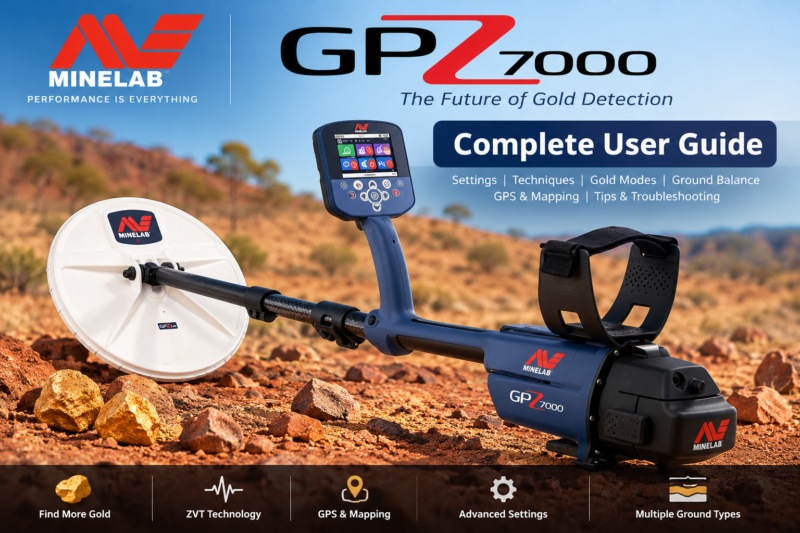
Minelab GPZ 7000 User Guide: Setup, Gold Modes, Ground Balance & Field Tips
The detector is a professional gold-prospecting detector designed to recover natural gold in demanding ground conditions. This independent, detailed GPZ 7000 user guide explains the controls, ZVT technology, Super-D coil, first-time setup, gold modes, ground types, Quick-Trak balancing, audio, field technique and troubleshooting. We also explain what the machine cannot promise, including fixed detection depths or certain identification of buried gold.
Whether you are preparing for your first day in the field or adjusting an established workflow, this guide combines Minelab’s official field instructions with practical, clearly labelled interpretation. Settings are starting points, not universal guarantees; local ground and gold characteristics determine results.
What Is the Minelab GPZ 7000?
The GPZ series was developed for dedicated nugget hunting rather than general-purpose coin hunting or underground imaging. It combines a dedicated gold-search platform, user-adjustable ground handling, a color interface and location-management features. It is especially relevant to prospectors dealing with mineralized soils where conventional detectors can struggle to separate weak metal responses from ground effects.
It detects metallic targets, not underground water, caves or guaranteed ore deposits. A response alone cannot prove that a buried object is gold; excavation and identification are required. For a broader comparison of Minelab’s approaches, see our guide to Minelab gold detectors.
ZVT Technology and the Super-D Coil Explained
What does ZVT mean?
ZVT stands for Zero Voltage Transmission, Minelab’s proprietary detection technology. Rather than interpreting the GPZ as a conventional fixed-frequency VLF detector, think of it as a specialist system engineered to detect responses from natural gold while handling difficult ground. ZVT processing and proper ground setup work together; neither technology nor a high sensitivity number eliminates every hot rock or interference source.
Why is the Super-D search coil important?
The supplied GPZ14 Super-D coil measures approximately 14 × 13 inches. Its specialized winding arrangement works with the detector’s ZVT platform and provides broad ground coverage while retaining useful responses to different nugget sizes. Keep the coil parallel to the ground and avoid striking rocks. Coil shape and construction are not substitutes for slow, overlapping sweeps.
Practical distinction: A stronger response from a larger gold nugget does not translate into a fixed maximum depth. Nugget orientation, alloy, shape, mineralization, nearby interference and the selected settings all matter.
Front and Rear Controls: What Each Button Does
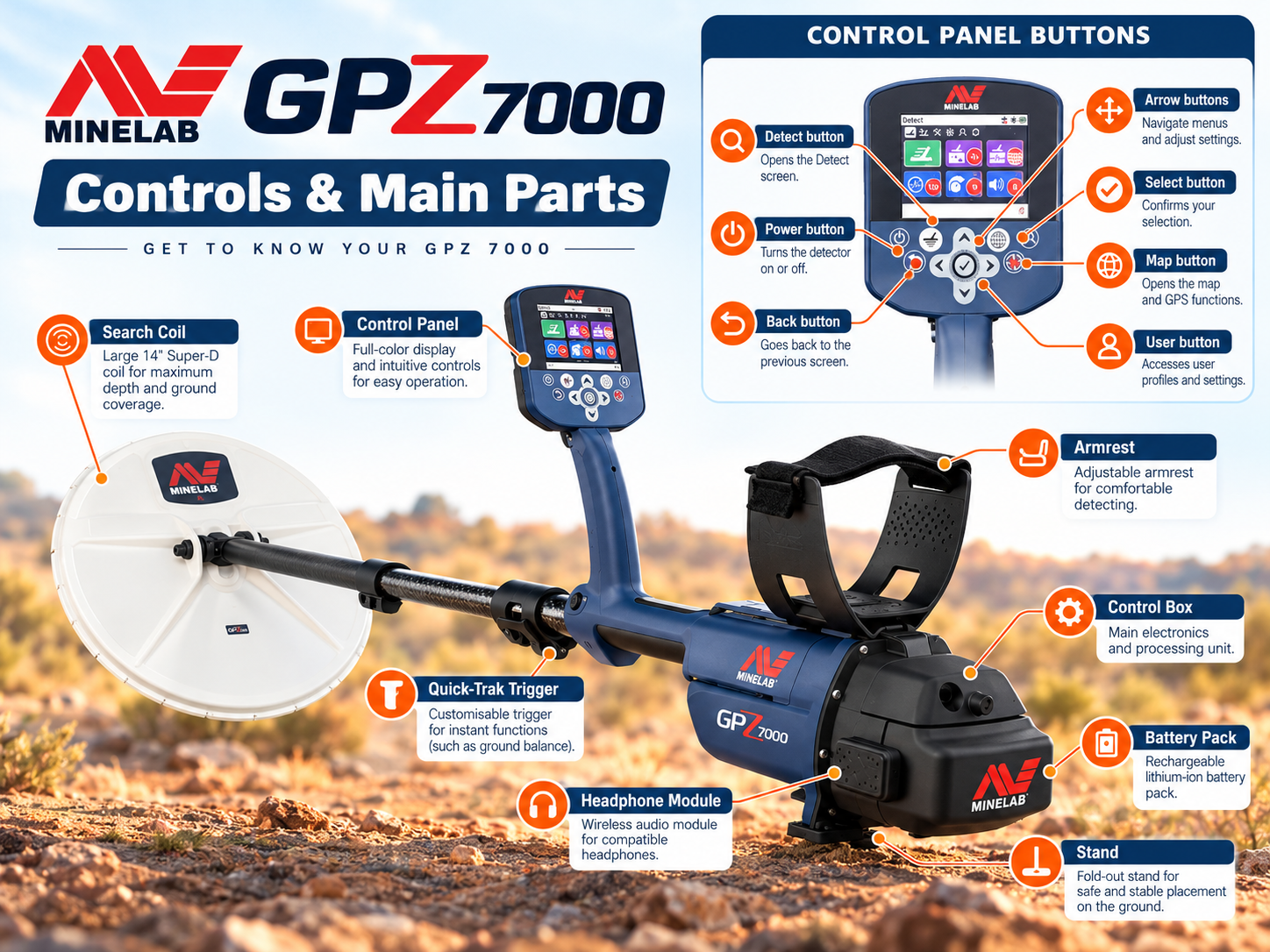
The illustration above introduces the physical components and a simplified control layout. For exact button positions and on-screen controls, consult the manufacturer’s English instruction manual. Detect accesses detection settings; Map opens mapping tools; Select confirms choices; and the Quick-Trak trigger activates ground balancing.
Start by learning just three navigation actions: Detect returns you to the detection interface, the arrow keys plus Select move through menu options, and the Quick-Trak trigger is used when the ground-balancing process requires it. The Map and GeoData controls support planning and documenting locations rather than changing target detection strength.
GPZ 7000 Quick Start: Six Steps Before Detecting
Minelab’s official field guide describes a consistent starting sequence for the detector:
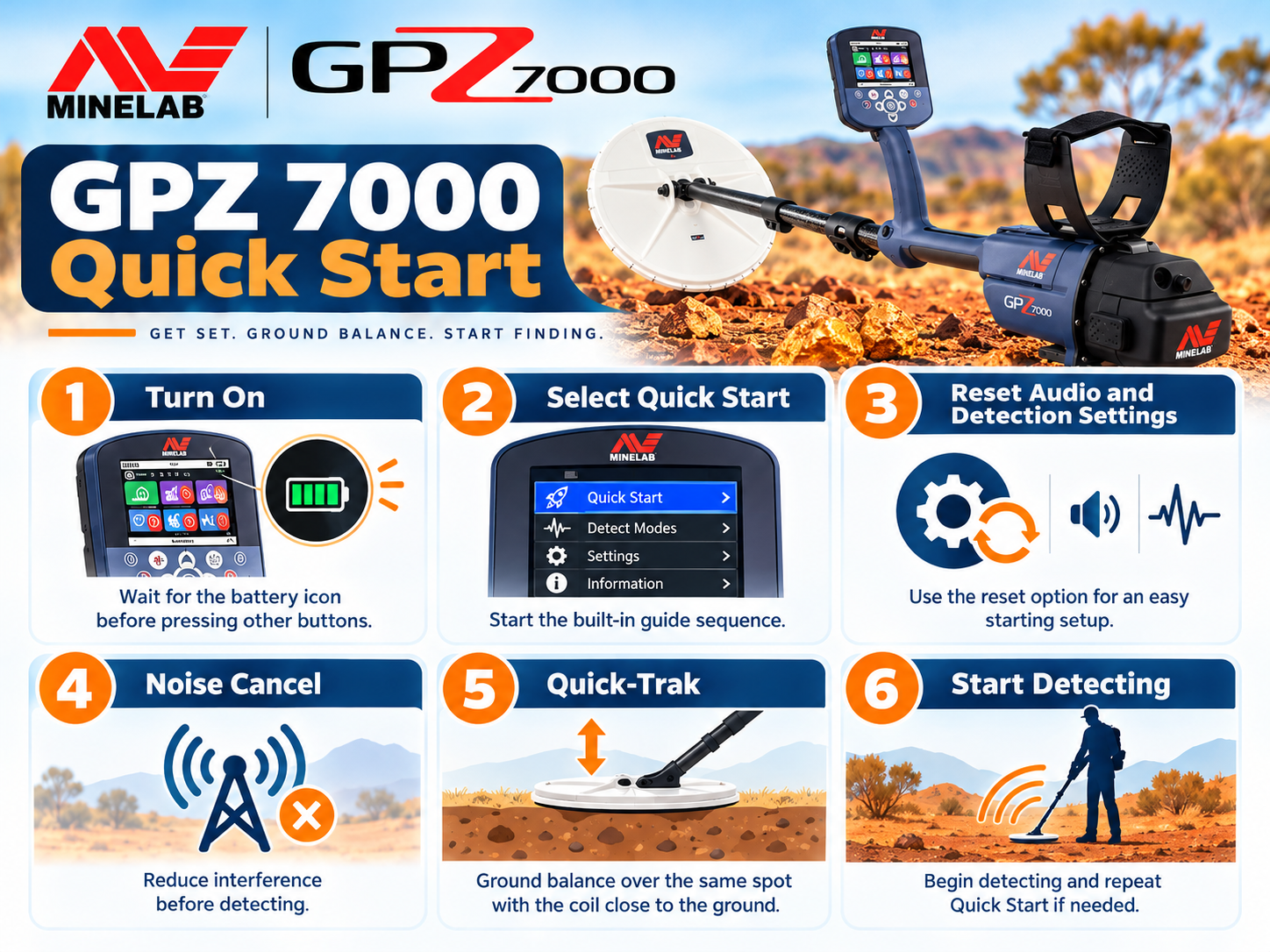
- Switch the detector on and wait for the battery indicator to appear.
- Select Quick Start.
- Choose Reset Settings when following the initial setup sequence.
- Allow Noise Cancel to reduce interference.
- Perform Quick-Trak ground balancing.
- Begin detecting using slow, level coil sweeps.
If you are restoring a previously configured machine, record useful custom settings first. A factory reset is not a daily requirement. The same field guide describes a full factory reset as holding Power for about 10 seconds and selecting Reset All; use it only when appropriate, because it resets user settings.
The Three Gold Modes: High Yield, General and Extra Deep
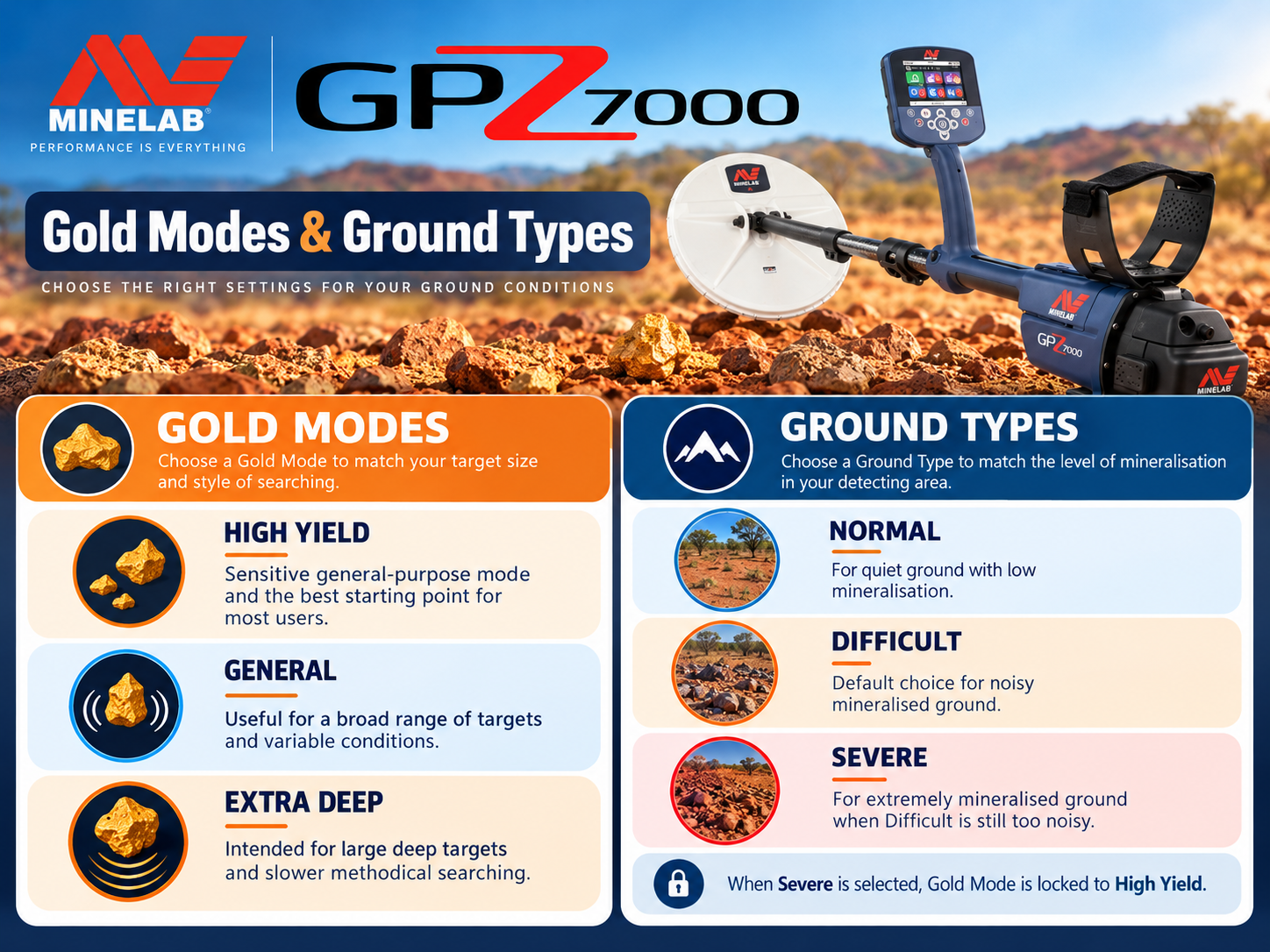
The detector offers three Gold Mode choices. They are designed around target-response priorities, not promises that every target will be found at a particular depth.
| Gold Mode | Official intended target | When to consider it | Trade-off to test |
|---|---|---|---|
| High Yield | Small and medium nuggets | Working productive patches for smaller gold | May not be the preferred choice for some large deep targets |
| General | General-purpose nuggets | When nugget size is unknown or varied | Compare with other modes on a known test target |
| Extra Deep | Deep, larger nuggets | Targeting deeper substantial gold | Not automatically the best response to tiny shallow nuggets |
Minelab’s field guide illustrates these modes with nugget-size and depth scenarios. The most useful operating habit is to verify a repeatable target in an alternative mode before making a decision; mode names alone do not establish target identity.
Ground Type: Normal, Difficult and Severe
Ground Type addresses a different problem from Gold Mode. Where Gold Mode prioritizes target responses, Ground Type adjusts the detector’s behavior in mineralized soil.
| Ground Type | Official description | Field interpretation |
|---|---|---|
| Normal | Low soil mineralization | Test when conditions are relatively mild and stable. |
| Difficult | High soil mineralization | A practical option when ground responses become distracting. |
| Severe | Severe soil mineralization | Reserved for especially challenging ground; consult the full manual for mode limitations. |
Important compatibility note: Severe ground processing imposes restrictions on Gold Mode combinations; check the detector menu and official manual rather than assuming every combination is selectable. When changing soil zones, re-check background stability instead of simply increasing sensitivity.
How to Use Quick-Trak Ground Balance
Quick-Trak is fundamental to successful GPZ 7000 field operation. Minelab’s illustrated process is straightforward:
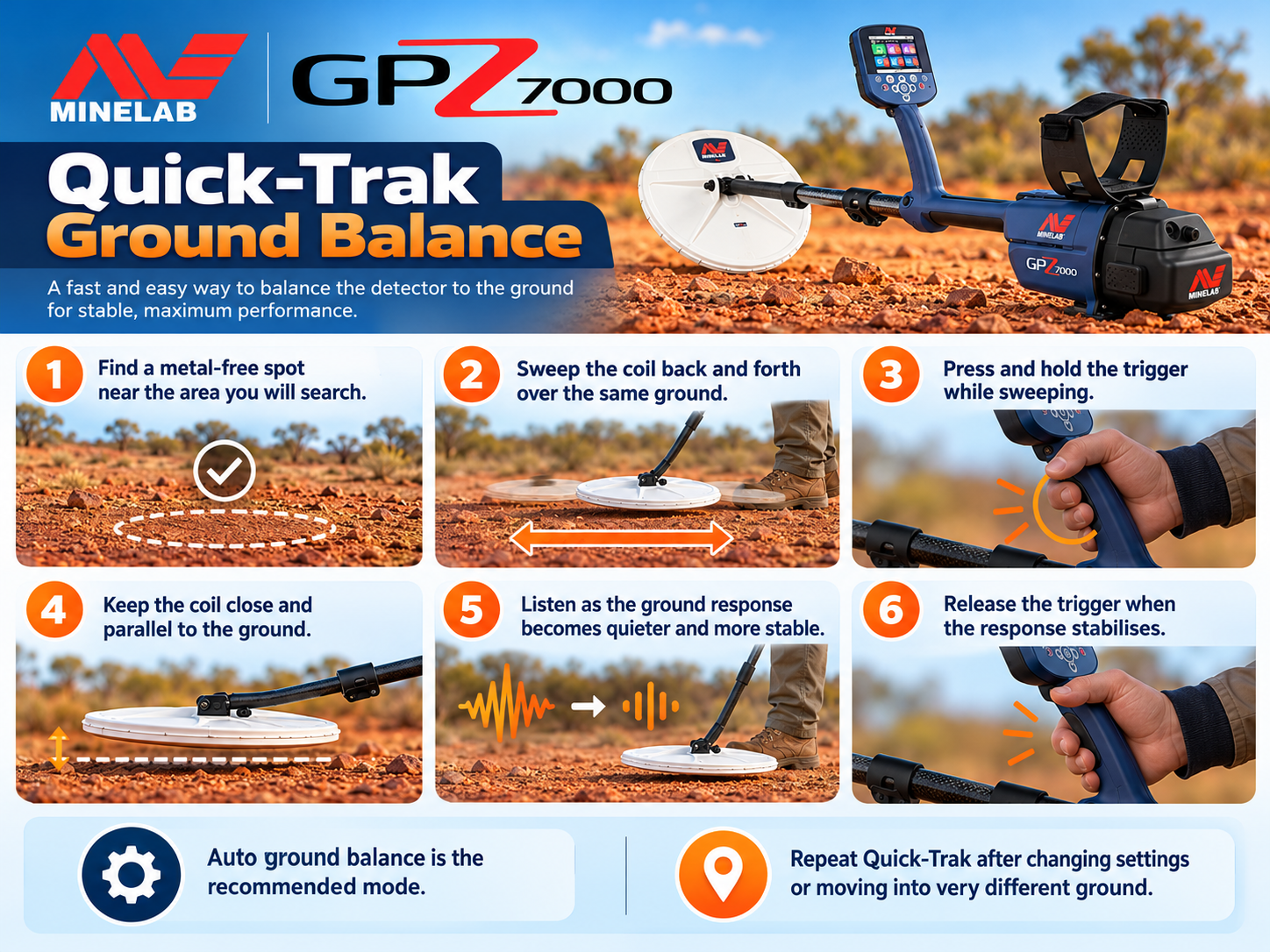
- Find a small patch of ground with no obvious metal target.
- Hold the coil close to the ground and keep it level.
- Sweep the coil over the same spot as shown in the official guide.
- Operate the Quick-Trak trigger according to the on-screen prompt and continue until the audio becomes stable.
- Release the trigger, then begin searching normally.
If the response continues to rise and fall with each sweep, verify that your chosen spot is free of metal, repeat the balancing procedure and consider a more appropriate Ground Type. Balancing directly over a real target can give misleading results and potentially reduce its response.
Threshold Level, Noise Cancel and Wireless Audio
Threshold: listen for changes, not loudness
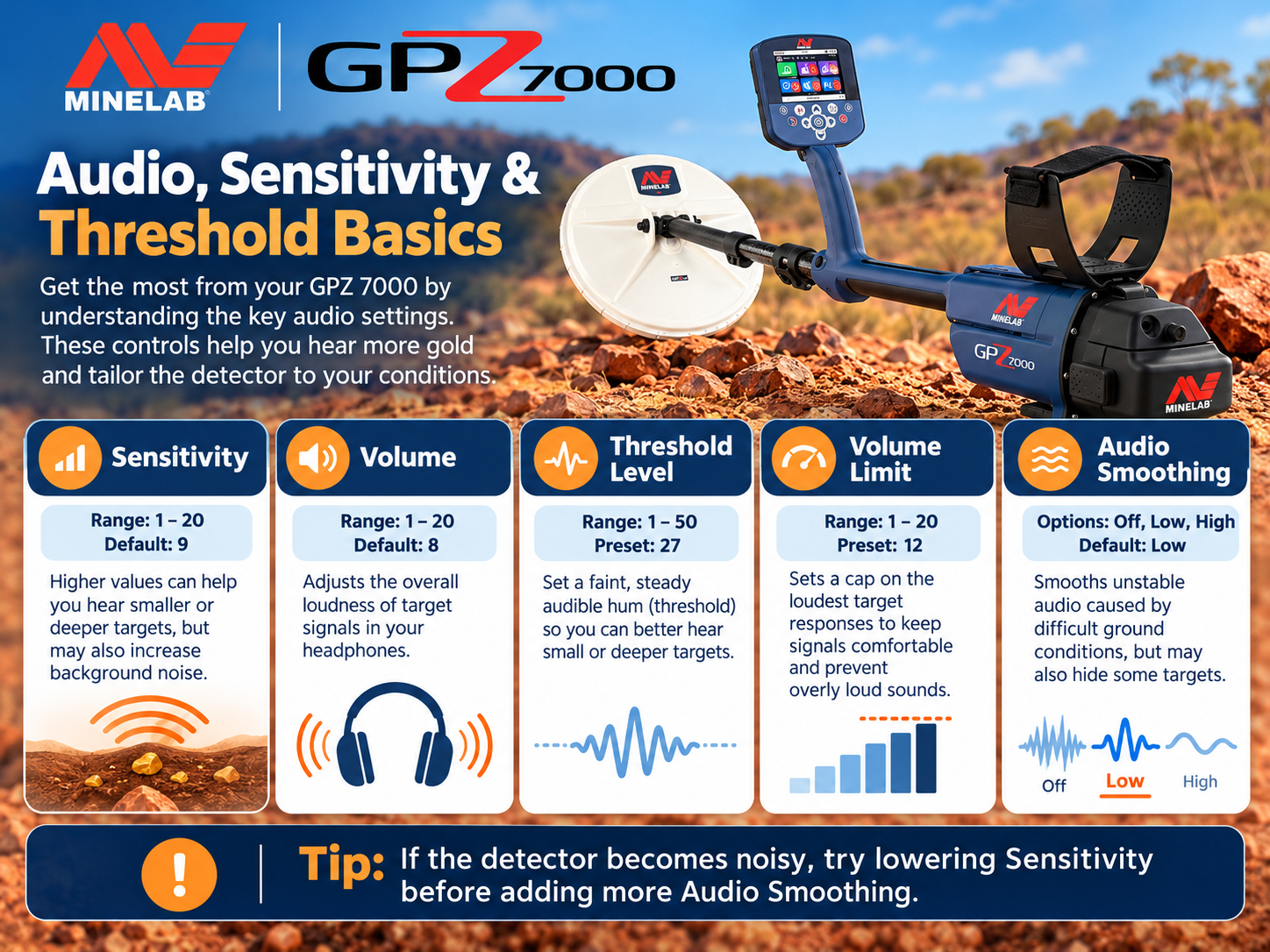
Threshold is a continuous reference tone. Set it to a comfortably audible background level so slight variations can be heard without fatigue. An excessively loud threshold can mask subtle changes; a tone set too quietly can make faint responses harder to recognize. The official field guide shows a Threshold Level adjustment example, but the pictured value should not be treated as ideal for everyone.
Noise Cancel versus ground balance
Noise Cancel deals primarily with external electromagnetic interference. Ground balance addresses responses associated with the ground itself. They solve different problems: if the detector is unstable while stationary, investigate interference; if noise changes with coil movement over soil, investigate ground conditions, technique and balancing. Both factors can coexist.
Connecting the WM 12
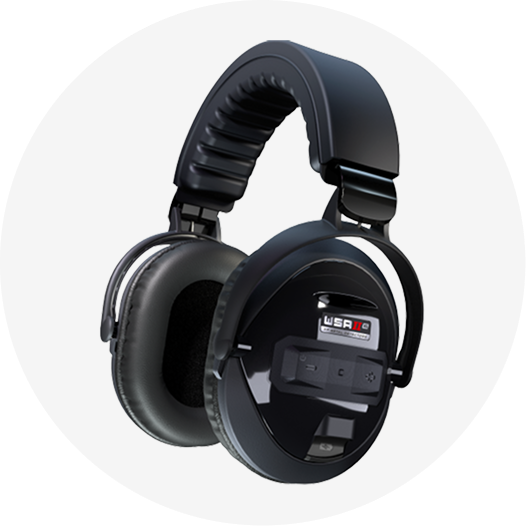
The supplied wireless audio module supports convenient listening away from the main control box. In Settings, select Connect WM 12 and follow the on-screen connection instructions. Verify that audio is working before walking away from the starting point.
Practical Starting Settings for Different Search Conditions
These are interpretive starting scenarios, not Minelab-certified universal presets. For each location, choose a stable setup and test it against local conditions or a securely controlled known target.
| Scenario | Gold Mode to test | Ground Type to test | Field priority |
|---|---|---|---|
| Small-nugget patch, mild ground | High Yield | Normal | Keep the coil close and sweep methodically. |
| Mixed-size nuggets, mineralized ground | General | Difficult | Balance carefully and use a quiet, usable sensitivity. |
| Prospecting for larger, deeper nuggets | Extra Deep | Appropriate stable ground type | Check target repeatability from different directions. |
| Very noisy, heavily mineralized ground | Mode compatible with Severe | Severe, if needed | Prioritize a stable signal; verify allowed combinations. |
| Nearby power lines or electronics | Retain current mode initially | Retain appropriate ground type | Run Noise Cancel and move away from interference sources. |
Do not assume that maximum Sensitivity delivers maximum real-world recovery. Too much instability can make soft, repeatable gold responses harder to distinguish. A setting that helps you hear targets consistently is often more useful than a higher number that creates constant false signals.
Detecting Basics: Sweeping, Spacing and Recovery
Minelab’s field illustrations reinforce several fundamentals: keep the coil level, move slowly, overlap each sweep and remove metal objects from the immediate vicinity of the coil. If another detector operator is nearby, the field guide recommends approximately 15 m of separation to reduce mutual interference. Refill holes and respect land access, mining permits and local rules.
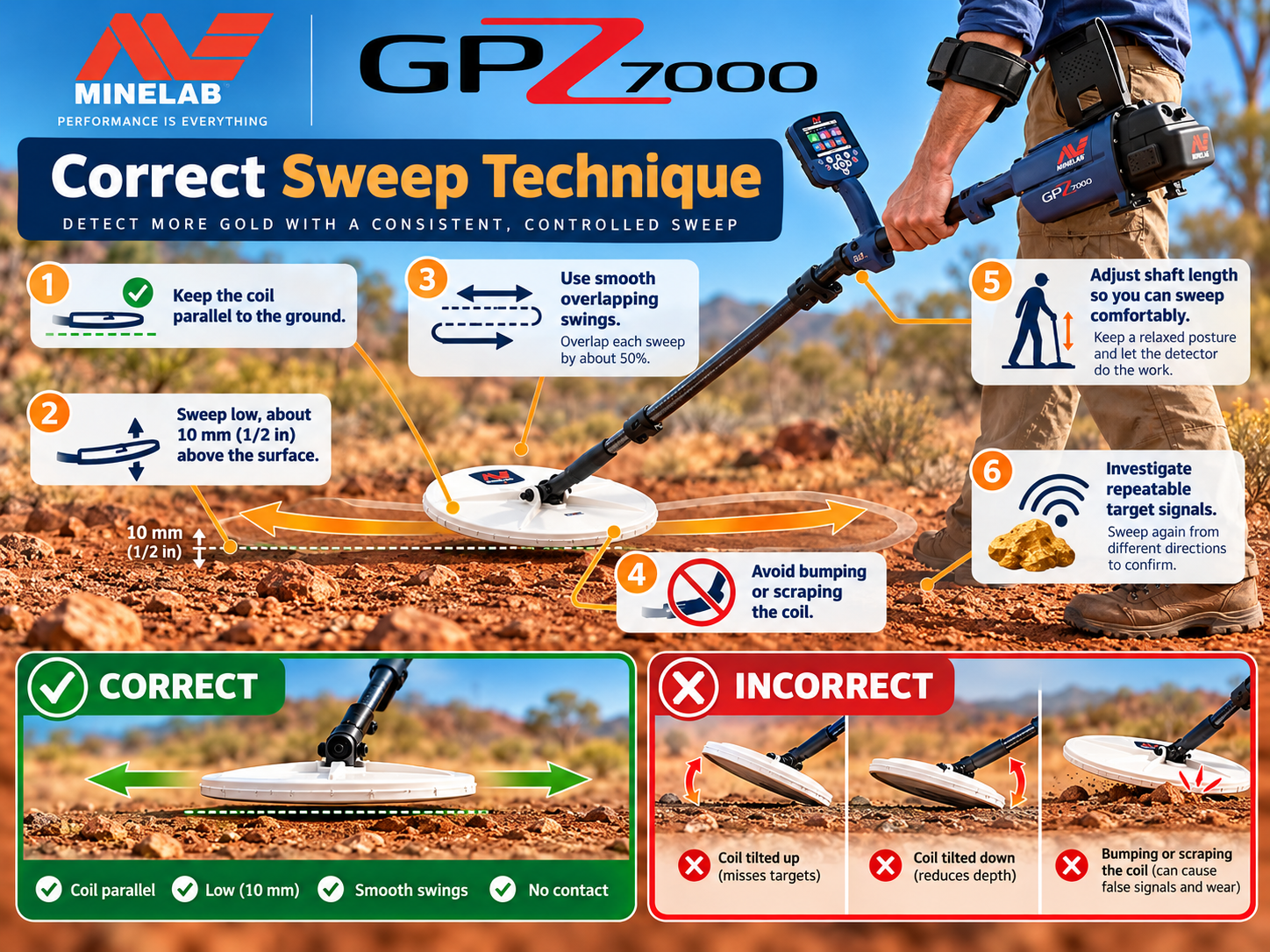
On hearing a possible target, sweep across it several times. Rotate around the position and listen for a repeatable response. Clear loose surface debris when safe, then check again before digging. This simple cross-check is more informative than relying on one isolated tone. Avoid bringing a metal pick, phone or metal-reinforced boots near the coil during confirmation.
How Deep Can the detector Really Detect Gold?
There is no reliable universal depth in meters for every gold nugget or every location. Depth depends on nugget mass, shape, orientation, composition, ground mineralization, coil, ambient interference, sweep technique and detector settings. A controlled test on one buried object does not represent a guarantee for all targets.
Minelab has promoted substantial depth advantages for its technology in specified comparisons, but marketing comparisons should not be read as a fixed field-depth claim. If a seller promises a guaranteed depth for all gold, ask for the exact test conditions and target specifications. The detector is a conventional electromagnetic metal detector—not a long-range locator or a 3D underground scanner.
GPS, Map and GeoData: Organizing a Prospecting Area
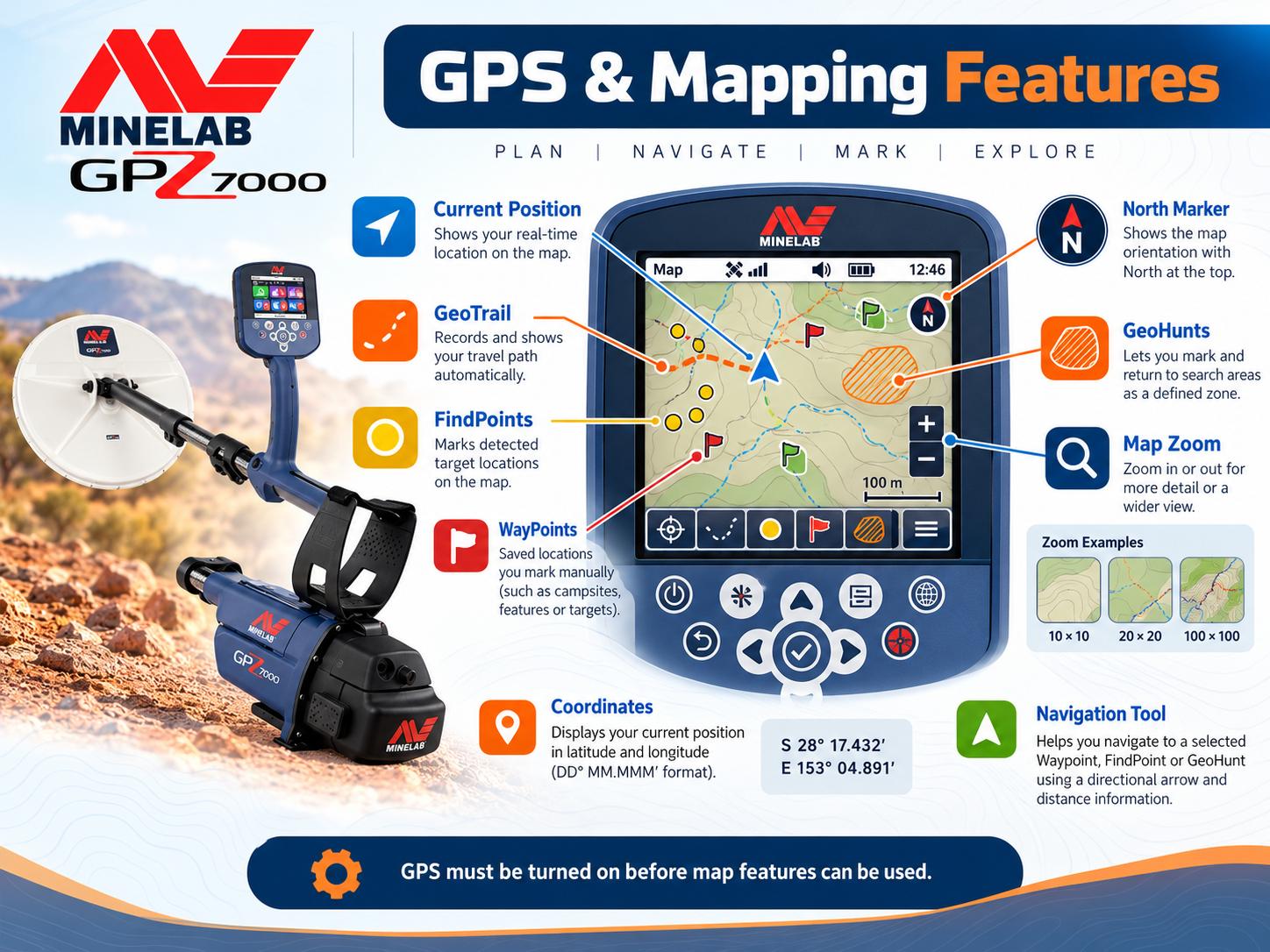
The Map screen and GeoData control help users document work rather than simply rely on memory. Mark interesting locations and revisit productive patches in planned, overlapping passes. When a location produces gold, record an approximate route, field observations, settings and ground condition in a separate log as well. GPS records help with area coverage, but satellite reception, local conditions and user setup can affect location accuracy.
GPZ 7000 Technical Specifications
Summary of official technical information. Package contents and regional inclusions should be checked with the seller before ordering.
| Specification | Details |
|---|---|
| Manufacturer / model | Minelab / GPZ 7000 |
| Main technology | ZVT (Zero Voltage Transmission) |
| Standard search coil | GPZ14 14 × 13 in Super-D |
| Gold Modes | High Yield, General, Extra Deep |
| Ground Types | Normal, Difficult, Severe |
| Sensitivity range | 1–20 |
| Noise Cancel | Automatic and manual |
| Display | Full-color LCD |
| Wireless audio | Wi-Stream via WM 12 |
| Additional technology | GPSi, Super-D |
| Approximate detector weight | 3.32 kg (7.32 lb) |
| Length | 117 cm collapsed; 152.6 cm extended |
| Battery | Removable 7.2 V / 72 Wh lithium-ion pack |
| Coil waterproof rating | Up to 1 m; control unit must not be submerged |
| Operating temperature | 0°C to 50°C |
| Manufacturer-listed warranty | 3 years for control box and coil, subject to applicable terms and region |
For specifications and any revisions, visit the official Minelab product page. Always distinguish manufacturer warranty coverage from seller-specific terms.
Troubleshooting Common Field Problems
| Symptom | Likely causes to check | Suggested first action |
|---|---|---|
| Continuous chatter even without sweeping | Electromagnetic interference, wireless or power sources | Perform Noise Cancel; move away from interference. |
| Noise rises and falls over soil | Ground mineralization or inadequate balancing | Quick-Trak on clean ground; reassess Ground Type. |
| Signals vanish when changing direction | Edge of a target, unstable ground, nearby metal | Cross-sweep slowly and remove nearby equipment. |
| Weak target difficult to hear | Threshold, sweep speed, sensitivity stability | Use comfortable audio; reduce speed and retest. |
| No wireless audio | WM 12 pairing, battery or volume setting | Reconnect via Settings and test the audio path. |
| Unstable performance after moving sites | Different ground, interference environment | Repeat Noise Cancel and Quick-Trak at the new location. |
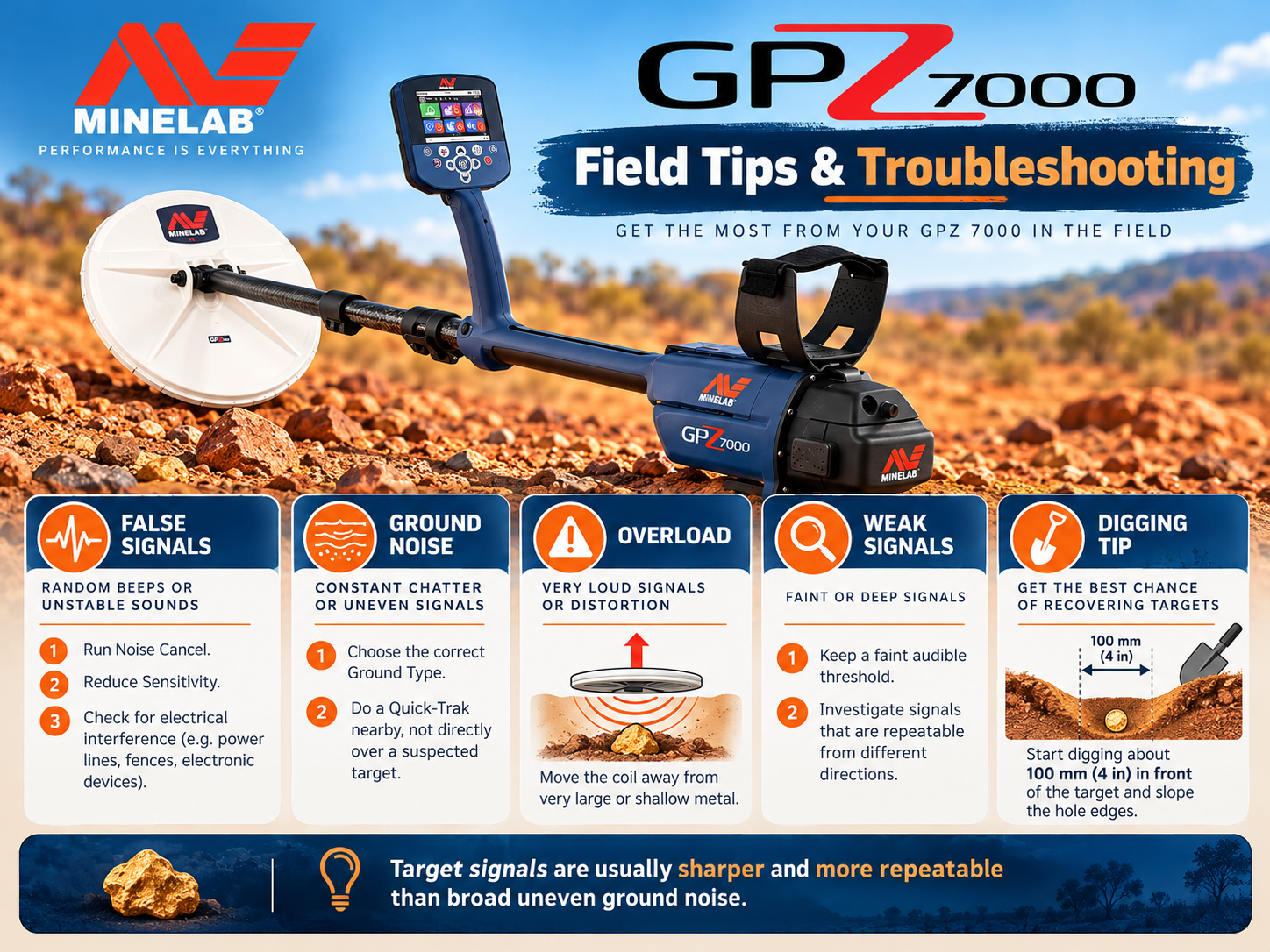
Change one setting at a time and note the result. Otherwise it becomes difficult to know which adjustment improved or worsened performance. For persistent electronic faults, consult the official user manual or qualified support rather than opening the control unit.
Who Should Buy It, and What Should You Check?
The detector is best suited to serious gold prospectors willing to invest time in ground interpretation and careful search technique. It may not be the most practical first machine for someone who wants a lighter, simpler detector for occasional shallow-gold outings. For small-gold alternatives and a different feature set, read our Gold Monster 2000 review and field guide.
Before buying a used unit
- Verify the serial number and seller documentation through legitimate channels.
- Inspect coil housing, cable, connectors, shaft locks and battery contacts for damage.
- Test screen, buttons, audio, charging and pairing.
- Run an outdoor functional test on appropriate ground with a known metallic target.
- Ask which accessories are included and whether the warranty applies in your country.
Detectors Shop provides guidance on choosing a detector and its accessories. View the GPZ 7000 at Detectors Shop, or contact our team to confirm today’s price, stock, shipping options and the applicable warranty before payment.
GPZ 7000 Frequently Asked Questions
Is the detector suitable for beginners?
It can be learned by a motivated beginner, but its weight, price and advanced ground settings make it better suited to dedicated prospectors who are prepared to practice.
What is the real detection depth of the detector?
There is no fixed maximum depth for all targets. Performance changes with gold size, shape, orientation, mineralization, equipment and operating technique.
Which Gold Mode should I use first?
High Yield is aimed at smaller or medium nuggets, General at mixed nuggets, and Extra Deep at deeper larger nuggets. Test the mode that matches your goal and local ground.
What is the difference between Normal, Difficult and Severe?
These Ground Type options are designed for low, high and especially severe soil mineralization respectively. Severe has Gold Mode compatibility restrictions.
Does the detector identify gold and reject all iron?
No. It is intended for gold prospecting, but a signal is not proof of gold, and the detector should not be treated as having a guaranteed iron-rejection system.
Is the detector fully waterproof?
No. Minelab lists the search coil as waterproof to about 1 meter. Do not submerge the control box.
When should I use Quick-Trak?
Use it during initial setup and when ground conditions change or ground-related instability becomes apparent. Balance over a metal-free patch.
How can I connect the wireless audio module?
Open Settings, choose Connect WM 12 and follow the instructions shown on the display. Check battery and volume if you cannot hear audio.
Why does the detector produce false signals?
Potential causes include electromagnetic interference, strong mineralization, a poorly balanced machine, an unstable sensitivity setting or metal close to the coil.
Where can I find official GPZ 7000 instructions?
Use the official Minelab product page and the manufacturer-issued field and instruction manuals. This independent guide is a practical companion, not a replacement for those documents.
